
TL;DR
- MCP standardizes tool I/O — how hosts discover and invoke tools, resources, and prompts from servers over JSON-RPC. It does not replace orchestration, retrieval, or guardrails.
- Three primitives: Tools (actions), Resources (read-only context), Prompts (reusable templates). Servers expose them; clients (inside a host) consume them.
- Host–client–server model: The host (IDE, desktop app, agent runtime) owns consent and the model conversation. Clients talk to servers over a transport; under the
2026-07-28spec the protocol core is stateless (no session handshake). - Inference-time protocol: MCP is not a training method. At request time, the host advertises discovered schemas to the model (often via function calling); the model emits intent; the host forwards approved calls to servers.
- Transports: stdio for local subprocess servers; Streamable HTTP for remote servers (legacy HTTP+SSE is deprecated with a long offramp). Auth, timeouts, and least privilege remain your responsibility.
- Vs ad-hoc function calling: Provider function calling is the model-facing intent format inside one app. MCP makes the same capabilities discoverable and reusable across many hosts.
On this page
- Why This Matters
- The Problem MCP Solves
- How We Got Here
- What Is Model Context Protocol?
- How MCP Works
- Architecture
- Step-by-Step Flow
- Real Production Example
- Design Decisions
- Comparisons
- Common Mistakes
- Where It Breaks Down
- When NOT to Use MCP
- Running in Production
- Related Guides
- Interview Questions
- Key Takeaways
- FAQs
- References
- Further Reading
Why This Matters
Production LLM applications need live data and side effects: issue trackers, databases, internal APIs, filesystems. Without a shared protocol, every host reimplements discovery, schema packaging, auth wiring, and error shapes for every integration. Cursor, Claude Desktop, and a custom agent each grow private adapters for GitHub, Postgres, and Slack. That is an N×M maintenance problem.
MCP collapses the integration surface to N + M: build one server per system; any compatible host can connect. For platform teams, that separation matters more than convenience. Capability ownership moves to the team that owns the backend. Agent and IDE teams consume a stable contract instead of forking SDK wrappers.
MCP also clarifies layer boundaries. Function calling answers “how does the model propose an action?” MCP answers “how does a host talk to an external capability process?” AI agents answer “when and how often should we loop?” Guardrails answer “what is allowed?” Confusing these layers produces brittle systems that treat a protocol handshake as a security model.
Who should read this?
| Reader | Why |
|---|---|
| AI / platform engineers | Expose internal APIs as reusable MCP servers with auth and SLOs. |
| Agent / IDE authors | Consume servers without per-tool adapters; enforce host-side consent. |
| Security engineers | Map trust boundaries across host, client, and server credentials. |
| Technical leads | Decide MCP vs in-process tools vs deterministic workflows. |
The Problem MCP Solves
Before MCP, tool integration looked like this:
- Define tool schemas in application code (often duplicated per framework).
- Hard-code auth and base URLs inside each agent or IDE plugin.
- Translate model tool calls into SDK-specific HTTP or SDK calls.
- Repeat for every host that needs the same backend.
Failures were duplicated: inconsistent descriptions, missing timeouts, different error formats, and no shared discovery. When GitHub’s API changed, every adapter changed.
MCP solves the capability interface problem—standardized list/call/read contracts and transports—so hosts and servers can evolve independently.
MCP does not solve:
- which tools to advertise on a given request;
- how to plan multi-step work (agent planning);
- how to retrieve documents (RAG);
- whether a call is authorized;
- whether the model selected the right tool;
- how to evaluate answer quality.
Those remain host, retrieval, and policy concerns.
How We Got Here
Early LLM apps prompted models to emit free-form “Action:” lines or JSON in markdown. Frameworks added parsers. Providers then shipped native function calling: typed name + arguments as a first-class response field. That fixed the model↔app boundary inside one process, but every application still built private connectors.
Agent frameworks (LangChain tools, OpenAI Assistants tools, custom registries) reduced boilerplate inside one stack, yet tools remained framework-local. Moving the same Postgres lookup from a Python agent to an IDE required a rewrite.
Anthropic open-sourced the Model Context Protocol in November 2024 as a host-agnostic client–server standard over JSON-RPC 2.0. SDKs in TypeScript and Python, reference servers, and clients (Claude Desktop, Cursor, and others) followed. Later revisions refined HTTP transports (including Streamable HTTP) and capability negotiation. The 2026-07-28 specification made the largest change since launch: a stateless protocol core (no initialize handshake / Mcp-Session-Id), Multi Round-Trip Requests (MRTR) for mid-call input, a formal extensions framework (Tasks, MCP Apps), and stronger OAuth alignment. Pin the protocol and SDK versions you deploy; hosts and servers negotiate version per request.
Diagram: Evolution toward interoperable tools
timeline
    title From ad-hoc tool glue to MCP
    section Prompt era
      Text actions : ReAct-style Action lines
      JSON in prose : Fragile parsers
    section Provider APIs
      Function calling : Typed intents in one app
      Framework tools : LangChain-style registries
    section Interop
      MCP 2024 : Host-agnostic discovery and I/O
      MCP 2026-07-28 : Stateless core + extensions
Structure moved from prose to provider APIs, then capability transport became a shared protocol that can scale on ordinary HTTP infrastructure.
Training versus inference
MCP is an inference-time protocol. Training or post-training may teach a model the general habit of selecting tools and filling arguments. That does not install MCP servers into model weights.
At inference:
- The host connects to configured servers and lists tools/resources/prompts.
- The host converts those definitions into the provider’s tool schema format (or an internal registry).
- The model conditions on the advertised set and may emit a structured call.
- The host validates, authorizes, and forwards the call to the MCP server.
- The server returns a result; the host continues the conversation.
Disabling a server in host config removes that capability for subsequent requests. No permanent learning occurs from listing tools.
What Is Model Context Protocol?
The Model Context Protocol is an open standard for connecting LLM applications to external data and tools. It defines JSON-RPC methods for listing and invoking tools, reading resources, and fetching prompt templates. Transports carry those messages over stdio (local) or Streamable HTTP (remote). Under 2026-07-28, each request is self-describing: protocol version, client identity, and capabilities ride in _meta (and matching HTTP headers on Streamable HTTP) instead of a prior handshake.
| Primitive | Purpose | Example |
|---|---|---|
| Tools | Side-effecting or query actions the model may request | create_issue, run_query, send_message |
| Resources | Read-only data URI-addressable by the host/model | repo://README, schema dumps, API docs |
| Prompts | Named templates with arguments | Code-review checklist, incident summary form |
An MCP server wraps one domain (GitHub, Postgres, an internal customer API). An MCP client is the protocol peer inside a host application. The host may run many clients—one per server—and presents a unified tool surface to the user and model.
MCP Server (GitHub)          MCP Client (in Cursor)       LLM (via host)
├── tools/                   ├── discover / list          ├── sees tool schemas
│   ├── create_issue         ├── tools/call forward       ├── selects tool
│   └── list_prs             └── consent / policy         └── generates answer
├── resources/
│   └── repo://file/...
└── prompts/
    └── code_review
How MCP Works
Protocol layers
MCP separates:
- Data / RPC layer — JSON-RPC 2.0 methods (
tools/list,tools/call,resources/list,resources/read,prompts/list, optionalserver/discover, …). - Transport layer — how bytes move (stdio pipes vs Streamable HTTP).
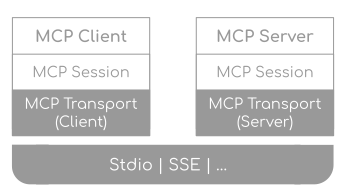
On 2026-07-28, there is no required initialize / initialized exchange and no Mcp-Session-Id. Clients may call server/discover when they want capabilities up front; otherwise any request can land on any load-balanced instance. Streamable HTTP requests include MCP-Protocol-Version, Mcp-Method, and Mcp-Name headers so gateways can route without parsing bodies.
Multi Round-Trip Requests (MRTR) replace earlier server-initiated sampling/elicitation streams: a tool can return resultType: "input_required" with requests and opaque state; the client answers and retries the original call. Application state that must span calls should be an explicit tool-returned handle, not hidden transport session state.
Roots, Sampling, and Logging are deprecated with at least a twelve-month removal window; new implementations should avoid them. Tasks live in the formal extensions framework (io.modelcontextprotocol/tasks) rather than experimental core.
Transports
| Transport | Typical use | Characteristics |
|---|---|---|
| stdio | Local IDE / desktop servers | Host spawns subprocess; JSON-RPC on stdin/stdout; process lifetime tied to host config |
| Streamable HTTP | Shared or remote servers | Stateless-friendly; needs TLS, auth, timeouts, horizontal scale |
Local config often looks like:
{
  "mcpServers": {
    "github": {
      "command": "npx",
      "args": ["-y", "@modelcontextprotocol/server-github"],
      "env": {
        "GITHUB_TOKEN": "${GITHUB_TOKEN}"
      }
    }
  }
}
Remote production servers add OAuth or service tokens, request timeouts, and health checks. stdio servers are not a multi-tenant API; each client connection is typically one process.
Relationship to function calling
MCP does not replace function calling. The usual composition is:
- MCP client discovers tool schemas from servers.
- Host maps schemas into the provider’s function/tool definition format.
- Model emits a function-call intent.
- Host maps the approved intent back to
tools/callon the correct MCP server.
Ad-hoc function calling keeps implementations inside one codebase. MCP externalizes implementations behind a protocol so multiple hosts share them. Both still require allowlists, validation, authz, and timeouts on the host (and often again on the server).
Diagram: Model intent meets MCP transport
sequenceDiagram
    actor U as User
    participant H as Host
    participant M as LLM API
    participant C as MCP client
    participant S as MCP server
    U->>H: Authenticated request
    H->>C: tools/list
    C->>S: tools/list (+ _meta / headers)
    S-->>C: Tool schemas (+ cache hints)
    H->>M: Messages + mapped schemas
    M-->>H: Function-call intent
    H->>H: Validate + authorize
    H->>C: tools/call
    C->>S: tools/call + args
    S-->>C: Result or error
    H->>M: Tool result message
    M-->>H: Final answer
    H-->>U: Response
The model proposes; the host polices; MCP only carries the approved call to the server.
Architecture
In a production AI system, MCP sits in the tools / integration layer of AI system architecture. Orchestration still owns routing, budgets, and retries. Retrieval still owns indexes. Guardrails still own policy.
Diagram: Where MCP sits in a production stack
flowchart TB
    subgraph Host["Host application"]
      UI[UI / API]
      ORCH[Orchestrator]
      FC[Function-call adapter]
      GW[Guardrails / policy]
      CLI[MCP clients]
    end
    subgraph Servers["MCP servers"]
      GH[GitHub server]
      DB[DB server]
      INT[Internal API server]
    end
    UI --> ORCH
    ORCH --> FC
    FC --> GW
    GW --> CLI
    CLI --> GH
    CLI --> DB
    CLI --> INT
    ORCH --> RET[Retrieval]
    ORCH --> LLM[LLM provider]
MCP standardizes the edges to external systems; the host remains the control plane.
Typical production layout:
| Component | Responsibility |
|---|---|
| Host | UX, model provider, consent, tool allowlist, tracing |
| MCP client | RPC, retries, transport errors, protocol version on each request |
| MCP server | Domain tools, credential use, input validation, timeouts to backends |
| Backends | Source of truth (GitHub, DB, CRM) |
Step-by-Step Flow
- Identify the capability — Which system should be reusable across hosts? Prefer one server per domain.
- Define primitives — Tools for actions; resources for schemas/docs; prompts for repeated workflows.
- Implement the server — Use the official SDK; validate inputs; set backend timeouts; return structured errors.
- Secure credentials — Server-side secrets via env/secret manager, or delegated tokens for multi-tenant hosts; never commit tokens in config.
- Configure the host — Register command/URL, env, and which principals may enable the server.
- Discover catalogs — Optional
server/discover, thentools/list/resources/list/prompts/list(honorttlMs/cacheScopecache hints when present). - Advertise to the model — Map a bounded subset of tools into the provider request for this turn.
- Execute approved calls — Host validates → authorize →
tools/callwith deadline → sanitize result size; handle MRTRinput_requiredloops if the server asks for mid-call input. - Observe — Log server, tool, latency, outcome codes; evaluate selection quality separately from backend SLOs.
- Version — Pin protocol/SDK versions; treat tool schemas as APIs; add fields compatibly; rename for breaking semantics.
Diagram: MCP request lifecycle (2026-07-28)
stateDiagram-v2
    [*] --> Ready: transport configured
    Ready --> Listing: tools/resources/prompts
    Listing --> Ready: catalogs cached
    Ready --> Calling: tools/call
    Calling --> InputNeeded: input_required (MRTR)
    InputNeeded --> Calling: retry with inputResponses
    Calling --> Ready: result or error
    Calling --> Failed: timeout / crash
    Failed --> Ready: retry / backoff policy
    Ready --> [*]
Steady-state list/call loops do not require a protocol session; failures need explicit retry policy. App state spans calls via explicit handles, not transport sessions.
Real Production Example
Pattern: wrap an internal customer API as an MCP server with bearer auth, per-call timeouts, and sanitized errors. Hosts (Cursor, a custom agent) connect via stdio locally or HTTP remotely.
Python MCP server (stdio) with auth and timeouts
# customer_mcp_server.py
from __future__ import annotations

import json
import os
from typing import Any

import httpx
from mcp.server import Server
from mcp.server.stdio import stdio_server
from mcp.types import TextContent, Tool

API_BASE = os.environ["CUSTOMER_API_URL"]
API_KEY = os.environ["CUSTOMER_API_KEY"]
# Bound backend latency so one slow CRM call cannot hang the host request.
BACKEND_TIMEOUT_S = float(os.environ.get("MCP_BACKEND_TIMEOUT_S", "8"))

server = Server("customer-api")


def _auth_headers() -> dict[str, str]:
    if not API_KEY:
        raise RuntimeError("CUSTOMER_API_KEY is not configured")
    return {
        "Authorization": f"Bearer {API_KEY}",
        "Content-Type": "application/json",
        "Accept": "application/json",
    }


@server.list_tools()
async def list_tools() -> list[Tool]:
    return [
        Tool(
            name="lookup_customer",
            description=(
                "Look up a customer by email or customer_id. "
                "Use for account status, plan, and billing contact. "
                "Do not use for placing orders or changing plans."
            ),
            inputSchema={
                "type": "object",
                "properties": {
                    "email": {
                        "type": "string",
                        "description": "Customer email if known",
                    },
                    "customer_id": {
                        "type": "string",
                        "description": "Stable ID, e.g. CUST-12345",
                    },
                },
                "additionalProperties": False,
            },
        ),
        Tool(
            name="list_recent_orders",
            description=(
                "List recent orders for a customer_id. "
                "Read-only. Prefer limit <= 20."
            ),
            inputSchema={
                "type": "object",
                "properties": {
                    "customer_id": {"type": "string"},
                    "limit": {
                        "type": "integer",
                        "minimum": 1,
                        "maximum": 50,
                        "default": 10,
                    },
                },
                "required": ["customer_id"],
                "additionalProperties": False,
            },
        ),
    ]


async def _safe_json(response: httpx.Response) -> Any:
    try:
        return response.json()
    except Exception:
        return {"raw": response.text[:2000]}


@server.call_tool()
async def call_tool(name: str, arguments: dict[str, Any]) -> list[TextContent]:
    try:
        async with httpx.AsyncClient(
            base_url=API_BASE,
            headers=_auth_headers(),
            timeout=httpx.Timeout(BACKEND_TIMEOUT_S, connect=3.0),
        ) as client:
            if name == "lookup_customer":
                params = {k: v for k, v in arguments.items() if v}
                if not params:
                    return [
                        TextContent(
                            type="text",
                            text=json.dumps(
                                {"error": "validation_error", "message": "email or customer_id required"}
                            ),
                        )
                    ]
                resp = await client.get("/customers", params=params)
            elif name == "list_recent_orders":
                cid = arguments["customer_id"]
                limit = int(arguments.get("limit", 10))
                resp = await client.get(
                    f"/customers/{cid}/orders",
                    params={"limit": limit},
                )
            else:
                return [
                    TextContent(
                        type="text",
                        text=json.dumps({"error": "unknown_tool", "name": name}),
                    )
                ]

            if resp.status_code == 401:
                payload = {"error": "upstream_unauthorized"}
            elif resp.status_code == 404:
                payload = {"error": "not_found"}
            elif resp.status_code >= 400:
                payload = {
                    "error": "upstream_error",
                    "status": resp.status_code,
                }
            else:
                payload = await _safe_json(resp)

            return [TextContent(type="text", text=json.dumps(payload))]
    except httpx.TimeoutException:
        return [
            TextContent(
                type="text",
                text=json.dumps({"error": "timeout", "timeout_s": BACKEND_TIMEOUT_S}),
            )
        ]
    except Exception:
        # Do not leak stack traces or secrets into the model context.
        return [
            TextContent(
                type="text",
                text=json.dumps({"error": "internal_error"}),
            )
        ]


async def main() -> None:
    async with stdio_server() as (read_stream, write_stream):
        await server.run(
            read_stream,
            write_stream,
            server.create_initialization_options(),
        )


if __name__ == "__main__":
    import asyncio

    asyncio.run(main())
Host configuration (local)
{
  "mcpServers": {
    "customer-api": {
      "command": "python",
      "args": ["/opt/mcp/customer_mcp_server.py"],
      "env": {
        "CUSTOMER_API_URL": "https://api.internal.acme.com/v1",
        "CUSTOMER_API_KEY": "${CUSTOMER_API_KEY}",
        "MCP_BACKEND_TIMEOUT_S": "8"
      }
    }
  }
}
TypeScript host-side pattern (timeouts + allowlist)
When you build a custom host—not only Cursor—wrap MCP calls with the same controls you use for in-process tools:
import { Client } from '@modelcontextprotocol/sdk/client/index.js';
import { StdioClientTransport } from '@modelcontextprotocol/sdk/client/stdio.js';

const ALLOWED = new Set(['lookup_customer', 'list_recent_orders']);
const CALL_TIMEOUT_MS = 10_000;

async function callMcpTool(
  client: Client,
  name: string,
  args: Record<string, unknown>,
  signal?: AbortSignal
) {
  if (!ALLOWED.has(name)) {
    throw new Error(`tool_not_allowlisted:${name}`);
  }

  const timeout = AbortSignal.timeout(CALL_TIMEOUT_MS);
  const combined = signal ? AbortSignal.any([signal, timeout]) : timeout;

  return client.callTool({ name, arguments: args }, undefined, {
    signal: combined,
  });
}

async function connectCustomerServer() {
  const transport = new StdioClientTransport({
    command: 'python',
    args: ['/opt/mcp/customer_mcp_server.py'],
    env: {
      ...process.env,
      CUSTOMER_API_URL: process.env.CUSTOMER_API_URL!,
      CUSTOMER_API_KEY: process.env.CUSTOMER_API_KEY!,
    },
  });
  const client = new Client({ name: 'acme-agent', version: '1.0.0' });
  await client.connect(transport);
  return client;
}
Notes for production:
- Auth: Prefer short-lived tokens scoped to the server’s least privilege. For multi-tenant hosts, do not share one global CRM key across all end users without an authorization check that binds the authenticated user to the customer record. Prefer Client ID Metadata Documents (CIMD) over Dynamic Client Registration for new OAuth clients; DCR is deprecated under
2026-07-28. - Timeouts: Set connect + call timeouts on the host and backend timeouts inside the server. Host timeout should be slightly larger than backend timeout so the server can return a structured
timeouterror. - Result size: Truncate large JSON before returning to the model; huge payloads burn context and hide signal.
Design Decisions
| Decision | Option A | Option B | Guidance |
|---|---|---|---|
| Server scope | One server per system | Monolith of all tools | Prefer one domain per server for deploy and blast-radius control |
| Transport | stdio | HTTP (remote) | stdio for local IDE tools; HTTP for shared platforms |
| Auth placement | Server holds secrets | Client passes user token | Server secrets for single-tenant ops; delegated tokens for multi-tenant |
| Tool granularity | Many fine tools | Few coarse tools | Coarse tools when selection errors dominate; fine when permissions differ |
| Resource use | Schemas/docs only | Live business data | Prefer resources for stable context; tools for queries with authz |
| Error shape | Raw HTTP errors | Stable error codes | Stable codes for model recovery; detailed logs only in telemetry |
| Host vs server validation | Validate once | Validate both | Validate both: host for policy, server for domain invariants |
Common patterns
- Reference servers for popular systems; thin wrappers around official SDKs.
- Internal platform servers owned by service teams; versioned like public APIs.
- Read-only servers in regulated environments; mutations via separate host workflows with human approval.
- Adapter bridges — LangChain / agent frameworks calling MCP so existing orchestrators reuse servers.
When should I use this?
| Use MCP | Prefer instead |
|---|---|
| Standardizing tool/data connections across hosts | One-off function schemas for a single app |
| Sharing tools across Cursor/Claude/custom agents | Replacing orchestration or authz |
| Exposing internal systems as MCP servers | Direct model→DB access without an app layer |
| Multi-client tool ecosystems | Skipping timeouts, allow-lists, and audit logs |
Comparisons
| Approach | What it standardizes | Execution location | Best fit |
|---|---|---|---|
| Ad-hoc function calling | Model intent shape inside one app | In-process handlers | Single product, few tools, tight loop latency |
| Framework tools (e.g. LangChain) | Framework-local tool objects | Process running the framework | One orchestration stack |
| MCP | Discovery + transport across hosts | Separate server process / service | Reuse across IDEs, desktops, agents |
| Deterministic workflow | Fixed steps, no model routing | Workflow engine | Known procedures, high compliance |
| AI agents | Loop, state, stopping rules | Orchestrator (may call MCP) | Open-ended tasks with bounded budgets |
MCP versus function calling
Function calling is the model-facing mechanism. MCP is the capability-facing protocol. Most production hosts use both. Choosing MCP does not remove the need for schemas, allowlists, or authorization described in the function-calling guide.
MCP versus tool calling
Tool calling is the umbrella product concept (model uses external capabilities). MCP is one concrete interoperability standard for packaging those capabilities. You can implement tool calling without MCP; MCP without a model is just an RPC API.
MCP versus orchestration / RAG / guardrails
| Concern | Owner |
|---|---|
| Multi-step plans, retries, memory | Orchestrator / agents |
| Document retrieval | RAG / retrieval layer |
| Policy, PII, jailbreak resistance | Guardrails |
| Capability I/O contract | MCP |
Using MCP does not mean “the protocol will plan, retrieve, and refuse unsafe actions.” Those are separate subsystems that should call or wrap MCP, not be replaced by it.
Common Mistakes
- Treating MCP as orchestration — Connecting servers does not plan tasks or stop runaway loops. Budgets and stopping rules stay in the host.
- Assuming MCP replaces RAG — Resources are not a vector index. Retrieval pipelines remain separate.
- Equating MCP with security — The protocol carries messages; it does not define enterprise IAM. Implement authn/authz yourself.
- Exposing 30+ tools from one server — Selection quality collapses; split by domain and allowlist per request.
- Vague tool descriptions — Descriptions are inference prompts. State when to use and when not to use each tool.
- No timeouts — stdio and HTTP calls can hang forever without deadlines on host and server.
- Leaking secrets in results — Upstream 500 bodies and stack traces must not enter the model context.
- Hardcoding credentials in committed config — Use secret managers and redacted env injection.
- Skipping host allowlists — Discovery is not permission. A listed tool can still be forbidden for a tenant.
- Ignoring resources — Dumping schemas via tools wastes turns; expose stable docs as resources.
- Not versioning schemas — Breaking argument shapes silently breaks every connected host.
- Trusting tool output as instructions — MCP results are untrusted data; apply the same injection discipline as web retrieval.
Where It Breaks Down
- Protocol and SDK churn — Spec and SDK versions move quickly; pin versions and test upgrades.
- Incomplete auth standardization — OAuth patterns continue to harden (issuer validation, CIMD); do not assume every host speaks the same auth profile yet.
- Latency — Extra serialization and process hops (often tens of milliseconds, more on remote HTTP) add up inside tight agent loops.
- Catalog size — Listing everything does not solve contextual tool routing; large catalogs still hurt models.
- Stateful backends — Long-lived sockets, interactive TTYs, or multi-hour jobs need explicit handles or the Tasks extension—not hidden transport sessions.
- Partial SDK feature parity — Not every language SDK exposes every transport or capability at the same time.
- Operational coupling — A crashing stdio server takes down that local process; remote servers need health checks and backpressure. Stateless HTTP helps horizontal scale but does not remove backend failure modes.
When NOT to Use MCP
Prefer simpler approaches when:
- a single application owns a few tools and will never share them with other hosts;
- the operation is a fixed deterministic workflow with no benefit from model-selected tools;
- sub-10ms in-process latency is required for high-frequency inner loops;
- you cannot yet enforce auth, audit, and timeouts around a new network/process boundary;
- the “integration” is only structured extraction with structured outputs and no external I/O;
- compliance requires a single audited service path that must not spawn user-configured subprocesses.
MCP shines when the same capability must be consumed by IDEs, desktop assistants, and multiple agent runtimes with independent release cycles.
Running in Production
Best Practice
Version each server’s tool schemas, pin SDK/protocol versions, enforce host allowlists, and measure tool-selection quality separately from backend availability.
Warning
MCP servers inherit the privileges of their credentials. A malicious or compromised server config is a confused-deputy risk—validate server provenance and run with least OS and API privilege.
Important
Host deadlines must cover MCP round-trips. A model loop without max turns plus per-call timeouts can amplify one slow server into a cost and latency incident.
Decision Trade-off
Remote HTTP servers enable central ops and scaling but add network failure modes. stdio is simpler for local developer tools but hard to multi-tenant and monitor centrally.
| Dimension | Practice |
|---|---|
| Scaling | Scale Streamable HTTP servers behind a load balancer (stateless core); treat stdio as one process per local host |
| Latency | Budget MCP overhead in agent SLOs; cache tools/list using catalog cache hints |
| Cost | Protocol is free; cost is tokens for schemas/results plus backend usage |
| Security | TLS for remote, secret rotation, input validation, audit mutations, sandbox where needed |
| Monitoring | Trace host → client → server → backend with shared correlation IDs |
| Evaluation | Golden tasks for correct tool selection across hosts; contract tests for schema changes |
| HA | Health endpoints, graceful drain, retry with backoff for remote transports |
| Fleet MCP | Push a shared remote (HTTP) server catalog from the host/org; do not fleet-deploy command/stdio binaries |
Org-managed catalogs. Some hosts let an organization push the same remote MCP servers to every user instead of copying .mcp.json files. Claude Code 2.1.259 (2026-09-02) adds managedMcpServers for HTTP/SSE entries (command-based entries are skipped). Treat that as an additive fleet catalog. After that release, allowedMcpServers filters only servers users add; use deniedMcpServers to keep a managed server off. Re-check allow vs deny semantics whenever you upgrade a coding-agent host.
Security checklist
- Advertise only tools needed for the current task class.
- Authorize using trusted identity, not model-supplied
user_idfields. - Separate read and write credentials when possible.
- Cap result payload size before synthesis.
- Distinguish fleet-provisioned servers from user-added servers; if policy is “block this server,” put it on the deny list—not only on a user allowlist.
- Patch SDK auth advisories promptly. In the Python SDK, advisory GHSA-qx49-fqc8-xw99 (High, published
2026-09-28) let a malicious MCP server steer the OAuth client into sending credentials to an authorization server of its choosing. It affectsmcp1.9.1 to before 1.30.0 and 2.0.0a1 to before 2.2.0. Upgrade to 1.30.0 or 2.2.0, passissuer=when usingClientCredentialsOAuthProviderorPrivateKeyJWTOAuthProvider, clear stored client registrations, and rotate any secrets that may have been exposed. stdio clients and servers are not affected. - See Guardrails for policy hooks and AI system architecture for layer placement.
Related Guides
-
Models: Claude Sonnet · Claude Fable · Claude Opus · GPT-5 — hosts commonly wired to MCP servers.
-
Companies: Anthropic · OpenAI — MCP originator and major host ecosystems.
-
Function Calling — model-facing typed intents that hosts often map to MCP tools.
-
Tool Calling — broader pattern of models using external capabilities.
-
AI Agents — orchestration loops that consume MCP (and other) tools.
-
AI System Architecture — where the tool/integration layer sits among retrieval and governance.
-
Guardrails — policy and validation that MCP does not provide.
-
Agent Architectures — ReAct and related patterns that issue tool calls.
-
Structured Outputs — schema-constrained final answers without execution.
Interview Questions
What problem does MCP solve that function calling does not?
Function calling standardizes how a model emits intent inside one application. MCP standardizes how hosts discover and invoke capabilities implemented outside that application so multiple clients can share one server.
Is MCP a training technique?
No. It is an inference-time protocol for capability discovery and invocation. Training may improve general tool use; MCP wires live servers at request time.
Does adopting MCP replace the need for guardrails?
No. MCP moves bytes and method calls. Authorization, content policy, PII handling, and injection defenses remain host and platform responsibilities.
How should timeouts be layered?
Set a backend timeout in the server, a slightly larger MCP call timeout in the host, and an overall agent/request budget above that. Return structured timeout errors instead of hanging.
stdio or HTTP for production?
stdio fits local developer tooling and single-user desktop hosts. Shared multi-user or centrally operated capabilities generally need HTTP with auth, TLS, and horizontal scaling. Org-wide rollouts should push HTTP catalogs, not command servers.
Where does authorization live?
At minimum in the host (who may enable which server/tool) and in the server (who may access which backend records). Identity must come from trusted session or service credentials, not from model arguments alone.
What changed in the 2026-07-28 MCP specification?
The protocol core became stateless: no initialize handshake and no Mcp-Session-Id. Requests carry version and client metadata; optional server/discover replaces mandatory capability negotiation. MRTR handles mid-call input; Tasks and MCP Apps live in extensions; Roots/Sampling/Logging and legacy HTTP+SSE are deprecated with long offramps.
How do resources differ from tools?
Resources are read-oriented, URI-addressable context. Tools are invoked actions that may query or mutate. Prefer resources for stable documentation and schemas.
What breaks when a server exposes too many tools?
Context cost rises and model selection accuracy falls. Split servers by domain and allowlist a subset per request.
Key Takeaways
- MCP standardizes tool I/O across hosts and servers; it is not an orchestrator, retriever, or policy engine.
- Use tools, resources, and prompts deliberately; keep servers domain-scoped.
- Compose MCP with function calling: discover via MCP, propose via the model, execute only after host checks.
- The protocol operates at inference time; training does not embed your servers.
- Production quality hinges on auth, timeouts, allowlists, schema versioning, observability, and pinned protocol versions (
2026-07-28+). - Prefer MCP when capabilities must be reused across multiple AI clients; prefer in-process tools for single-app, latency-sensitive cases.
FAQs
Is MCP only for Anthropic / Claude?
No. MCP is an open protocol. Any host can implement a client and any team can implement a server. Models are not required to be Anthropic models; the host mediates.
Do I need MCP if I already use function calling?
Not if one application owns a small, private tool set. MCP helps when the same tools must be shared across IDEs, desktops, and agents without rewriting adapters.
How is MCP different from LangChain tools?
LangChain tools are framework-local objects. MCP tools are protocol services any compliant client can call. Frameworks can adapt MCP servers into their tool interfaces.
Can I wrap an internal API as an MCP server?
Yes—that is a primary enterprise use case. Apply the same auth, rate limits, and audit controls you would for any microservice.
Is MCP secure by default?
No. You must add authentication, authorization, input validation, TLS (for remote), and audit logging. Treat servers as privileged microservices.
What is the difference between MCP tools and resources?
Tools perform operations the model requests. Resources expose read-only data for context. Resources reduce unnecessary tool calls for stable documents.
How do I debug MCP servers?
Use MCP Inspector or SDK logging, run the server standalone, and verify tool descriptions against golden prompts. Trace host allowlist decisions separately from server errors.
Can MCP servers call other MCP servers?
Not as a first-class protocol feature. Compose at the host by connecting multiple clients, or have a server call ordinary HTTP APIs internally.
Does MCP replace RAG?
No. RAG indexes and retrieves unstructured evidence. MCP can expose a search tool or document resources, but retrieval architecture remains separate.
Do I still need an initialize handshake?
Not on protocol version 2026-07-28. Older clients/servers may still speak prior revisions—pin and test both sides. Prefer Tier 1 SDKs that advertise 2026-07-28. Hosts are starting to default to it: from Claude Code v2.1.292 (2026-10-06), local stdio servers negotiate 2026-07-28 by default, and MCP_PROTOCOL_NEGOTIATION=legacy opts back out.
Training vs inference—where does MCP apply?
Only at inference (and in ops). Servers are configured and discovered when the host runs, not baked into model weights.
How should organizations roll out MCP servers to every developer?
Prefer a host-managed remote (HTTP) catalog over copying .mcp.json. Do not fleet-push command/stdio servers. After host upgrades, confirm whether user allowlists still filter managed servers—Claude Code 2.1.259 moved that control to deniedMcpServers.
References
- Model Context Protocol Specification
- MCP 2026-07-28 Specification announcement
- MCP Architecture Overview
- Anthropic MCP Announcement
- MCP TypeScript SDK
- MCP Python SDK
- MCP Python SDK security advisory GHSA-qx49-fqc8-xw99
Further Reading
- MCP GitHub Organization
- MCP Servers Repository
- Claude Docs: MCP
- JSON-RPC 2.0 Specification
- DataAIHub: Function Calling
- DataAIHub: AI System Architecture
- Claude Code changelog — org-managed MCP servers (
managedMcpServers, 2.1.259)