TL;DR
-
GraphRAG combines knowledge graphs with vector retrieval to answer questions that require understanding relationships between entities, not just matching similar text.
-
It solves multi-hop and global questions that vanilla RAG fails on — "How do these three systems interact?" or "Summarize themes across 10,000 documents."
-
Microsoft's GraphRAG pipeline extracts entities, builds a graph, generates community summaries, and uses both local (entity-neighborhood) and global (community) retrieval.
-
Trade-off: indexing cost and complexity. Graph construction requires LLM calls per document chunk; indexing is 10–50× more expensive than standard RAG.
-
Use GraphRAG when relationship traversal matters — compliance, supply chain, org charts, research synthesis. Use vanilla RAG for straightforward document Q&A.
Why This Matters
Vanilla RAG retrieves text chunks by semantic similarity. This works for "What is our refund policy?" but fails for questions that require connecting information across documents:
- "Which vendors supply components used in products recalled last quarter?"
- "How does the authentication service depend on the billing microservice?"
- "What are the main themes in our customer feedback from the past year?"
These queries need entity resolution, relationship traversal, and summarization over connected subgraphs — capabilities vector search alone cannot provide.
GraphRAG addresses this by building a knowledge graph during indexing, then retrieving structured context (entity neighborhoods, community summaries) alongside or instead of raw text chunks. Organizations with complex, interconnected data — legal, pharma, finance, enterprise IT — increasingly adopt GraphRAG as a complement to standard RAG and governed knowledge graphs.
If you already run production RAG and eval shows failures on relationship-heavy or corpus-wide questions, GraphRAG is the next pattern to evaluate — not a replacement for your vector pipeline.
The Problem GraphRAG Solves
Standard RAG has three classes of failure that graph-based retrieval fixes:
Multi-hop queries. The answer requires following a chain of relationships across documents. Vector search returns chunks similar to the query text, not chunks connected through entity links. If the relationship "Vendor A supplies Component X used in Product Y" spans three documents, no single chunk may embed close to the query.
Global summarization. "What are the key risks mentioned across our 5,000 incident reports?" requires synthesizing themes across the entire corpus. Vector retrieval returns a handful of similar chunks — a sample, not a summary. GraphRAG's community detection clusters related entities and pre-generates summaries at each community level.
Entity disambiguation. "Tell me about Apple" could mean the company, the fruit, or a project codename. Knowledge graphs resolve entities to canonical nodes with typed relationships, reducing ambiguity in retrieval.
GraphRAG does not replace vector RAG — it extends it for queries where structure matters. Production systems typically run both and route by query type.
How We Got Here
GraphRAG is the convergence of information retrieval, knowledge graph construction, and capable LLMs — not a single invention.
Diagram: Evolution toward GraphRAG
flowchart LR
    A[Keyword IR] --> B[Dense RAG 2020]
    B --> C[Hybrid + rerank]
    C --> D[KG-augmented RAG]
    D --> E[Microsoft GraphRAG 2024]
    E --> F[Agentic GraphRAG]
Retrieval moved from lexical matching to dense vectors, then to hybrid fusion, graph structure, and agent-driven exploration.
| Era | What shipped | Limitation |
|---|---|---|
| Keyword IR (1990s–2010s) | BM25, inverted indexes | No paraphrase; no cross-document relationships |
| RAG (2020) | Retriever + generator over chunks | Multi-hop and global questions fail |
| Hybrid RAG (2022–2024) | Hybrid search, rerankers, vector DBs | Still chunk-centric; relationships implicit |
| GraphRAG (2024) | Microsoft GraphRAG — entities, communities, local/global search | High index cost; extraction quality is ceiling |
| Agentic retrieval (2025+) | Agentic RAG over graphs and vectors | Higher complexity; needs stronger eval |
The Microsoft GraphRAG paper introduced community detection (Leiden) and hierarchical summaries as first-class retrieval artifacts. Frameworks such as LangChain and LlamaIndex now ship graph index and property-graph retriever integrations.
What Is GraphRAG?
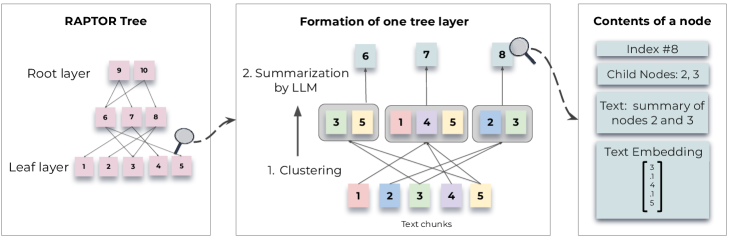
GraphRAG is a retrieval pattern that builds a knowledge graph from your document corpus and uses graph structure — entities, relationships, and community hierarchies — to inform what context gets passed to the LLM at query time.
The approach was popularized by Microsoft's GraphRAG research, which introduced a pipeline:
- Extract entities and relationships from text using an LLM.
- Build a graph where nodes are entities and edges are relationships.
- Detect communities (clusters) in the graph using algorithms like Leiden.
- Generate hierarchical summaries for each community.
- At query time, choose between local search (entity-centric neighborhood retrieval) and global search (community summary retrieval).
# Conceptual GraphRAG query routing
def graphrag_query(question: str, graph, vector_store):
    query_type = classify_query(question)  # local vs global

    if query_type == "local":
        entities = extract_entities(question)
        context = graph.get_neighborhood(entities, hops=2)
        chunks = vector_store.search(question, top_k=5)
        return llm.generate(question, context + chunks)

    elif query_type == "global":
        communities = graph.rank_communities(question)
        summaries = [c.summary for c in communities[:5]]
        return llm.generate(question, summaries)
GraphRAG sits alongside other graph-enhanced retrieval approaches: Neo4j vector indexes, LlamaIndex Knowledge Graph Index, and custom entity-linking pipelines over governed knowledge graphs.
Source: Microsoft GraphRAG
How GraphRAG Works
A GraphRAG system operates in two distinct phases with different latency, cost, and failure profiles — similar to RAG, but with graph construction and community summarization added to indexing.
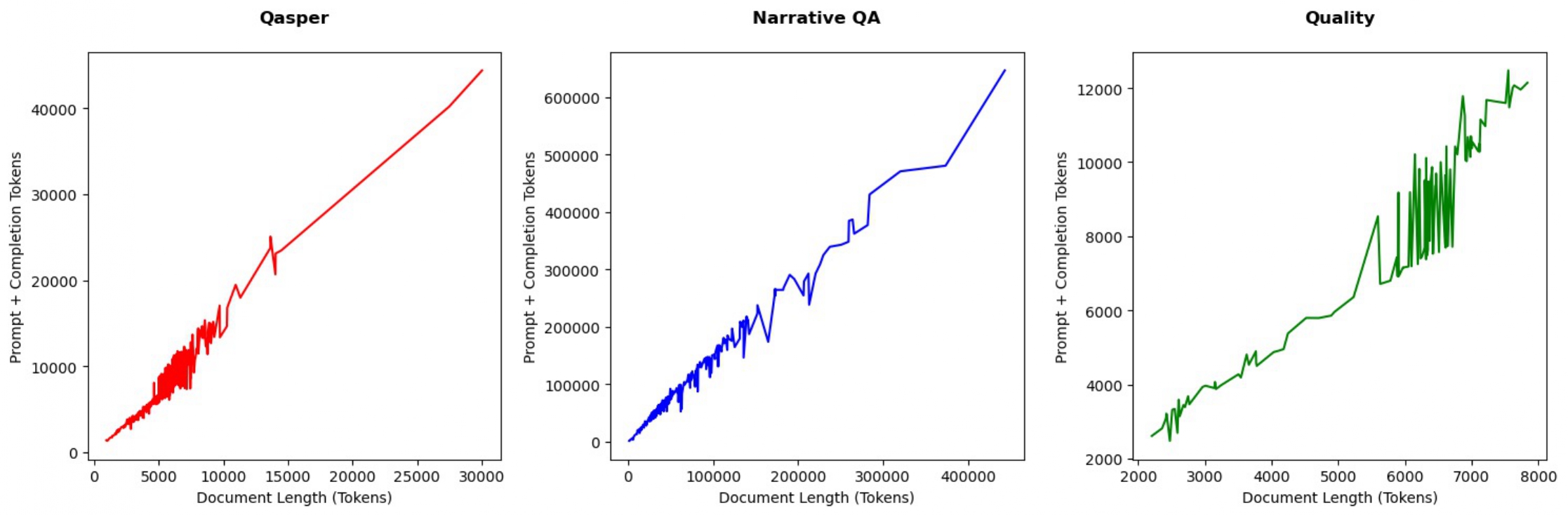
Indexing Phase
Entity extraction. An LLM reads each chunk and extracts entities (people, organizations, products, concepts) and relationships (works_at, supplies, depends_on). This is the most expensive step — one or more LLM calls per chunk.
Entity resolution. "IBM", "International Business Machines", and "Big Blue" must merge into one node. Fuzzy matching, embedding similarity, and LLM-based deduplication handle this.
Community detection. Algorithms like Leiden partition the graph into densely connected clusters. Each community gets a summary generated by an LLM reading the entities and relationships within it.
Dual indexing. Text chunks still get embedded into a vector store for hybrid retrieval. The graph store holds entities, edges, and community summaries.
Source: Microsoft GraphRAG
Diagram: GraphRAG indexing pipeline
flowchart TD
    A[Documents] --> B[Chunking]
    B --> C[Entity + relation extraction]
    C --> D[Entity resolution]
    D --> E[Graph construction]
    E --> F[Community detection]
    F --> G[Community summaries]
    B --> H[Chunk embeddings]
    G --> I[Graph + vector index]
    H --> I
Offline indexing builds both graph structure and vector indexes; community reports enable global search at query time.
Query Phase
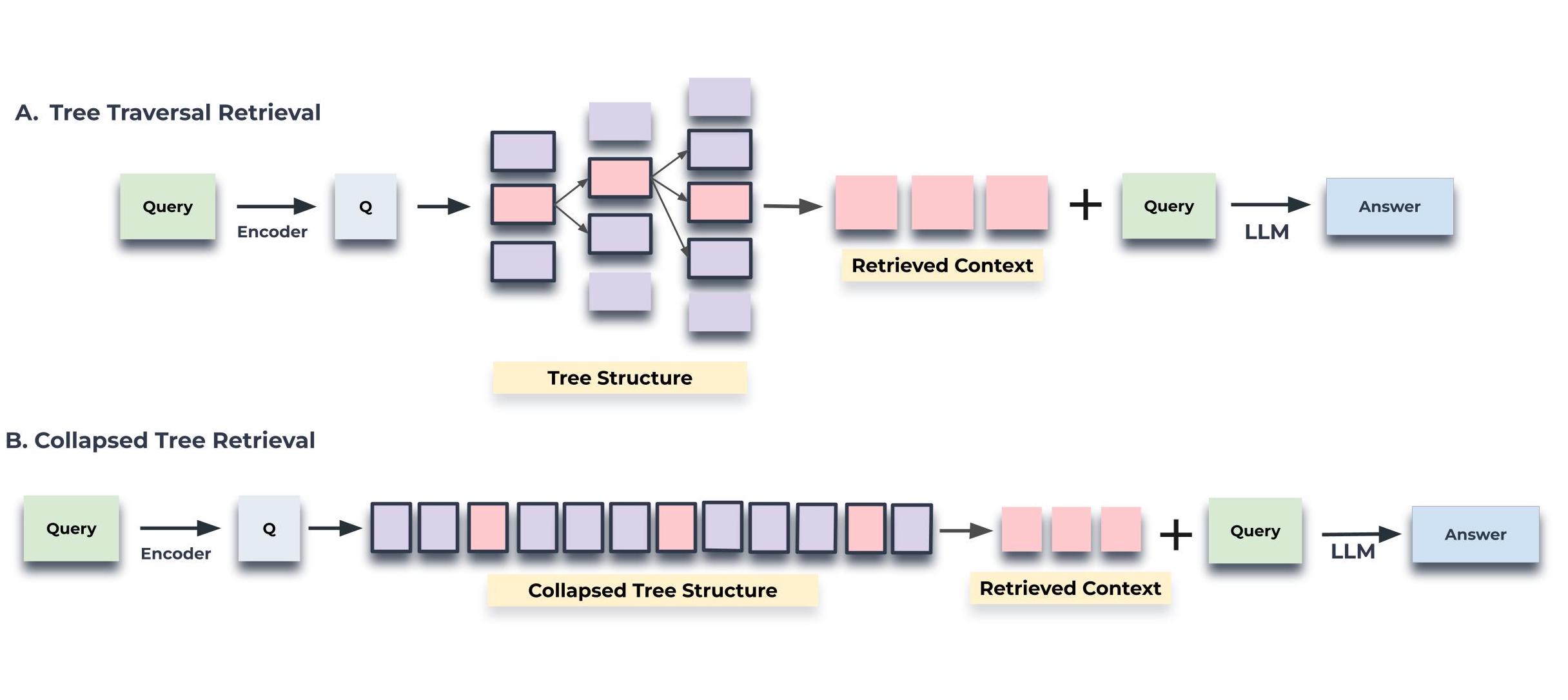
Local search — For specific entity questions. Extract entities from the query, traverse the graph 1–2 hops, retrieve connected entity descriptions and relationships, combine with vector-retrieved text chunks.
Global search — For broad thematic questions. Rank community summaries by relevance to the query, pass top summaries to the LLM for synthesis.
Source: Microsoft GraphRAG
Diagram: Local vs global query sequence
sequenceDiagram
    participant U as User
    participant P as Query planner
    participant G as Graph store
    participant V as Vector DB
    participant L as LLM
    U->>P: question
    alt local search
        P->>G: entity linking + k-hop traversal
        G-->>P: subgraph + entity descriptions
        P->>V: hybrid chunk search
        V-->>P: linked text units
    else global search
        P->>G: rank community reports
        G-->>P: top community summaries
    end
    P->>L: ranked evidence + question
    L-->>U: grounded answer + citations
The query planner selects local, global, or hybrid retrieval; wrong mode selection is a common production failure.
Architecture
| Component | Role | Technology Options |
|---|---|---|
| Document store | Raw text, parsed structure | S3, PostgreSQL, blob storage |
| Graph store | Entities, relationships, communities | Neo4j, NetworkX, GraphML, Neo4j vector |
| Vector store | Chunk embeddings for hybrid retrieval | Pinecone, Weaviate, pgvector — see Best Vector Databases |
| Extraction LLM | Entity/relationship extraction | GPT-4o, Claude, local Llama |
| Generation LLM | Answer synthesis | Same or separate model |
| Orchestrator | Pipeline coordination | LangChain, LlamaIndex, custom |
Production GraphRAG systems typically maintain three stores: raw documents, a property graph, and a vector index. The orchestrator routes queries to the appropriate retrieval strategy. See GraphRAG Architecture for component-level production design.
Diagram: Production GraphRAG stack
flowchart TB
    subgraph offline [Indexing offline]
        D[Documents] --> X[Extract + resolve]
        X --> GS[Graph store]
        X --> VS[Vector index]
        X --> CR[Community reports]
    end
    subgraph online [Query online]
        Q[User query] --> PL[Planner]
        PL --> LS[Local search]
        PL --> GL[Global search]
        LS --> GS
        GL --> CR
        LS --> VS
        LS --> GEN[LLM]
        GL --> GEN
    end
Indexing and query paths scale independently; graph versioning pins queries to known snapshots.
Step-by-Step Flow
Step 1: Chunk documents using the same strategies as vanilla RAG. GraphRAG still benefits from good chunking for entity extraction quality.
Step 2: Extract entities and relationships from each chunk via LLM prompt. Use structured output (JSON schema) for reliable parsing.
Step 3: Resolve entities across chunks. Build a canonical entity registry with aliases, types, and descriptions.
Step 4: Construct the graph. Nodes = entities. Edges = extracted relationships with source chunk references.
Step 5: Run community detection. Partition the graph. Generate LLM summaries for each community at multiple hierarchy levels.
Step 6: Embed text chunks into a vector store (standard RAG indexing continues in parallel).
Step 7: At query time, classify the query as local or global. Retrieve from graph + vector store. Generate answer with citations to both text chunks and graph entities.
Step 8: Evaluate on multi-hop and global question sets. Compare against RAG baseline before expanding traffic.
Real Production Example
A compliance team needs to answer: "Which third-party processors handle EU customer PII and what certifications do they hold?"
import json
from neo4j import GraphDatabase

EXTRACTION_PROMPT = """Extract entities and relationships from this text.
Return JSON: {"entities": [{"name": "", "type": ""}],
"relationships": [{"source": "", "target": "", "type": ""}]}

Text: {chunk}"""

class GraphRAGPipeline:
    def __init__(self, llm, graph_driver, vector_store):
        self.llm = llm
        self.graph = GraphDatabase.driver(graph_driver)
        self.vector_store = vector_store

    def extract_graph_elements(self, chunk: str) -> dict:
        response = self.llm.generate(
            EXTRACTION_PROMPT.format(chunk=chunk),
            response_format={"type": "json_object"},
        )
        return json.loads(response)

    def index_chunk(self, chunk: str, doc_id: str):
        elements = self.extract_graph_elements(chunk)
        with self.graph.session() as session:
            for entity in elements["entities"]:
                session.run(
                    "MERGE (e:Entity {name: $name}) "
                    "SET e.type = $type, e.source_doc = $doc_id",
                    name=entity["name"], type=entity["type"], doc_id=doc_id,
                )
            for rel in elements["relationships"]:
                session.run(
                    "MATCH (a:Entity {name: $src}), (b:Entity {name: $tgt}) "
                    "MERGE (a)-[:REL {type: $rtype, source_doc: $doc_id}]->(b)",
                    src=rel["source"], tgt=rel["target"],
                    rtype=rel["type"], doc_id=doc_id,
                )
        self.vector_store.upsert(chunk, metadata={"doc_id": doc_id})

    def local_search(self, query: str, hops: int = 2) -> str:
        entities = self.extract_graph_elements(query)["entities"]
        entity_names = [e["name"] for e in entities]
        with self.graph.session() as session:
            result = session.run(
                f"MATCH (e:Entity) WHERE e.name IN $names "
                f"MATCH path = (e)-[*1..{hops}]-(connected) "
                f"RETURN e, connected, relationships(path) LIMIT 50",
                names=entity_names,
            )
            graph_context = "\n".join(
                f"{r['e']['name']} -> {r['connected']['name']}"
                for r in result
            )
        vector_chunks = self.vector_store.search(query, top_k=5)
        return f"Graph context:\n{graph_context}\n\nDocuments:\n{vector_chunks}"

    def query(self, question: str) -> str:
        context = self.local_search(question)
        return self.llm.generate(
            f"Answer using this context:\n{context}\n\nQuestion: {question}"
        )
The graph traversal finds processors connected to "EU customer PII" through processes_data_for relationships, even when no single document mentions both concepts together. Vector chunks provide certification detail; the graph provides the cross-document connection.
Design Decisions
| Decision | Option A | Option B | When to choose |
|---|---|---|---|
| Graph store | Neo4j (property graph) | In-memory NetworkX | Neo4j for production persistence; NetworkX for prototyping |
| Extraction | LLM per chunk | NLP pipeline (spaCy) | LLM for accuracy; NLP for cost at scale |
| Query routing | LLM classifier | Rule-based keywords | LLM when query types are ambiguous |
| Community summaries | Pre-computed (Microsoft) | On-demand | Pre-compute for stable corpora; on-demand for dynamic data |
| Hybrid with vector | Always combine | Graph-only for local queries | Always combine — vector catches what graph misses |
Common patterns
- Hybrid evidence packages — merge ranked subgraph, community report excerpts, and hybrid-search chunks before generation.
- Graph versioning — pin queries to
graph_versionafter re-index; blue-green deploy new graphs after eval passes. - Planner golden set — maintain labeled local/global/hybrid examples; planner errors fail silently in production.
Comparisons
GraphRAG vs vector RAG
| Dimension | Vector RAG | GraphRAG |
|---|---|---|
| Retrieval unit | Document chunks | Entities, edges, communities + chunks |
| Query type | Similarity to question | Multi-hop relationships, global themes |
| Index cost | Embeddings per chunk | Extraction + communities + embeddings (10–50×) |
| Latency | 1–3s typical | 3–8s — planning + traversal |
| Best for | FAQ, policy lookup, support | Cross-document relationships, corpus themes |
GraphRAG vs governed knowledge graph + LLM
| Dimension | KG + LLM | GraphRAG |
|---|---|---|
| Knowledge source | ERP, CRM, MDM — governed systems | Unstructured document corpora |
| Graph origin | ETL from source systems | LLM extraction from text |
| Truth model | Authoritative records | Probabilistic extraction — validate before trust |
| When to choose | Operational facts, compliance lineage | Document discovery, research synthesis |
Use both in production: governed graph for system-of-record facts; GraphRAG for document-derived structure.
GraphRAG vs fine-tuning
| Dimension | GraphRAG | Fine-tuning |
|---|---|---|
| Knowledge update | Re-index documents | Retrain or refresh adapters |
| Provenance | Entity paths + chunk citations | No source trail |
| Relationship reasoning | Explicit graph traversal | Implicit in weights — unreliable |
| Best for | Dynamic corpora with relationships | Style, format, reasoning patterns |
Decision tree: when to add GraphRAG
Decision tree: GraphRAG vs RAG alone
flowchart TD
    A[Production RAG running?] -->|No| B[Build RAG first]
    A -->|Yes| C[Eval fails on multi-hop or global Q?]
    C -->|No| D[Stay on RAG + hybrid + rerank]
    C -->|Yes| E[Corpus has extractable entities?]
    E -->|No| F[Try query expansion or agentic RAG]
    E -->|Yes| G[Prototype GraphRAG index]
    G --> H{Wins on golden set?}
    H -->|Yes| I[Deploy hybrid GraphRAG + RAG]
    H -->|No| D
Prove GraphRAG wins on your question classes before paying index cost.
Common Mistakes
-
Using GraphRAG for simple Q&A. If your queries are "What is X?" on well-structured docs, vanilla RAG is faster and cheaper. GraphRAG adds value for relationship and global queries.
-
Skipping entity resolution. Duplicate entities ("AWS" vs "Amazon Web Services") fragment the graph and break traversals.
-
Under-budgeting indexing. GraphRAG indexing requires LLM calls per chunk for extraction plus community summarization. A 10K-document corpus can cost $50–500 to index vs $5 for vector-only.
-
Ignoring graph maintenance. Documents change; entities merge and split. Without incremental graph updates, the graph drifts from reality.
-
No fallback to vector search. Graph retrieval alone misses chunks that weren't entity-rich. Always combine with vector retrieval.
-
Over-extracting relationships. Noisy extraction creates a hairball graph. Validate extraction quality on a sample before full indexing.
-
Wrong search mode. Running local search for thematic questions or global search for entity-specific lookups produces confident wrong answers.
Where It Breaks Down
GraphRAG indexing is slow and expensive compared to vector RAG. Entity extraction quality depends on the LLM — errors propagate into the graph permanently until re-indexed.
Sparse entity documents — Logs, code, and tabular data produce few meaningful entities. GraphRAG adds little value over vector search for these content types.
Dynamic data — Graphs are expensive to update incrementally. A corpus that changes hourly may outpace graph maintenance. Vector RAG with frequent re-indexing may be more practical.
Small corpora — Under 1,000 documents, the graph may be too sparse for meaningful community detection. The overhead isn't justified.
Real-time queries — Graph traversal + vector search + LLM generation adds latency. Expect 3–8 seconds per query vs 1–3 for vanilla RAG.
When NOT to Use GraphRAG
Skip GraphRAG when:
- Simple FAQ or single-document Q&A — RAG with hybrid search and reranking is sufficient.
- Corpus under ~500 documents — community detection overhead rarely pays off.
- No relationship questions in eval — if users only ask factoid lookups, graph extraction is wasted cost.
- Sub-2s p95 latency required — graph planning and traversal add seconds.
- Governed enterprise facts only — use Knowledge Graph + LLM over source-system graphs instead of document extraction.
- Prototype without RAG baseline — prove vector RAG fails on your golden set before investing in graph indexing.
Prefer agentic RAG when retrieval strategy must adapt per query rather than fixed local/global routing.
Running in Production
Best Practice
✅ Best Practices — Instrument every stage, version embedding and extraction models, enforce access control at retrieval time, and evaluate on a fixed golden set before shipping changes.
| Dimension | Consideration |
|---|---|
| Scaling | Graph stores scale to billions of edges but community detection is CPU-intensive. Run community detection offline on a schedule, not per query. |
| Latency | Local search: 2–5s. Global search: 3–8s. Cache entity extractions for repeated queries. Stream generation to mask LLM latency. |
| Cost | Indexing: 10–50× vector-only RAG. Budget $100–500 for initial indexing of 10K docs. Route extraction through economy models where quality permits. |
| Monitoring | Track extraction quality, graph growth rate, query routing accuracy, empty retrieval rate, and end-to-end answer quality. |
| Evaluation | Multi-hop test set with known graph paths. Compare against RAG baseline on same questions. |
| Security | Graph edges can leak relationships across access boundaries. Apply the same metadata filters as vector RAG — filter nodes and edges by tenant/permission. |
Important
GraphRAG is a complement to vanilla RAG, not a replacement. Run both pipelines and route queries based on complexity.
Related Guides
-
Models: GPT-5 · Claude Sonnet · Claude Opus · Gemini 3.1 Pro — LLMs used for graph extraction and grounded answering.
-
Companies: OpenAI · Anthropic · Microsoft — GraphRAG research and production stacks.
-
Foundations: RAG · Knowledge Graphs · What is a Knowledge Graph? · Embeddings
-
Retrieval stack: Hybrid Search · Re-ranking · Chunking Strategies · Retrieval Evaluation
-
Advanced patterns: Agentic RAG · Knowledge Graph + LLM · GraphRAG Architecture · Enterprise Knowledge Graph Architecture
-
Orchestration: LangChain · LlamaIndex
-
Vector stores: compare in Best Vector Databases · Neo4j vector
-
Agents: Best AI Agent Frameworks when moving to agentic graph retrieval
Diagram: Recommended learning path
flowchart LR
    A[RAG] --> B[Knowledge Graphs]
    B --> C[GraphRAG]
    C --> D[GraphRAG Architecture]
    C --> E[Agentic RAG]
Prerequisites: RAG · Embeddings · Knowledge Graphs
Next topics: GraphRAG Architecture · Hybrid Search · Agentic RAG
Interview Questions
-
What query types does GraphRAG solve that vector RAG cannot?
- Expected: multi-hop across documents, global thematic summarization, entity-linked retrieval when no single chunk matches.
-
Explain local vs global search in Microsoft GraphRAG.
- Expected: local = entity neighborhood + linked chunks; global = ranked community reports for corpus-wide themes.
-
Why is entity resolution critical at both index and query time?
- Expected: duplicate nodes fragment the graph at index; unresolved query mentions retrieve wrong subgraphs at query time.
-
How does community detection enable global questions?
- Expected: Leiden clustering + LLM community reports compress themes; global search retrieves reports not individual chunks.
-
GraphRAG vs KG + LLM — when do you use each?
- Expected: GraphRAG for document-derived graphs; KG + LLM for governed source-system facts with provenance.
-
What drives GraphRAG indexing cost vs standard RAG?
- Expected: LLM calls per chunk for extraction, community report generation, plus embeddings — typically 10–50×.
-
How do you evaluate whether GraphRAG is worth deploying?
- Expected: golden set with multi-hop/global questions; GraphRAG must beat RAG baseline on target classes to justify cost.
-
Name three production monitoring signals for GraphRAG.
- Expected: extraction precision sample, planner mode accuracy, graph staleness, empty retrieval rate, faithfulness on graph evidence.
Key Takeaways
- GraphRAG adds knowledge graph structure to RAG for relationship-aware and global retrieval.
- Use it when queries require multi-hop reasoning or corpus-wide summarization — not for simple document Q&A.
- Indexing is significantly more expensive due to LLM-based entity extraction and community summarization.
- Always combine graph retrieval with hybrid vector search — neither alone covers all query types.
- Entity resolution quality determines graph utility; invest in deduplication and validation.
- Route queries between local (entity-centric) and global (community summary) search strategies.
- Compare infrastructure in Best Vector Databases and orchestrate with LangChain or LlamaIndex.
FAQs
When should I use GraphRAG vs vanilla RAG?
Use GraphRAG when queries require relationship traversal, multi-hop reasoning, or global summarization across a large corpus. Use vanilla RAG for straightforward document Q&A.
How much more expensive is GraphRAG indexing?
Typically 10–50× vector-only RAG. Entity extraction requires an LLM call per chunk, plus community summarization. A 10K-document corpus might cost $50–500 vs $5 for vector indexing.
Do I need Neo4j?
Not necessarily. NetworkX works for prototyping. Neo4j, FalkorDB, or Amazon Neptune for production persistence and Cypher queries. Neo4j vector supports hybrid graph + vector retrieval.
Can I use GraphRAG with existing vector RAG?
Yes — this is the recommended approach. Build both indexes in parallel. Route queries to graph retrieval, vector retrieval, or both based on query type.
How do I handle entity extraction errors?
Validate on a sample corpus first. Use structured output with JSON schemas. Run a human review pass on extracted entities before full indexing. Plan for periodic re-extraction.
What is community detection?
An algorithm (Leiden, Louvain) that partitions the graph into densely connected clusters. Each cluster gets an LLM-generated summary, enabling global queries like "What are the main themes?"
How do local and global search differ?
Local search retrieves an entity's neighborhood (1–2 hops) for specific questions. Global search retrieves community summaries for broad thematic questions across the corpus.
Does GraphRAG work with code repositories?
Limited value. Code has few traditional entities/relationships. Vector RAG with code-aware chunking usually performs better.
How often should I rebuild the graph?
Full rebuild when changing extraction models or community detection parameters. Incremental updates when documents are added/changed — merge new entities and edges.
Can GraphRAG replace a data warehouse?
No. GraphRAG is a retrieval pattern for LLM context, not an analytics engine. Use it to find and synthesize information, not to run aggregations or reports.
References
- From Local to Global: A Graph RAG Approach (Microsoft, 2024)
- Microsoft GraphRAG Documentation
- Microsoft GraphRAG — Indexing Architecture
- Neo4j LLM Knowledge Graph Builder
- LangChain GraphRAG Integration
Further Reading
- LlamaIndex Knowledge Graph RAG
- OpenAI Structured Outputs
- GraphRAG Architecture — production component reference