
TL;DR
- LoRA trains low-rank matrices (A, B) so (W' = W + BA) (often scaled by (\alpha / r)) while (W) stays frozen.
- Rank (r) sets adapter capacity; alpha sets update scale. Defaults like r=16, alpha=32 are the right first experiment on most SFT tasks.
- Target modules usually start at attention projections (
q_proj,k_proj,v_proj,o_proj); add MLP (gate_proj,up_proj,down_proj) for harder generation. - Merge adapters into the base for simple zero-overhead serving; keep separate for multi-tenant hot-swap on one base.
- LoRA is the default open-weight path in PEFT; use QLoRA when BF16/FP16 base weights do not fit. Prefer neither over RAG for changing facts — see fine-tuning.
Quick Decision Guide
| If you want to... | Read |
|---|---|
| See all adapter methods | PEFT |
| Use low-rank adapters | LoRA |
| Train with limited VRAM | QLoRA |
| Do full fine-tuning | Fine-tuning |
| Change model knowledge instead | RAG |
| Understand the base architecture | Transformers |
Who this guide is for
- Best for: AI engineers · ML engineers · applied research engineers
- Difficulty: Intermediate
- Estimated time: 55 min
Learning Path
Transformers → Fine-tuning → PEFT → LoRA → QLoRA → RLHF
On this page
- Why This Matters
- The Problem LoRA Solves
- How We Got Here
- What Is LoRA?
- How LoRA Works
- Architecture
- Step-by-Step Flow
- Real Production Example
- Design Decisions
- Comparisons
- Common Mistakes
- Where It Breaks Down
- When NOT to Use LoRA
- Running in Production
- Production Checklist
- Related Guides
- Interview Questions
- Key Takeaways
- FAQs
- References
- Further Reading
Why This Matters
Full fine-tuning a 70B-class model stores optimizer moments for tens of billions of parameters and writes multi-hundred-GB checkpoints. LoRA reduces trainable parameters by ~99%+, fits many 7B–8B runs on a single modern GPU, and produces adapters measured in tens to hundreds of megabytes. That changed who can customize open models such as Llama 3.x / Llama 4-class instruct checkpoints and Mistral instruct variants.
Operationally, LoRA enables one shared base plus many domain adapters (support tone, SQL dialect, tool-calling conventions). Understanding rank, alpha, targets, and merge policy is the difference between a stable production adapter and an overfit toy. Parent concepts: fine-tuning, hub: PEFT, memory twin: QLoRA.
From a systems view, LoRA also clarifies ownership. The platform team owns the base image, tokenizer, and serving runtime. Domain teams own datasets and adapters. Contracts between those layers — pinned revisions, eval gates, promotion rights — matter more than whether someone can paste a LoraConfig from a blog. Without those contracts, LoRA’s operational advantage evaporates into undocumented folders on a shared volume.
Engineering Insight
Fine-tuning changes behavior; RAG changes knowledge. LoRA makes that behavior change cheap by training small adapters on a frozen base.
The Problem LoRA Solves
Three constraints dominate LLM adaptation:
Memory. AdamW keeps two states per trainable parameter. Full FT on 7B+ in high precision pushes past a single 24–48GB GPU once activations and overhead are included.
Storage and deployment. Ten full copies of an 8B model waste disk and multiply serving footprints. Ten LoRA adapters share one base.
Forgetting and blast radius. Updating all weights on a narrow dataset can damage general behavior. Frozen (W) anchors pretrained competence; adapters absorb task deltas.
LoRA attacks all three by learning a compact (\Delta W) instead of rewriting (W). A fourth, softer constraint is organizational parallelism: multiple squads can train adapters overnight against a frozen platform base without serializing on a single full-model training queue. That only works if the platform publishes a blessed base revision and refuses ad-hoc “fine-tunes” that fork the tokenizer.
How We Got Here
Diagram: Adaptation efficiency timeline
timeline
    title Toward low-rank adaptation
    2019 : Bottleneck adapters
         : Extra layers in blocks
    2021 : LoRA paper
         : ΔW = BA on frozen W
    2022-2023 : PEFT standardization
              : HF configs + merge APIs
    2023 : QLoRA
         : 4-bit frozen W + LoRA
    2024-2026 : Multi-adapter serving
              : LoRAX, S-LoRA, engine support
LoRA won production mindshare because it is mergeable, well-supported, and strong on SFT quality.
Hu et al. (2021) argued that task updates have low intrinsic rank. Empirically, small (r) often matches full FT on instruction and classification workloads. Hugging Face PEFT made configs portable; TRL recipes made SFT/DPO with LoRA routine. Serving stacks added multi-LoRA batching so adapters became a first-class multi-tenant unit.
What Is LoRA?
Low-Rank Adaptation injects trainable matrices into existing linear layers:
[ h = Wx + \frac{\alpha}{r} B A x ]
(Exact scaling conventions vary by implementation; PEFT’s lora_alpha / r implements the common scale.)
| Symbol | Shape | Role |
|---|---|---|
| (W) | (d \times k) | Frozen pretrained weights |
| (A) | (r \times k) | Trainable (often init Gaussian) |
| (B) | (d \times r) | Trainable (often init zero → start as no-op) |
| (r) | scalar | Rank ≪ (\min(d,k)) |
| (\alpha) | scalar | Scales update magnitude |
At deploy time, compute (W \leftarrow W + \frac{\alpha}{r}BA) (merge) to remove extra matmuls.
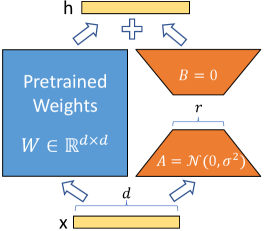
Source: Microsoft Research — LoRA
How LoRA Works
Low-rank hypothesis
Task gradients for a focused dataset tend to lie in a low-dimensional subspace. A rank-(r) factorization captures most useful directions without touching every entry of (W). If (r) is too small, you underfit; too large, you waste memory and memorize.
Empirically, many instruction and classification adapters saturate between ranks 8 and 32 on 8B-class models. That does not prove every task is low-rank — it shows that common product adaptations often are. When you change writing system, add a large new ontology, or continue pretrain on billions of domain tokens, expect the hypothesis to strain.
Forward and backward
Forward adds the low-rank path beside the frozen matmul. Backward flows gradients into (A) and (B) only. Base weights remain requires_grad=False under PEFT wrapping. Mixed precision usually keeps adapters in BF16 while allowing FP32 master copies inside the optimizer depending on Trainer settings — match what your stack documents rather than assuming defaults.
Dropout on the LoRA path (lora_dropout) regularizes small datasets. It is not a substitute for deduplicating tickets or fixing label noise. Bias terms are commonly left frozen (bias="none") unless an ablation shows benefit.
Initialization and scaling
Zero-init (B) keeps the model identical to base at step 0. Scaling (\alpha/r) means changing (r) without adjusting (\alpha) quietly changes effective step size — keep them coupled unless you are deliberately sweeping scale. Some codebases absorb scale differently; when porting configs across Unsloth, Axolotl, and raw PEFT, verify the effective multiplier with a one-step dump or official docs.
Multi-adapter composition (intuition)
If two adapters encode compatible skills (e.g., “polite tone” and “JSON fields”), naive merging sometimes works after eval. If they encode conflicting policies (“always refund” vs “never refund”), composition is undefined behavior from a product view. Prefer routing over arithmetic on adapters unless you have a measured merge recipe (weighted mergekit experiments included).
Architecture
Diagram: LoRA on attention projections
flowchart LR
  X[Hidden x] --> W[Frozen W]
  X --> A[A r×k]
  A --> B[B d×r]
  W --> Y[Sum]
  B --> Y
  Y --> H[Output h]
The trainable path is a thin bottleneck; width is controlled by rank r.
Target modules (Llama/Mistral-style names)
| Module | Role | Priority |
|---|---|---|
q_proj / k_proj / v_proj |
Attention Q/K/V | High — default set |
o_proj |
Attention output | High — include by default |
gate_proj / up_proj / down_proj |
MLP | Medium — add for generation |
| Embeddings / LM head | Token in/out | Rare — special vocab cases |
Different families rename modules (W_q vs q_proj). Always print named_modules() once per new base architecture. Auto-targeting in PEFT covers common causal LMs, but MoE experts, vision towers, and custom forks frequently need explicit lists. Targeting every linear layer maximizes capacity and memory — start narrower, widen when eval plateaus.
Rank guidance
| Rank (r) | Typical use |
|---|---|
| 4–8 | Tiny data, simple classification |
| 16 | Default SFT starting point |
| 32 | Harder generation / more data |
| 64+ | Approaching full-FT cost; justify with ablations |
Where LoRA sits in a transformer block
In a decoder-only transformer, attention projections steer where information flows; MLP layers transform features heavily. Empirically, attention-only LoRA often suffices for classification and light style shifts. SQL generation, code repair, and long-form constrained writing more often benefit from MLP targets because those tasks need richer feature remapping, not only reweighted attention.
Do not LoRA the embedding table unless you are adding special tokens with enough data to learn them. Randomly expanding vocab without careful init is a common silent quality killer. Layer norms are usually left frozen; making them trainable is an advanced experiment, not a default.
Step-by-Step Flow
Diagram: LoRA training lifecycle
stateDiagram-v2
  [*] --> Baseline: Prompt eval
  Baseline --> Configure: Choose r, alpha, targets
  Configure --> Train: PEFT + TRL SFT
  Train --> Evaluate: Held-out metrics
  Evaluate --> Configure: Under/overfit
  Evaluate --> Package: Save adapter
  Package --> Merge: Single-tenant serve
  Package --> HotSwap: Multi-adapter serve
  Merge --> [*]
  HotSwap --> [*]
Always pass through a prompt baseline and a packaged, versioned adapter before production traffic.
- Load instruct base (e.g. Llama 3.1 8B Instruct) in BF16.
- Configure LoRA;
get_peft_model; print trainable %. - Format data with the same chat template used at inference.
- Mask loss to assistant tokens.
- Train 1–3 epochs; LR often (1\mathrm{e}{-4})–(3\mathrm{e}{-4}).
- Save adapter + config; smoke-test reload.
- Decide merge vs multi-adapter; re-eval the exact serve path.
- Canary; monitor task slices; keep rollback.
Real Production Example
Domain adapter: natural-language → warehouse SQL for an analytics team on Llama 3.1 8B Instruct, comparing ranks.
from transformers import AutoModelForCausalLM, AutoTokenizer, TrainingArguments
from peft import LoraConfig, get_peft_model, PeftModel
from trl import SFTTrainer
import torch

MODEL_ID = "meta-llama/Llama-3.1-8B-Instruct"

tokenizer = AutoTokenizer.from_pretrained(MODEL_ID)
tokenizer.pad_token = tokenizer.eos_token

model = AutoModelForCausalLM.from_pretrained(
    MODEL_ID,
    torch_dtype=torch.bfloat16,
    device_map="auto",
    attn_implementation="flash_attention_2",
)

config = LoraConfig(
    r=16,
    lora_alpha=32,
    target_modules=[
        "q_proj", "k_proj", "v_proj", "o_proj",
        "gate_proj", "up_proj", "down_proj",
    ],
    lora_dropout=0.05,
    bias="none",
    task_type="CAUSAL_LM",
)
model = get_peft_model(model, config)
model.print_trainable_parameters()

def formatting_func(example):
    return tokenizer.apply_chat_template(
        [
            {"role": "system", "content": "Write SQL for the schema. No prose."},
            {"role": "user", "content": f"Schema:\n{example['schema']}\n\nQ: {example['question']}"},
            {"role": "assistant", "content": example["sql"]},
        ],
        tokenize=False,
    )

args = TrainingArguments(
    output_dir="./sql-lora-r16",
    num_train_epochs=2,
    per_device_train_batch_size=2,
    gradient_accumulation_steps=8,
    learning_rate=2e-4,
    lr_scheduler_type="cosine",
    warmup_ratio=0.05,
    bf16=True,
    eval_strategy="steps",
    eval_steps=100,
)

trainer = SFTTrainer(
    model=model,
    args=args,
    train_dataset=dataset["train"],
    eval_dataset=dataset["test"],
    formatting_func=formatting_func,
    processing_class=tokenizer,
)
trainer.train()
model.save_pretrained("./sql-lora-r16/adapter")

base = AutoModelForCausalLM.from_pretrained(MODEL_ID, torch_dtype=torch.bfloat16, device_map="auto")
merged = PeftModel.from_pretrained(base, "./sql-lora-r16/adapter").merge_and_unload()
merged.save_pretrained("./sql-lora-r16/merged")
| Rank | Exact match | Exec accuracy | Trainable (order) |
|---|---|---|---|
| 8 | 78.2% | 84.1% | ~0.5% |
| 16 | 86.4% | 91.7% | ~1% |
| 32 | 87.1% | 92.3% | ~2% |
| 64 | 86.8% | 92.0% | ~4% |
They shipped r=16 — diminishing returns beyond that. Schema docs still came from RAG at inference; the adapter learned SQL style and dialect, not the live warehouse catalog.
Design Decisions
| Decision | Option A | Option B | Choose A when |
|---|---|---|---|
| Rank | 16 | 32–64 | Default / limited data |
| Targets | Attn only | Attn+MLP | Classification / light SFT |
| Alpha | 2r | r | Standard PEFT practice |
| Dropout | 0.05 | 0 | Small datasets |
| Deploy | Merge | Unmerged | Single adapter, simple engines |
| Memory | LoRA BF16 | QLoRA | Weights fit comfortably |
| Trainer | TRL SFTTrainer | Custom loop | Standard chat SFT |
Multi-adapter patterns
- One adapter per product surface (tenant or task)
- Explicit
set_adapterin application code; log adapter ID - Avoid blind linear merges of unrelated adapters without eval
- Prefer engine-native multi-LoRA batching when concurrency is high
- Canary a new adapter at 1–5% traffic with automatic rollback on slice regressions
Document the decision table in the model card so future engineers do not re-litigate rank mythology. If r=16 won last quarter on the same task family, start there again unless data volume or difficulty clearly changed.
Comparisons
| Dimension | Full fine-tuning | LoRA | QLoRA |
|---|---|---|---|
| Trainable params | ~100% | ~0.1–1% | LoRA-sized |
| Base storage dtype (train) | FP16/BF16 | FP16/BF16 | NF4 4-bit |
| Typical VRAM | Highest | Medium | Lowest |
| Merge story | N/A (full ckpt) | Excellent | Adapter merges onto higher-precision base for serve |
| Quality ceiling | Highest potential | Near FT on many tasks | ≈ LoRA with small quant noise |
| Ops complexity | Heavy checkpoints | Light adapters | bitsandbytes + CUDA |
| Dimension | LoRA | Prompting | RAG |
|---|---|---|---|
| Changes | Weights (small) | Tokens | Retrieved context |
| Good for | Stable behavior | Fast policy edits | Fresh facts |
| Risk | Overfit / memorization | Fragility | Retrieval miss |
Common Mistakes
- r=64 on 200 examples — memorization.
- Changing r without alpha — accidental LR scale change.
- Training on prompt tokens — waste capacity; mask correctly.
- No base+prompt baseline — cannot prove value.
- Only
q_proj— usually underpowered; use full attn set. - Full-FT learning rates — LoRA often wants higher LR.
- Merge without parity check — compare unmerged vs merged outputs.
- Chat template drift between train and serve.
- Assuming LoRA cannot harm safety — it can; run safety evals.
- Using LoRA as a knowledge base — use RAG/tools.
Where It Breaks Down
Deep distribution shift (new language, heavy continued pretraining) may need ranks so high that LoRA loses its point — or true full FT / CPT. Tiny datasets may favor prompting. Multi-adapter interference is real. Extremely precision-sensitive tasks may prefer higher-precision bases and careful eval (see also QLoRA trade-offs). LoRA does not fix weak bases or missing eval sets.
LoRA also breaks down socially inside companies. Because experiments are cheap, teams skip the prompt baseline and declare victory on training loss. Leadership then believes “we fine-tuned” when the production gain is indistinguishable from a better system prompt. The method works; the measurement culture does not. Tie every adapter release to a pre-registered metric and a kill criterion.
Long-context behavior deserves separate testing. An adapter trained at 2K tokens can degrade reasoning when served at 32K–128K even if the base model supports those windows. Include long-context slices in the release suite whenever your product allows large pastes or retrieved bundles.
When NOT to Use LoRA
Skip LoRA when:
- prompting already meets gates;
- knowledge must be cited and updated hourly;
- you cannot maintain adapter/base version pins;
- you need continued pretraining on massive corpora;
- measured ablations show a large gap vs full FT on a small model where full FT is affordable;
- you lack rights to the training text or cannot scrub secrets before gradient updates.
Use QLoRA instead when the only blocker is fitting the frozen base in VRAM. Use neither when the real defect is retrieval quality, taxonomy ambiguity, or an underspecified product contract — those failures survive any rank you pick.
Running in Production
| Dimension | Practice |
|---|---|
| Artifact | adapter_config.json + weights + base revision + tokenizer commit |
| Latency | Merged ≈ base; unmerged adds small matmuls per target |
| Serving | vLLM/TGI multi-LoRA or merge for simplicity |
| Eval | Task, safety, template parity, merge parity |
| Security | Treat adapters as untrusted code+data hybrids; scan training sets |
| Prefs | DPO/RLHF commonly use LoRA policies |
Important
Reload tests must use the same
r,alpha, andtarget_modules. Silent mismatch yields fluent nonsense.
Merge checklist
Before promoting a merged checkpoint:
- Reload unmerged PEFT model and merged model; compare greedy outputs on a fixed prompt pack (temperature 0).
- Run the full task suite on the merged binary — not only on the trainer’s in-loop eval.
- If you quantize after merge (GPTQ/AWQ/FP8), treat that as another stage gate.
- Record file hashes for base, adapter, and merged tree in the release ticket.
- Keep the unmerged adapter around for one rollback window even if production serves merged weights — debugging is easier when you can hot-load the adapter onto a known base.
Rank sweeps without wasting budget
Run a small factorial on a proxy: ranks {8,16,32} × targets {attn, attn+mlp} for one epoch on a data subset, then promote the winner to a full train. Log trainable parameter counts beside metrics so stakeholders see cost. If r=32 ties r=16 within confidence intervals, ship 16. If both underfit, inspect data quality before jumping to r=64 or full FT.
Domains where LoRA shines
Stable taxonomies, reply templates, SQL dialects, internal jargon, tool-call skeletons, and bilingual formatting are frequent wins. Domains where policies change weekly are poor fits — you will retrain constantly and still lag a prompt/rules engine. Pair LoRA with retrieval whenever answers cite living documents: the adapter learns how to use evidence; the index supplies what is true today.
Continue Learning
Production Checklist
- Base model revision pinned
- Tokenizer and chat template version pinned
- Adapter version / hash pinned in release artifacts
- Rank (
r) and alpha validated on a proxy sweep - Target modules documented and reload-tested
- Merge strategy selected (merged serve vs multi-LoRA)
- Merge parity check completed (greedy outputs vs unmerged)
- Task and safety evaluation completed on the served artifact
- Rollback adapter retained for one release window
- Training-data scan for secrets completed
- Latency impact of unmerged vs merged path measured
Related Guides
Prerequisites
- PEFT — method hub and library
- Fine-Tuning
Core Concepts
Optimization
- QLoRA — 4-bit training path
Advanced Topics
Diagram: LoRA in the PEFT family
flowchart LR
    FT[Fine-tuning] --> PEFT[PEFT]
    PEFT --> LoRA[LoRA]
    LoRA --> QLoRA[QLoRA]
    LoRA --> DPO[DPO]
    LoRA --> RLHF[RLHF]
    FT --> TR[Transformers]
Interview Questions
Write the LoRA update equation and explain r.
(W' = W + (\alpha/r) BA) with rank-(r) factors. Larger (r) increases capacity and memory; start at 16.
Why initialize B to zero?
So the adapter starts as a no-op and training remains stable relative to the pretrained model.
Merge vs keep adapters?
Merge for single-adapter simplicity and max engine compatibility. Keep separate for multi-tenant routing and smaller rollback units.
LoRA vs full fine-tuning?
LoRA trains far fewer params with frozen base; usually matches FT on narrow SFT. Full FT may win on large shifts or when PEFT saturates.
Which modules do you target first?
Attention projections; add MLP if generation quality plateaus.
How does QLoRA change the picture?
Same adapters; frozen base stored in 4-bit during training to save VRAM (QLoRA).
Key Takeaways
- LoRA learns low-rank (\Delta W) beside frozen (W); merge for zero-overhead serve.
- r=16 / alpha=2r / attention targets is the standard first recipe.
- Compare to prompt baselines and to QLoRA/full FT with measurements.
- Version adapters with base+template; evaluate the exact deployment graph.
- Stay linked through PEFT to the rest of the adaptation stack.
- Multi-adapter serving is a product architecture choice: route explicitly, log adapter IDs, and never assume two adapters compose because both “look small.”
- Treat training loss as a debug signal, not a release metric — held-out task slices and safety probes decide promotion.
- Prefer current open instruct bases (Llama 3.x / Llama 4-class, Mistral) over toy GPT-2 demos when writing internal runbooks.
FAQs
Does merged LoRA equal training with BA always fused?
Mathematically the forward matches after merge (up to numerics). Always smoke-test.
How large is an adapter on 8B at r=16?
Often on the order of 50–200 MB depending on targets — not multiple GB.
Can I stack adapters?
Yes with care; evaluate combinations. Prefer explicit routing over hoping merges compose semantically.
Unsloth / Axolotl?
Faster or YAML-driven trainers that still emit LoRA adapters — validate exports with PEFT loaders.
Apple Silicon?
LoRA in BF16/FP16 can work in-framework; QLoRA’s bitsandbytes 4-bit path is CUDA-centric.
Epochs?
Often 1–3; early-stop on eval. More epochs on tiny data → memorization.
Should I train LoRA jointly with embedding updates?
Only with a clear vocab expansion plan and enough examples for new tokens. Otherwise keep embeddings frozen and stick to attention/MLP targets.
How do I debug an adapter that loads but outputs gibberish?
Verify base revision, chat template, task_type, rank/alpha/targets against adapter_config.json, and that you did not accidentally load a QLoRA-trained adapter onto an incompatible quantized runtime without the matching recipe. Compare a single known training example’s teacher-forced loss if needed.