October 28, 2026
Alphabet’s Revenue Rises 25% as Profit Falls - The New York Times
Alphabet’s Revenue Rises 25% as Profit Falls The New York Times
Read original articleDataAIHub Daily
Archive →50 curated AI news stories from leading AI companies.
October 28, 2026
Alphabet’s Revenue Rises 25% as Profit Falls The New York Times
Read original articleOctober 28, 2026
Microsoft expects 'very few people' to accept buyouts, CFO says in internal memo Business Insider
Read original articleOctober 28, 2026
Unpacking the company’s 300-plus page prospectus
Read original articleOctober 28, 2026
Microsoft reported better-than-expected cloud revenue while ServiceNow gave an outlook for quarterly subscription sales that met analysts’ estimates. Anurag Rana has more on "Bloomberg The Close." (Source: Bloomberg)
Read original articleOctober 28, 2026
Microsoft Corp. reported better-than-expected cloud revenue, suggesting the company continues to reap the benefits of its massive investment in artificial intelligence.
Read original articleOctober 28, 2026
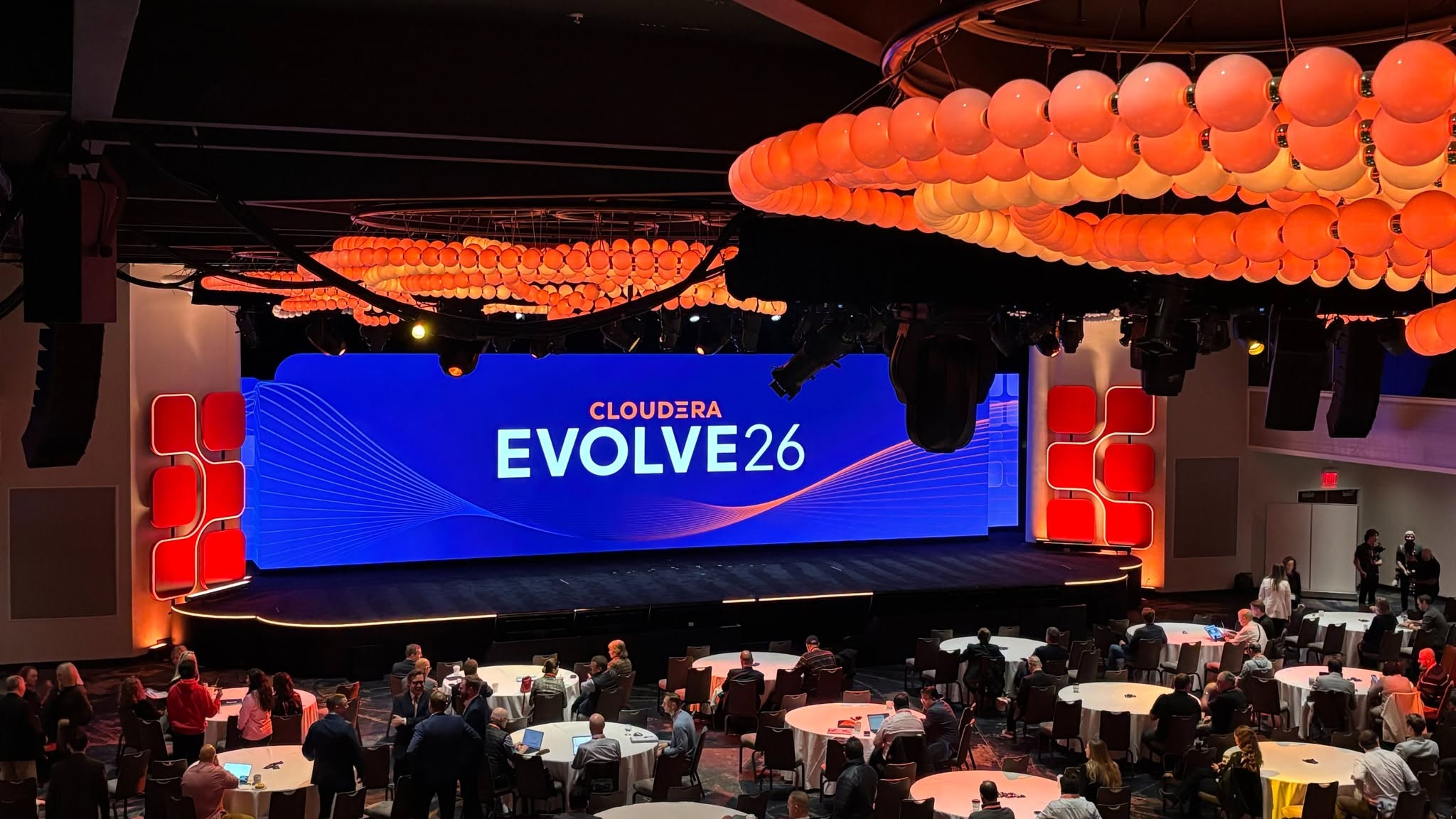
Cloudera Inc. Tuesday announced an expansion of its enterprise artificial intelligence ecosystem, introducing preconfigured AI applications built with Nvidia Corp. technology and expanding partnerships with Neo4j Inc. and Mistral AI SAS. Cloudera said the initiatives are intended to help enterprises move AI projects into production while maintaining control over their data, infrastructure and deployment costs. Announced […] The post Cloudera expands its AI ecosystem with partnerships and packaged blueprints appeared first on SiliconANGLE.
Read original articleOctober 28, 2026
The frontier lab is lifting the curtain on how users spend money on its models ahead of a planned IPO.
Read original articleOctober 28, 2026
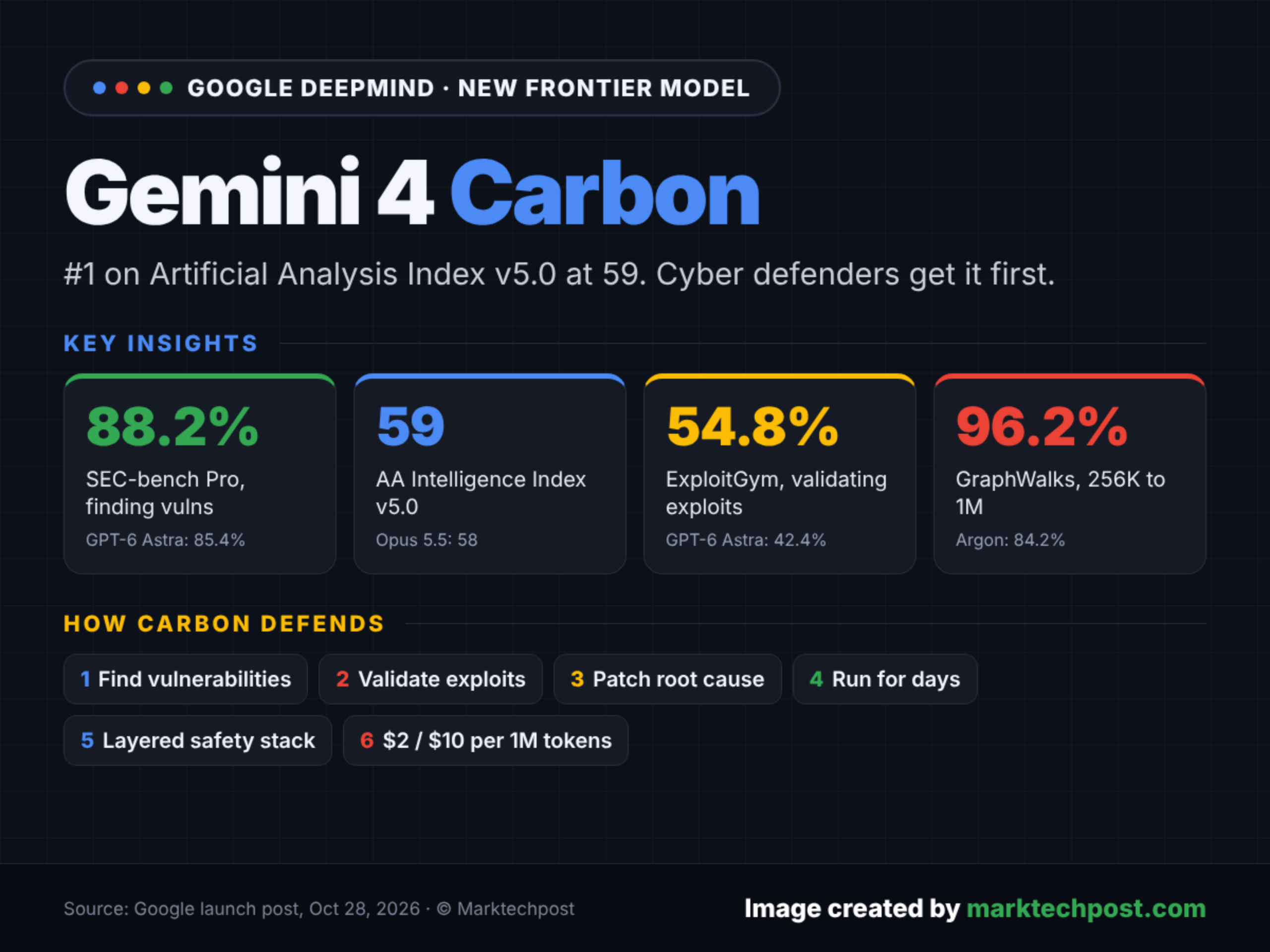
Just two weeks after Gemini 4 Argon, Google DeepMind is releasing Gemini 4 Carbon, which tops the Artificial Analysis Intelligence Index v5 with 59 points. Google says the model is built for extended agent workflows and the full cyber defense lifecycle. Because of those advanced security capabilities, access is limited to selected security experts at first. The article Google Deepmind releases Gemini 4 Carbon just two weeks after Argon with gains across the board appeared first on The Decoder.
Read original articleOctober 28, 2026
The US Justice Department is making inquiries about Nvidia Corp.’s agreement to acquire AI model company Hugging Face for about $13 billion, part of broader regulatory scrutiny of the chip giant, Reuters reported.
Read original articleOctober 28, 2026
EXCLUSIVE: US DOJ is inquiring about Nvidia's purchase of Hugging Face, sources say Reuters
Read original articleOctober 28, 2026
Gemini 4 Carbon is essentially a slightly better version of Argon.
Read original articleOctober 28, 2026
Before you read further: watch this short demo. In this short demo, the voice agent...
Read original articleOctober 28, 2026
Google DeepMind introduced Gemini 4 Carbon, a frontier model that scores 59 on the Artificial Analysis Intelligence Index and 88.2% on SEC-bench Pro. Access starts with vetted cyber defenders, at $2/$10 per million tokens. The post Google DeepMind Introduces Gemini 4 Carbon, Its Top Model for Cyber Defense and Coding appeared first on MarkTechPost.
Read original articleOctober 28, 2026
But the AI responses get more forthright when asked outside the US.
Read original articleOctober 28, 2026
Bloomberg’s Ed Ludlow breaks down expectations for Microsoft and Alphabet, which both report earnings after the bell, with Wall Street looking for proof that their massive AI investments are paying off. Plus, Bloomberg reports that Anthropic has tapped JPMorgan to lead the US retail offering for its potentially record-setting IPO. And, Apple is betting consumers will pay even more for a MacBook Pro with touch screens coming for the first time. (Source: Bloomberg)
Read original articleOctober 28, 2026
Anthropic is weighing a retail offering of 15% to 20% of the shares available in the IPO, according to people familiar with the matter. Those sources say the company behind Claude has tapped JPMorgan Chase to lead the US retail offering. Bloomberg’s Ryan Gould discusses the plans with Ed Ludlow on “Bloomberg Tech.” (Source: Bloomberg)
Read original articleOctober 28, 2026
Google is giving coding agents like Anthropic’s Claude Code and OpenAI’s Codex deeper access to its Android development tools, including The post Google just handed its rivals the keys to Android appeared first on The New Stack.
Read original articleOctober 28, 2026
Microsoft and Alphabet Earnings Put Focus on AI Cash Flow Drain Bloomberg.com
Read original articleOctober 28, 2026
Get a jump start on the US trading day with Dani Burger on "Bloomberg Open Interest." Powerful profits from SK Hynix refuel the AI trade as booming demand for memory chips shows no signs of slowing. Microsoft and Alphabet gear up to report results on the busiest day of earnings season for the S&P 500. Plus, Federal Reserve Chair Kevin Warsh takes the spotlight, with the Fed expected to hold rates today while keeping the door open to a December move. Nuveen Chief Investment Officer Saira Malik and Goldman Sachs Chief US Economist David Mericle break down the forces shaping the market outlook through the rest of 2026. Plus, the view from Dallas with Causeway CEO Sarah Ketterer, DFW International Airport CEO Chris McLaughlin and Fortress Global Co-Head of Corporate Credit Brian Stewart. (Source: Bloomberg)
Read original articleOctober 28, 2026
Prophecy Launches DataGPT, Bringing Enterprise Data Workflows to Claude, ChatGPT, and Copilot HPCwire
Read original articleOctober 28, 2026
Google opens the floodgates for more connected apps in Gemini and Search Android Authority
Read original articleOctober 28, 2026
Cloudera Launches Cloudera Blueprints, Bringing NVIDIA Agent Toolkit to Enterprise Data Anywhere HPCwire
Read original articleOctober 28, 2026
A new developer platform will let businesses bring their services to Google's AI experiences, potentially changing how consumers discover and use apps.
Read original articleOctober 28, 2026
Google is opening up Android Studio to third-party AI agents. Through a new "Bring Your Own Agent" feature, the IDE now supports more than 40 coding agents, including Anthropic's Claude Agent and OpenAI's Codex. Google says new terminal tools also help agents finish UI tasks 77 percent faster while using up to three times fewer tokens. Android development is becoming agent-centric too. The article Google opens Android development to third-party AI agents and unveils new Gemini APIs appeared first on The Decoder.
Read original articleOctober 28, 2026
At DevDay Exchange in Berlin, OpenAI mostly repeated what it had already announced, but it did share a few new details. The AI assistant Dots should roll out more widely in Europe "in a few weeks," and weekly Codex users in Germany have grown twentyfold since January. A clear subtext ran through the sessions and the repeated nods to ChatGPT's 1.2 billion weekly users: OpenAI wants developers to build their businesses directly on its infrastructure. The article OpenAI teases Dots for Europe, but its Berlin DevDay was really about building a platform appeared first on The Decoder.
Read original articleOctober 28, 2026
Anthropic is adding pre-built templates to Claude for Legal. These interactive overviews and tables simplify setup for legal teams and speed up routine work like contract reviews, while more than 60 integrations let firms connect their own databases directly. The article Claude for Legal now verifies sources automatically, then hands the file to a lawyer appeared first on The Decoder.
Read original articleOctober 28, 2026
GitHub has debuted GitHub Copilot Fusion, a new system that handles model selection and orchestration for coding tasks so developers The post GitHub debuts Copilot Fusion, a new model selection & orchestration system that beats Claude Code for half the API cost appeared first on The New Stack.
Read original articleOctober 28, 2026
Managing PostgreSQL databases across on-premises, edge, and multi-cloud environments often forces administrators to rely on command-line tools, making it hard to see cluster health and quickly diagnose issues. To solve this, we are announcing the General Availability (GA) of the AlloyDB Omni Web UI for Red Hat and containers. This production-ready, read-only console gives you direct visibility into hardware telemetry, query performance, and configuration flags for AlloyDB Omni so you can troubleshoot workloads quickly and safely without leaving your local or enterprise environment. What is AlloyDB Omni? AlloyDB Omni is a downloadable, self-managed edition of AlloyDB that brings enterprise capabilities and full PostgreSQL compatibility to your own infrastructure. Built to run anywhere — across on-premises data centers, edge environments, and multi-cloud deployments — it includes built-in columnar acceleration and integrated AI tooling. With AlloyDB Omni, you can modernize demanding transactional and analytical workloads while retaining complete control over your operating environment. Key Web UI capabilities at a glance Cluster overview and profiles: Switch between target connection profiles quickly without using the command line. System monitoring: View real-time performance telemetry for CPU, memory, and disk I/O to plan capacity and triage infrastructure issues. Query performance: Identify resource-heavy SQL statements through a visual breakdown of database load, latency bottlenecks, and slow queries. Columnar Engine diagnostics: Track the in-memory columnar store, caching, and coverage to verify analytical query acceleration. Parameter and flag auditing: Inspect runtime database parameters centrally to identify configuration drift against your organizational baselines. AlloyDB AI and ecosystem shortcuts: Inspect vector search and AI workflows, and access quick launchpad shortcuts for ecosystem tools like pgBackRest. Production-safe diagnostics and profile management When you triage complex database workloads across bare-metal VMs, containers, or Kubernetes, you need a clear, isolated view of instance health. The Web UI provides a dedicated visual environment for this. Profile management: Store and toggle between saved connection profiles for local development, staging, or production environments. Read-only operations: The interface operates strictly in read-only mode, ensuring that diagnostic sessions cannot execute write commands or modify your underlying database configurations. Dual-layer observability: System and query monitoring To isolate production performance spikes, you need immediate visibility into both hardware health and SQL statement execution. System monitoring: The Web UI integrates with standard Prometheus telemetry to show you real-time CPU use, memory allocation, storage I/O, and active connection trends. Query monitoring: The dashboard automatically ranks execution-heavy SQL statements by total latency and call frequency. You can instantly isolate unindexed or resource-intensive queries to resolve issues faster. System Insights and Query Insights in AlloyDB Omni Web UI Real-time Columnar Engine diagnostics AlloyDB Omni includes an advanced Columnar Engine that organizes frequently accessed data in memory, accelerating analytical queries significantly compared to standard PostgreSQL. The Web UI helps you monitor this feature directly: Memory footprint tracking: Check real-time columnar memory consumption against your hardware limits. Columnarization and cache coverage: See exactly which tables and columns are actively cached in memory to confirm your workloads are running as fast as possible. AlloyDB AI and Columnar Engine Insights in AlloyDB Omni Web UI Database flag and parameter auditing Keeping database parameters uniform across distributed environments keeps your operations stable. The Web UI gives you a central catalog to inspect active database flags and runtime settings. You can verify node settings against your organizational policies without connecting to servers via SSH or parsing configuration files manually. If configuration drift is detected, changes should be applied via the authoritative provisioning workflow (e.g., updating Kubernetes CRDs/GitOps manifests, running Ansible playbooks, or using alloydbctl). Database flags in AlloyDB Omni Web UI Built-in AlloyDB AI and tooling hub As you build generative AI applications on top of PostgreSQL, the Web UI gives you direct visibility into vector search workflows and AI model integrations. You can also quickly navigate to documentation and external ecosystem resources, including backup tools like pgBackRest, directly from the console's tooling hub. Operational scope and prerequisites We designed the AlloyDB Omni Web UI with clear operational boundaries so you can deploy it easily within enterprise security boundaries and air-gapped environments. Non-Intrusive Monitoring: The interface operates with minimal permissions out of the box, preserving your existing command-line tools and CI/CD pipelines as the authoritative controls for cluster provisioning and administrative workflows. Standard monitoring prerequisites: To see complete system hardware metrics, you need standard Prometheus monitoring configured within your host environment. Get started Ready to modernize your PostgreSQL workloads and get dedicated observability for your AlloyDB Omni cluster ? Sign up for enterprise access: To request access to RPM-based enterprise distributions, advanced tooling, and the Web UI, complete the sign-up form for RPM based deployment of AlloyDB Omni. To request access to container-based enterprise distributions, advanced tooling, and the Web UI, complete the sign-up form for container-based deployment. Install the Web UI: Follow the step-by-step installation instructions in the AlloyDB Omni documentation to deploy the AlloyDB Omni Web UI For deployment using Red Hat RPM: Deploy via native RPM Package For deployment using Docker or Podman: Deploy via container image
Read original articleOctober 28, 2026
Keeping production databases on supported versions shouldn’t require giving up your weekend. To stay secure, compliant, and with the best performance and newest AI capabilities, organizations need to run on the latest database engine versions. Yet for many teams, major version upgrades mean weeks of cross-team coordination, negotiating narrow maintenance windows, and hours of application downtime. In an era where mission-critical applications and AI agents operate as 24/7 systems of action, even a brief maintenance outage can mean disrupted customer experiences and lost revenue. To help, we are excited to announce the preview of fully managed blue-green deployments in Cloud SQL, starting with Cloud SQL for MySQL. You can now execute major version upgrades and configuration updates with minimal downtime via the Google Cloud console or automated CLI scripts. By continuously synchronizing a parallel environment, teams can safely test with production data before a seamless cutover — all while keeping the original database as a reliable safety net after the switchover. Why the upgrade dilemma matters to your business Putting off major version upgrades (like moving from MySQL 8.0 to 8.4) exposes you to security vulnerabilities and causes you to miss out on performance improvements and latest AI capabilities. To test changes and avoid in-place upgrade downtime, teams often turn to a blue-green deployment — testing changes on a separate, upgraded staging copy (green) alongside the live database (blue) and switching traffic over once it’s ready. However, manual blue-green setups are incredibly complex to build, synchronize, and safely cut over. Cloud SQL’s fully managed blue-green deployments can turn your database upgrades from a high-risk weekend project into a predictable, low-downtime operation. The traditional upgrade The managed blue-green way Late-night maintenance: Scheduling hours of offline downtime at 2:00 AM on a Saturday. Business-hour upgrades: Staging, sync, and testing happen in the background during normal work hours. Limited testing options: Tests are limited to non-production environments, adding operational risks. Pre-cutover verification: Safely testing actual applications against real-time production data copy before any traffic shifts. High-stress rollbacks: If an issue is found, rebuilding or restoring from backups takes hours. Built-in fallback: Cancel the upgrade and leave your blue instance as is if issues come up, or keep your “old blue” as a manual fallback after cutover. The technical differentiators With Cloud SQL, managed blue-green deployments automate the entire lifecycle across three stages: Blue environment (production): Your current primary Cloud SQL instance, which continues serving live application traffic without interruption. Green environment (staging): A temporary clone of your blue instance that Cloud SQL upgrades to your target database version and keeps in sync via continuous replication. Switchover: When you're ready to cut over, Cloud SQL briefly sets the blue instance to read-only, finishes the final data synchronization, and promotes the green instance to your new primary database. Three notable capabilities make this release a game-changer for enterprise workloads: Near-zero downtime cutover: The transition from the old version to the new version is incredibly fast. Organizations using Cloud SQL Enterprise Plus experience sub-second downtime for maintenance. No application changes: When you trigger the switchover, Cloud SQL automatically transfers your existing database IP address, instance name, and backups to the new database. Your developers do not need to rewrite connection strings, modify configuration files, or update client applications. Safe, real-data testing: You can run real application traffic and queries against the upgraded green environment to verify performance before going live. If you spot an issue, simply delete the deployment before switchover without touching your live database. Simple to orchestrate, built to scale Upgrading your database environment can now be initiated in just a few clicks within the console, or via a simple CLI script. code_block <ListValue: [StructValue([('code', "# Create the synchronized, upgraded green deployment environment\r\ngcloud sql blue-green-deployments create my-upgrade \\\r\n --source-instance=prod-mysql-db \\\r\n --target-database-version=MYSQL_8_4\r\n\r\n# Check the status and get the test endpoint\r\ngcloud sql blue-green-deployments describe my-upgrade \\\r\n--region=us-central1\r\n\r\n# Connect and test the upgraded copy\r\ngcloud sql connect TARGET_INSTANCE_NAME --user=admin\r\n\r\n# Switch your live traffic to the upgraded database in seconds\r\ngcloud sql blue-green-deployments switchover my-upgrade\r\n\r\n# Clean up the old database when you're ready\r\ngcloud sql blue-green-deployments delete my-upgrade \\\r\n --region=us-central1 \\\r\n --delete-old-source"), ('language', ''), ('caption', <wagtail.rich_text.RichText object at 0x7f51d4d54790>)])]> With near-zero downtime switchovers, this feature takes the risk out of database upgrades. By shifting maintenance from a weekend chore to a routine daytime task, your team can stay ahead of security lifecycles, unlock the latest AI-ready engine features, and focus on building features that drive business growth, not managing infrastructure risk. Try it today Near-zero downtime database upgrades are available in preview for Cloud SQL for MySQL standalone primary instances, including High Availability configurations, with support for PostgreSQL coming soon. Get started today by visiting the Cloud SQL console or reviewing the step-by-step documentation.
Read original articleOctober 28, 2026
In my previous post, I took you behind the scenes of Google Agent Skills, covering how the project started, how we maintain quality at scale, and how we handle governance. In this post, I'll share what we've built since then: the automated quality gates that every change must pass, the AI review agent that inspects skill quality, and the lessons that we learned along the way. You can adopt similar gates and review rules in your own skill repository. Since my last post, the Google Agent Skills repository has passed 21,000 GitHub stars, up from 15,000. It now hosts over 170 skills from teams across Google, and we distribute them across multiple AI platforms. Building agent skills for a single developer or a small project is straightforward. You write a SKILL.md file, define a few instructions, test it manually, and it works. At our scale, manual workflows stop being effective. Unvetted edits can introduce subtle bugs, and it becomes difficult to catch issues before they reach users. The core philosophy: Ship skills like products One key lesson from my previous post: a skill is a living product, not a one-off document. In practice, that means we ship every skill update like a product release. It's tempting to treat a skill as documentation. But documentation explains concepts to a human reader, while a skill steers an AI agent's reasoning loop, tool selection, and execution path. A misplaced phrase in a skill can cause an agent to invoke invalid command flags, enter an infinite loop, or waste tokens. That makes every instruction edit a behavioral change. You wouldn't ship a product update without testing it, and the same goes for a skill. This principle drives three core requirements: Strict semantic versioning: Every behavioral change requires an explicit version bump. Deterministic automated validation: Linters and validators check every proposed change before a human or AI reviewer sees it. Mandatory evaluation evidence: Every change includes an evaluation report. It compares the skill against its previous version, or—if the skill is new—against an agent without the skill. Automated conformance gates: The pull request pipeline In my previous post, I briefly listed the checks that every skill passes on check-in: linters, link checkers, and AI-assisted checklists. Here's what's inside them, plus two gates that I haven't covered before: semantic versioning and evaluation suite validation. When an author submits a change to our internal skills repository, an automated continuous integration and continuous delivery (CI/CD) pipeline triggers immediately. Before a skill is exported to GitHub, it must pass these six automated gates and receive human approval: Structural conformance: Directory layout, allowed files, and taxonomy. Skill linters: Frontmatter, folder naming, and Markdown rules. Semantic versioning: Version bump for every behavioral change. Evaluation suite: Valid eval suite and a fresh eval report. Link validation: Links are valid. AI review agent: Skill quality and design standards. Human approval: Final approval from a human reviewer (a subject matter expert). Structural conformance and skill linters Our automated validation suite inspects every pull request for structural and syntactical correctness. Some of the rules include these requirements: Folder name and metadata name must match. SKILL.md and description length limits are enforced. All required fields in the frontmatter metadata are present. Only a curated list of files and directories is allowed within a skill directory. All Markdown files follow formatting rules. The main README.md file and the machine-readable index.json registry are up to date. Semantic versioning Every skill declares a semantic version in its SKILL.md frontmatter metadata: code_block <ListValue: [StructValue([('code', '---\r\nname: spanner-basics\r\nmetadata:\r\n version: "1.1.1"\r\n category: Databases\r\ndescription: ...\r\n---'), ('language', ''), ('caption', <wagtail.rich_text.RichText object at 0x7f51d48cefd0>)])]> First, our automated checks verify that the version is a quoted string. YAML parses unquoted values like 2.0 as numbers, which causes unexpected parsing errors in tools that expect a string. Second, the validator checks the version transition itself. New skills must start at 1.0.0, and any change to an existing skill's instructions, scripts, or references requires a version bump or the pull request is blocked. Standard reset rules apply: bumping MAJOR (for example, 1.4.2 to 2.0.0) resets MINOR and PATCH to 0, and bumping MINOR (for example, 1.4.2 to 1.5.0) resets PATCH to 0. Why enforce strict versioning if the agent only reads the Markdown instructions? The version number is for the developer and their package tooling, not for the model at runtime. Skills don't auto-update in the background, which means there's no network check or latency overhead each time an agent invokes a skill. Instead, explicit versions let developers compare their locally installed skills against the upstream catalog and decide when to pull changes—for example, by running the npx skills update command. This versioning also supports workflows where teams want to lock a critical skill to a known-good version to guarantee reproducible agent behavior across their projects. Evaluation suite validation Our continuous evaluations (evals) compare agent performance with and without each skill. Those results are only as reliable as the evaluation suites behind them. If a suite contains broken file references or compound expectations, test results become noisy and untrustworthy. Our validator parses each evaluation suite and the pull request description. Then it checks several strict invariants: Resolution of file-based prompts: When a test prompt references a file (such as @file:test_prompt.txt), the validator confirms that the target file exists and that it isn't empty. Atomic expectations: Each expectation must check exactly one criterion. The validator blocks compound expectations until authors split them. Lesson 2 later in this post shows why. Duplicate detection: The validator flags duplicate test prompts and conflicting expectations within the same evaluation suite. Mandatory evaluation report: Every pull request that modifies a skill must link to an evaluation report in its description. Eval staleness check: Authors usually iterate on a pull request as reviewers leave feedback. The validator confirms that the linked report ran against the latest commit. Link validation Over 170 skills link to documentation for fast-evolving Google products, and those pages can move long after a skill passes review. Rather than waiting for users to report broken links, we validate links at two stages. Before merge, pull request checks verify all relative links, such as files in references/. Then, every Monday, a GitHub Actions workflow runs lychee across all external links in the public repository and it reports any broken links to skill owners for remediation. AI review agent Linters and schema validators catch syntactic errors, but they can't evaluate overall quality. They can't tell you if an instruction is confusing, if a reference guide is too verbose, or if a task should have been a bash script instead of a large language model (LLM) instruction. To solve this, we integrated an AI review agent into our review pipeline. When a change affects a skill, the AI reviewer inspects it using a dedicated review skill. Yes, we use a skill to review skills. Here are the core rules the AI reviewer evaluates. You can adopt these rules in your own skill development workflows. 1. Skill suitability and the deterministic trap The first question our AI reviewer asks is simple: Does this task belong in an instruction? We often see authors fall into the deterministic trap. They write rigid, numbered sequences of command-line interface (CLI) commands directly into Markdown text. LLMs are probabilistic engines. If an operation requires a strict sequence of commands where a variation can cause an error, embedding those commands in the instruction text invites hallucinations. Our AI reviewer enforces a clear boundary between deterministic and probabilistic logic. Rigid CLI sequences, JSON parsers, and deployment steps must live in executable scripts under scripts/. Markdown instructions are reserved for tasks that require judgment, such as choosing an architecture, diagnosing error logs, or synthesizing code. This rule complements the Model Context Protocol (MCP) guidance that I shared last time: prefer remote MCP tools whenever possible. When you must fall back to CLI or API calls, wrap them in a script instead of spelling them out in the instructions. 2. The L1/L2/L3 modular architecture Context windows are valuable. Loading a 2,000-line skill into an agent consumes context and degrades reasoning. Our AI reviewer enforces a three-tier information hierarchy that follows the progressive disclosure model of Agent Skills: Level 1 (Metadata): The YAML frontmatter (name, description). The agent uses this concise summary for discovery and routing. Level 2 (Core instructions): The main SKILL.md file. The body must stay compact (under 500 lines). It provides workflow overviews, decision trees, and guardrails. Level 3 (Reference docs): Detailed API references, schemas, and other reference tables live in a references/ directory. Our AI reviewer enforces two distinct rules for Level 3: flat directory structure and single-hop indirection. Keeping references/ flat (no subdirectories) is a repository convention that discourages sprawling documentation trees and makes file discovery simpler. More importantly for runtime performance, the reviewer blocks chained references, where SKILL.md links to a reference file that links to yet another file. Each hop requires an extra tool call, adding latency and cost, and our evaluations showed that agents frequently stop before following a second level of chained references. 3. Non-interactive script design When skills bundle helper scripts in scripts/, we expect agents to execute them directly in terminal sandboxes. Our AI reviewer flags any script that blocks on interactive prompts. Every script must accept inputs through command-line flags or environment variables, provide --help documentation, and include a --dry-run or confirmation flag for destructive operations. Scripts also need to separate output cleanly, writing structured data (usually JSON) to standard output and writing actionable error messages to standard error. Example AI review checklist snippet The review skill also checks frontmatter for spec compliance and discovery, and it turns the L1/L2/L3 architecture into concrete structure rules. Here's an excerpt from those criteria: code_block <ListValue: [StructValue([('code', '### Front Matter & Discovery\r\n\r\n- **Spec Compliance**: YAML front matter MUST strictly follow the Agent Skills\r\n Reference Specification (https://agentskills.io/specification). Use `>-`\r\n (folded strip-chomping) format for multi-line descriptions.\r\n- **Description Quality**: The `description` field must follow the\r\n [Description Guide](references/description_guide.md).\r\n\r\n### Content Structure & Authoring Quality\r\n\r\n- **L1/L2/L3 Architecture**: Enforce modular structure. The main `SKILL.md`\r\n body must stay under 500 lines. Move deep domain reference material to\r\n `references/` (see [Skill Structure](references/skill_structure.md)).\r\n- **Flat References Directory**: `references/` must be a flat directory (one\r\n level deep, no nested subdirectories). References > 100 lines must include a\r\n Table of Contents with line hints (see\r\n [Skill Structure](references/skill_structure.md)).\r\n- **Avoid Deeply-Nested References**: Avoid deeply-nested references (e.g.,\r\n `SKILL.md` -> `references/guides.md` -> `assets/output.tmpl`). Keep\r\n reference structures shallow (one level of indirection from `SKILL.md`)\r\n because agents might not load such link targets fully.'), ('language', ''), ('caption', <wagtail.rich_text.RichText object at 0x7f51d52606d0>)])]> Human approval After it passes all automated checks, every pull request must receive approval from a human reviewer. The reviewer is typically the skill's subject matter expert and, for new skills, a member of the Central Skills team. Lessons learned from repository history Six months of commit history and pull request discussions reveal several practical takeaways. 1. Scope CI checks carefully Early in the project, we configured automated pull request checks with broad directory patterns. One check required an approved bug tracking ticket on every change. Because the pattern matched too broadly, engineers making a one-line typo fix were blocked for missing a tracking ticket. Meanwhile, newly added skills in deeper subdirectories went uninspected. Takeaway: Match automated check rules to specific file operations, such as added versus modified files, and verify exact path depths. Treat minor edits to existing skills differently from new skills. 2. Atomic expectations When we started writing evaluation suites, we saw authors write compound expectations like this: code_block <ListValue: [StructValue([('code', '# Bad: Compound expectation\r\n- "The agent must create a Cloud Storage bucket in us-central1, enable\r\n uniform bucket-level access, and apply lifecycle rules."'), ('language', ''), ('caption', <wagtail.rich_text.RichText object at 0x7f51d55a1e50>)])]> If the agent configured the region and lifecycle rules but missed the uniform access flag, the LLM-as-a-judge scorer returned inconsistent ratings. Migrating to atomic expectations resolved the inconsistent ratings: code_block <ListValue: [StructValue([('code', '# Good: Atomic expectations\r\n- "The agent specifies us-central1 for the bucket location."\r\n- "The agent enables uniform bucket-level access on the created bucket."\r\n- "The agent defines a lifecycle configuration rule deleting objects\r\n older than 30 days."'), ('language', ''), ('caption', <wagtail.rich_text.RichText object at 0x7f51d55a0f10>)])]> Takeaway: Check exactly one criterion per expectation. Atomic expectations make evaluation results clear, reliable, and debuggable. 3. Documentation drift happens fast In a multi-contributor repository, documentation tables drift within days if maintained manually. Takeaway: If you publish an index or catalog, never rely on contributors to update it manually. Instead, write a generator script and enforce it with a CI unit test. That's the origin of the README.md and index.json checks in our linters. Our index.json even opens with a warning: "This file is generated. Do not edit it by hand." 4. Gate expensive LLM checks behind fast deterministic ones Running full evaluation suites and an AI review agent on every change can get expensive fast, both in token usage and CI runtime—especially when authors push frequent small commits during review. In our pipeline, fast deterministic checks run first. Structural conformance, skill linters, and semantic versioning act as blocking gates: if any of them fail, the pipeline stops immediately and it won't trigger the AI reviewer or evaluation checks until those issues are fixed. Takeaway: Stage your pipeline so cheap, deterministic checks block broken changes before LLM-powered gates run. When you build a similar system, consider adding further cost guardrails, such as manual triggers for heavy checks (for example, a /run-evals pull request comment) or only triggering automatic re-runs when the diff exceeds a specific threshold. Conclusion Building a scalable Agent Skills repository requires more than good prompt engineering. It requires solid developer infrastructure: Ship skills like products: version, validate, and evaluate every change. Enforce semantic versioning and atomic expectations with automated CI gates. Use an AI reviewer to catch design anti-patterns, such as the deterministic trap. Check links before merge and on a schedule. Links and further reading To get started with Google Agent Skills, check out these resources: Google Agent Skills repo: github.com/google/skills Previous post: Behind the scenes: How we build, test, and scale Google Agent Skills Launch announcement: Level Up Your Agents: Announcing Google's Official Skills Repository Skills tutorial: Introduction: What Are Google Cloud Agent Skills? What's next? If you found this post helpful, share it with your friends on social media and connect with me on LinkedIn, X, or Bluesky. Thanks for reading!
Read original articleOctober 28, 2026
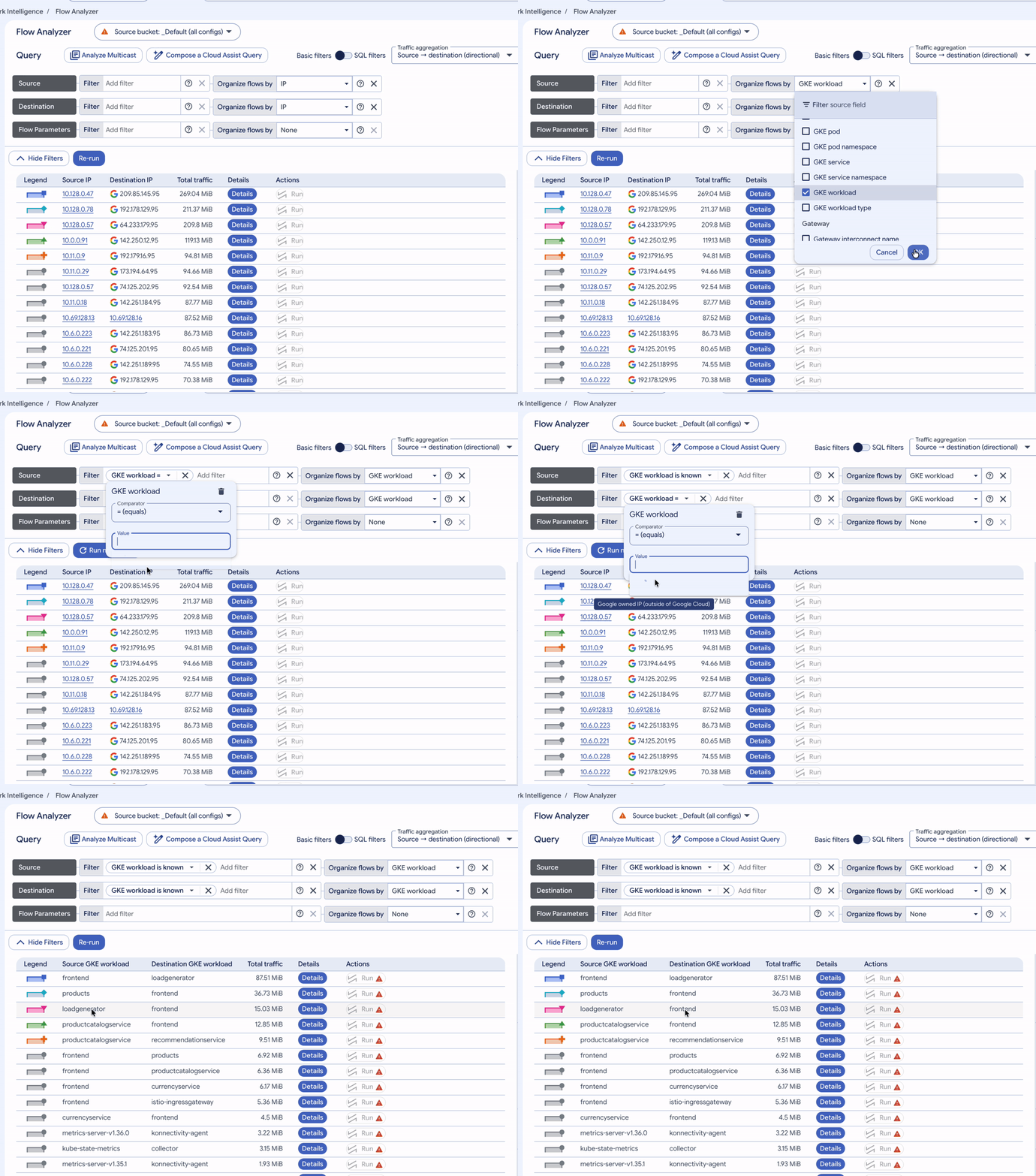
Having visibility into your network traffic is essential to operating Kubernetes environments effectively. When a service slows down or loses connectivity, knowing who is talking to whom lets you narrow the problem down quickly. In a standard cloud network, flow logs provide that view by recording connections between IP addresses, ports, and protocols. In Kubernetes, however, pods are temporary. Their IP addresses change constantly as pods scale, crash, or move between nodes, so a raw log entry showing 10.4.2.18 talking to 10.4.8.44 tells you little about which workload (and pod) owned that address, what namespace it was in, or what application it was trying to reach. By the time you search your cluster, the pod may already be gone! In a Google Cloud environment, VPC Flow Logs closes this gap at the network layer. Google Cloud's virtual network already sees every connection a pod makes, so each sampled flow is recorded with the Google Kubernetes Engine (GKE) metadata behind the IP address: pod, workload, namespace, and service. You get workload-level attribution for L3/L4 traffic without deploying extra agents or sidecars, and it complements in-cluster Container Network Interface (CNI) and dataplane observability tools you may already run when you need deeper detail. Let’s take a deeper look at how VPC Flow Logs and GKE work together, and how to get started with it. How GKE metadata enriches VPC Flow Logs VPC Flow Logs samples traffic directly inside Google Cloud's virtual network. When flow logs are enabled for a subnet that hosts a GKE cluster, every record of pod traffic that passes through the VPC network is annotated with the Kubernetes context that owned the IP address at the time of sampling. This helps ensure the context is preserved even after the pod is gone: Cluster: The cluster name and location. Workload: The pod name and namespace, along with the controller that owns the pod, such as a deployment, StatefulSet, or DaemonSet. Service name: The Kubernetes service that received the traffic. Node and zone: The standard VPC fields, including the node VM and its zone on both ends of the flow. If you register your GKE workloads in App Hub, each record also carries application-level labels (apphubSource and apphubDestination) that identify the business application, environment, and criticality of each endpoint. This is especially useful when GKE microservices talk to App Hub-registered resources outside the cluster, such as Cloud Run services. Before you start Upgrade your log bucket to Observability Analytics (formerly Log Analytics): Flow Analyzer reads only from an upgraded bucket, typically _Default. Note: This upgrade is permanent.gcloud logging buckets update _Default \ --location=global \ --enable-analytics Enable VPC Flow Logs organization-wide: One organization-level configuration covers every subnet in every VPC network, including future clusters (requires Network Management Admin role). Keep include-all-metadata on so every record carries namespace and pod details. To balance visibility against cost, you can add a secondary sampling rate (--flow-sampling), an aggregation interval (--aggregation-interval), or a filter expression (--filter-expr) to view only the traffic of interest.gcloud network-management vpc-flow-logs-configs create CONFIG_NAME \ --location=global \ --organization=ORGANIZATION_ID \ --metadata=include-all-metadata Turn on intranode visibility: Autopilot clusters already have it, but you need to enable it on Standard clusters. Note: Enabling it restarts control plane and node components and adds some per-node overhead, so test it on a non-production cluster first.gcloud container clusters update CLUSTER_NAME \ --location=LOCATION \ --enable-intra-node-visibility Now you’re ready to get started. Analyze traffic visually in Flow Analyzer VPC Flow Logs write every record to Cloud Logging, you can search and query it in Logs Explorer or Log Analytics. For day-to-day work, Flow Analyzer, part of Network Intelligence Center, turns the same records into an interactive chart and table, so you can group and filter traffic by cluster, namespace, workload, pod, or service in a few clicks. The walkthroughs below use Online Boutique, an open-source microservices demo, on a GKE Autopilot cluster in us-central1. A loadgenerator deployment sends synthetic shopper traffic to the frontend, which calls , cartservice, currencyservice, , shippingservice, adservice, and checkoutservice. Case 1: Turn IP addresses into workload namesWhether you’re investigating an incident or assessing an architecture change, the first question is always the same: Which endpoints are communicating, and at what volume? Rather than presenting ephemeral IP address pairs, GKE metadata allows Flow Analyzer to answer this question directly using Kubernetes workload names. Steps in Flow Analyzer: Open Network Intelligence Center > Flow Analyzer and set the time range to last 1 hour. Under Source and Destination, set Organize flows by to GKE workload. In the filter bar, add the GKE workload is known filter so only pod-to-pod traffic is shown. Click Run new query. Grouping traffic by Source GKE workload and Destination GKE workload in Flow Analyzer to map microservice dependencies without raw IP lookups. Key insights: Sorted by volume, the table is a ready-made application dependency map: frontend handles incoming requests from loadgenerator (representing user traffic), while answers calls from both and frontend. Because each row shows workload names instead of raw IP addresses, any unauthorized or unexpected workload-to-workload communication immediately becomes apparent. Case 2: Drill into a single serviceWhen a service is slow or about to change, you need to know who depends on it and how heavily. Steps in Flow Analyzer: Change Traffic aggregation to Client ↔ server (bidirectional), so requests and responses between a pair are counted together. Under Server, add the filter GKE workload = . Click Run new query, then click Details on the top row. Filtering on Server GKE workload () with Client ↔ server (bidirectional) aggregation to view caller share and the Details timeline. Key insights: You get every caller of the catalog service, each caller's share of its traffic, and a timeline for every pair, so if one caller's line climbs while the others stay flat, you know where to look first. When the question is latency rather than volume, switch the display mode to latency to rank the same callers by round-trip time. Case 3: Find the pods that talk across zonesIn a regional GKE cluster, chatty services that land in different zones send every request across a zone boundary, adding inter-zone data transfer charges. Because VPC Flow Logs record the zone at both ends of every flow, the pod pairs driving that traffic are easy to spot. Steps in Flow Analyzer: Switch from Basic filters to SQL filters, which let you compare two fields of the same flow. In the WHERE box, enter src_gcp_zone <> dest_gcp_zone. Set Organize flows by to Source GCP zone, Source GKE pod, Destination GCP zone, and Destination GKE pod. Click Run new query. Using SQL filters with src_gcp_zone <> dest_gcp_zone and multi-attribute grouping to identify pod pairs driving cross-zone network traffic. Key insights: The table displays cross-zone traffic ranked by volume, identifying the exact pods and zones on each end. In our cluster, the top flows occur between a frontend pod in us-central1-b and a currencyservice pod in us-central1-c, followed by checkoutservice, shippingservice, and pairs. To investigate further, click Explore in Log Analytics to open the underlying SQL query for additional customization, such as adding joins or time buckets. GKE has a built-in answer: set trafficDistribution: PreferSameZone (PreferClose on older versions) on the Service to prefer healthy endpoints in the caller's zone, and make sure each zone has enough replicas to serve its own traffic. What to keep in mind Pod-to-internet traffic: VPC Flow Logs carry no pod annotations, because the masquerade agent replaces the pod IP with the node IP before the flow is sampled. Keeping internal destinations in the non-masquerade list preserves pod names for those flows, and if you run ip-masq-agent with intranode visibility, that list must also include the cluster's node and pod IP ranges to avoid connectivity problems. Blocked traffic: Traffic blocked by a network policy never reaches the VPC network, so use NetworkPolicy logging to investigate it. Sampling: Flow logs are sampled, which makes byte and packet counts well suited for ranking and trending rather than per-connection accounting. Next steps If your clusters already have VPC Flow Logs turned on, upgrading the _Default bucket and opening Flow Analyzer is all it takes to reproduce the three walkthroughs above. To learn more, see the documentation: Using VPC Flow Logs VPC Flow Logs record format for GKE Analyzing network traffic with Flow Analyzer Best practices for GKE network observability Troubleshooting GKE network observability
Read original articleOctober 28, 2026
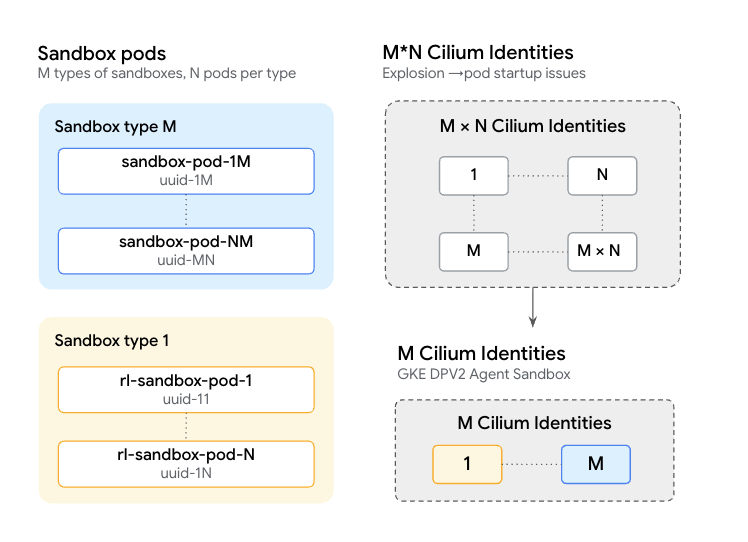
What do you need to orchestrate high-density concurrent AI agents? As we transition from static requests toward autonomous agentic workflows, the need for secure, high-density sandboxes is pushing conventional infrastructure far beyond its architectural breaking point. This transition is driving top-tier research labs to demand infrastructure at unprecedented scale — often up to one million concurrent code-execution sandboxes! At this scale, the efficiency of your Kubernetes networking infrastructure directly impacts the economic viability of an agentic initiative. In advanced workflows like reinforcement learning (RL), extreme pod churn can mean thousands of isolated sandboxes spinning up and down every minute. To make sure that valuable GPUs and TPUs are spending their time executing models rather than waiting on sandboxes to initialize, you need sub-second provisioning and extreme compute density. By providing secure, lightweight isolation, Agent Sandbox on GKE is uniquely positioned to power these highly dynamic execution environments. Furthermore, for next-generation workloads with millions of concurrent idle sessions, Agent Substrate on GKE builds on these primitives to deliver even greater density and sub-second state rehydration. In this post, you will learn how GKE Dataplane V2 optimizes network identity management, solves identity scaling limits, and enables sub-second provisioning to power high-density, large-scale AI agent workloads. A common scale challenge: network identity management Operating with massive concurrency introduces fascinating new engineering challenges, particularly in how you manage network identities. Traditionally, custom controllers and workload orchestrators often assign unique, dynamic labels to each pod (such as agent-id, timestamps, or claim-uid). GKE Dataplane V2, powered by eBPF technology, helps enforce robust network security policies by mapping pod labels to a numeric identity. Because agentic workflows generate highly unique labels for every pod, the system proactively provisions a distinct identity for each sandbox. In a rapidly changing environment, this serial allocation process can briefly pause pod creation as the system securely updates eBPF maps, occasionally leading to slower-than-desired initialization. Additionally, sophisticated workloads can approach the cluster-wide limit of 65,536 network identities, either through this rapid generation or overall scale of the workload itself. GKE network dataplane innovations for an agentic world Providing a reliable and highly secure platform is fundamental to everything we do. As such, we needed to find a way to provide the same underlying identity and security controls while providing higher scalability and performance. That's where the architectural innovations in GKE Dataplane V2 come in. A customer has testified to the success of Agent Substrate on GKE to orchestrate hundreds of thousands of secure environments across clusters and handle spikes of over 30,000 sandboxes on a single cluster. To achieve this, GKE relies on a two-pronged networking approach: Migrating high-cardinality data Google's GKE Dataplane V2 separates "identifying" data from "functional" metadata. Ensure your fields that do not actively participate in service selector matching or core resource grouping are migrated from the Pod's Labels set to the Annotations set. GKE Dataplane V2 intelligently calculates network identities based on labels rather than annotations, moving this high-cardinality metadata out of the labels completely bypasses the need for per-Pod identity generation. This elegant shift natively resolves identity scaling limits without sacrificing visibility. Advanced Cilium label filtering In addition, applying precise label exclusion filters (e.g., using the cilium-config-emergency-override ConfigMap in kube-system) by configuring rules like !agents.x-k8s.io/sandbox-name-hash or !timestamp, these explicitly instruct GKE Dataplane V2 to gracefully ignore these dynamic labels during security identity calculation. This means that even if a developer framework inadvertently introduces high-cardinality labels, configuring appropriate exclusion filters allows Google’s network dataplane to drop them automatically. As a result, identical agent types continue sharing a single Cilium pod identity, maintaining the ultra-low-latency startup times critical for dynamic AI workloads. By preventing linear identity growth and avoiding Cilium’s 65,536 identity limit, GKE provides leading speed and efficiency for fully isolated agents with 300 sandboxes per second at sub-second latency. Looking ahead For workloads that require extreme performance, scale, and density, Agent Substrate natively integrates these GKE Dataplane V2 recommendations while bypassing Kubernetes scheduling limits, pushing GKE’s performance and scale even further. In benchmark validation running 200,000 agents, Agent Substrate sustained 500 activations per second at less than 500 ms suspend and resume latency. You can deploy it on your existing GKE clusters today to minimize idle compute costs for your most demanding AI workflows. By optimizing network identity calculation and filtering high-cardinality metadata, GKE Dataplane V2 addresses critical infrastructure bottlenecks in large-scale AI workloads. These architectural improvements reduce sandbox provisioning latency to sub-second levels, minimize expensive GPU idle times, and help maintain high compute density. Ultimately, these efficiencies let you scale your agentic AI operations reliably while controlling operational costs. To learn more, explore Agent Sandbox and Agent Substrate on GKE.
Read original articleOctober 28, 2026
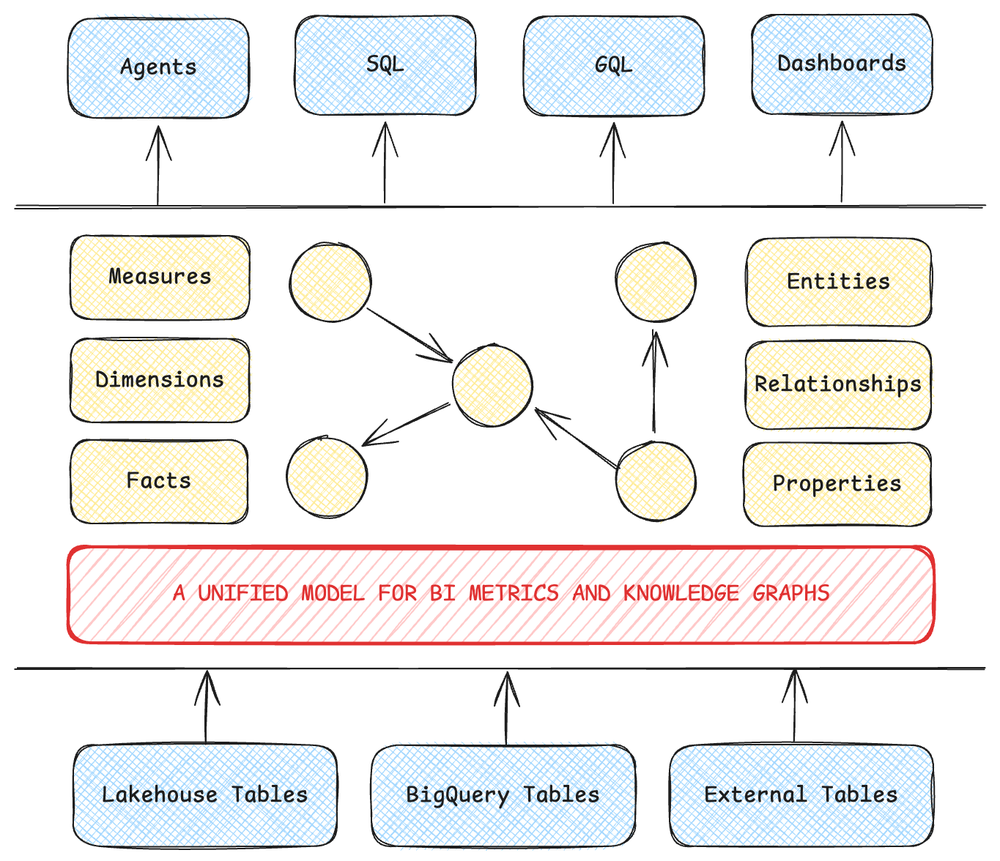
To answer a complex business question, an AI agent must understand two things: what happened, and why. The what is a governed metric, like revenue at risk; the why is the network of relationships that produced it. Because metric definitions, a.k.a. measures, traditionally live in business intelligence (BI) platforms while relationships live in knowledge graphs, an AI agent only ever sees half the picture. It guesses the rest, leading to confident but sometimes wrong answers. To solve this hallucination problem, we introduced measures in BigQuery, which are now generally available. Historically, organizations needing both BI and knowledge graphs had to run two siloed technology stacks: one to calculate reliable metrics, the other to map out entity relationships. Bridging them entailed brittle data pipelines and runtime reconciliation by analysts and AI agents, who held the connections in their heads or in sprawling prompts. This patchwork approach wasn't just slow and expensive — it’s where data governance broke down, as every analyst and prompt may define joins and metrics differently. Figure 1: A unified model for defining BI metrics and knowledge graphs in one place, for powering AI agents, SQL, GQL and dashboards. To replace manual reconciliation, you need a single model that understands both the structure of your business and the math that measures it. BigQuery measures builds directly on BigQuery Graph to deliver that unified foundation. By defining measures directly on the graph entities they describe, your BI dashboards and AI agents don't just get a number they can trust — they get the relational context behind it. Finally, they can reliably answer both the what and the why. "With BigQuery measures, we can now deliver self-documenting data products. Defining measures natively in BigQuery ensures Looker Dashboards, Conversational Agents and our Data team queries operate on identical logic, guaranteeing metric alignment across leadership and significantly reducing data team maintenance overhead." - Amanda Reelick, Head of Data Enablement, Woolworths NZ One model to answer both the what and the why Let's walk through an example. Suppose your retail bank's risk analytics team spots a sudden spike in transaction activity in the Prague district. You need to know whether this represents healthy customer growth or concentrated risk exposure. Answering requires two pieces of evidence: how much money actually moved (the what), and which specific accounts it flowed through (the why). At most banks, getting that answer takes two teams, two tools, and two numbers that are rarely reconciled. With BigQuery, your underlying data is already in place — whether in native tables or in a borderless Lakehouse. With a single schema, you can define a semantic model directly over your existing transaction, account, and district tables — with no data movement and no secondary system: code_block <ListValue: [StructValue([('code', '-- Entities, relationships, and measures, declared in one model\r\nCREATE OR REPLACE PROPERTY GRAPH retail_banking.BankingGraph\r\n NODE TABLES (\r\n retail_banking.trans AS Trans\r\n KEY (trans_id)\r\n PROPERTIES (\r\n trans_id, account_id, amount,\r\n MEASURE(SUM(amount)) AS total_trans_amount\r\n ),\r\n retail_banking.account AS Account\r\n KEY (account_id)\r\n PROPERTIES (\r\n account_id, district_id, stmt_frq,\r\n MEASURE(COUNT(account_id)) AS account_count\r\n ),\r\n retail_banking.district AS District\r\n KEY (district_id)\r\n PROPERTIES (district_id, city, state)\r\n )\r\n EDGE TABLES (\r\n retail_banking.trans AS POSTED_TO\r\n KEY (trans_id)\r\n SOURCE KEY (trans_id) REFERENCES Trans (trans_id)\r\n DESTINATION KEY (account_id) REFERENCES Account (account_id)\r\n NO PROPERTIES,\r\n retail_banking.account AS LOCATED_IN\r\n KEY (account_id)\r\n SOURCE KEY (account_id) REFERENCES Account (account_id)\r\n DESTINATION KEY (district_id) REFERENCES District (district_id)\r\n NO PROPERTIES\r\n );'), ('language', ''), ('caption', <wagtail.rich_text.RichText object at 0x7faca21f0e10>)])]> To determine whether the Prague spike reflects broad growth or concentrated exposure, your team checks whether the transaction volume is spread across many accounts or driven by just a few. Using GRAPH_EXPAND, you flatten the graph and roll up both measures with the AGG() function: code_block <ListValue: [StructValue([('code', '-- Volume by city, and the accounts behind it, each counted once\r\nSELECT\r\n District_city,\r\n AGG(Trans_total_trans_amount) AS total_volume,\r\n AGG(Account_account_count) AS accounts_involved\r\nFROM GRAPH_EXPAND("retail_banking.BankingGraph")\r\nGROUP BY District_city;'), ('language', ''), ('caption', <wagtail.rich_text.RichText object at 0x7faca21f27d0>)])]> You can ensure accurate reporting by using measures that have been “grain-locked” — where a fixed level of granularity has been assigned to how facts and dimensions are modeled. Because a single account can have thousands of transactions, joining the two tables can duplicate account rows. A standard SQL COUNT(account_id) would overcount those accounts, leaving your risk and finance teams with conflicting numbers. BigQuery measures preserve the native grain of each entity, counting every account only once regardless of how the tables are joined. The second half of the investigation is about connectivity: Which accounts are driving the Prague activity? You can answer that with a traversal in GQL (the ISO-standard Graph Query Language) over the exact same model: code_block <ListValue: [StructValue([('code', "-- Which accounts moved money in Prague\r\nGRAPH retail_banking.BankingGraph\r\nMATCH (:Trans)-[:POSTED_TO]->(a:Account)-[:LOCATED_IN]->(d:District)\r\nWHERE d.city = 'Prague'\r\nRETURN DISTINCT a.account_id"), ('language', ''), ('caption', <wagtail.rich_text.RichText object at 0x7faca21f1050>)])]> Neither query requires a separate system, and both evaluate against the same governed definitions. New features in BigQuery measures While the preview introduced grain-locked measures tightly integrated with BigQuery Graph, real-world production analytics demand more than basic sums — and enterprise AI agents need programmatic ways to discover and interpret those metrics. The GA of BigQuery measures focuses on two key areas: richer modeling and visualization for complex business logic, and native semantic discovery for the agentic ecosystem. Richer modeling, querying and BI visualization To enable more expressive and flexible measure definitions, MEASURE() supports both composite expressions and derived measures; this capability is GA. Rather than repeating conditional logic across queries, you can define baseline aggregates once and compose them into higher-order calculations on the same table using AGG(). BigQuery validates these formula dependencies at schema compilation time to catch circular references or invalid aggregations early. Downstream dashboards and AI agents can then query complex ratios and net metrics at any dimensionality with consistent accuracy. For example, on your Trans node, you can define settled volume alongside total volume, and then derive unsettled volume and unsettled percentage directly from those building blocks: code_block <ListValue: [StructValue([('code', '-- Compose custom calculations, conditional expressions, and derived ratios\r\nPROPERTIES (\r\n trans_id, account_id, amount, fee, is_settled,\r\n MEASURE(SUM(amount)) AS total_trans_amount,\r\n MEASURE(SUM(CASE WHEN is_settled = TRUE THEN amount ELSE 0.0 END))\r\n AS settled_volume,\r\n MEASURE(AVG(CASE WHEN amount > 10000 THEN amount ELSE NULL END))\r\n AS avg_large_trans,\r\n -- Derived: written in terms of the measures above\r\n MEASURE(AGG(total_trans_amount) - AGG(settled_volume)) AS unsettled_volume,\r\n MEASURE(\r\n SAFE_DIVIDE(AGG(total_trans_amount) - AGG(settled_volume),\r\n NULLIF(AGG(total_trans_amount), 0)) * 100.0\r\n ) AS unsettled_pct\r\n)'), ('language', ''), ('caption', <wagtail.rich_text.RichText object at 0x7faca21f1d10>)])]> Query across multiple fact tables Enterprise data models routinely span multiple business processes. Joining separate fact tables that share a common dimension — such as transactions and credit cards linked to the same bank account — traditionally causes a "chasm trap," where cross-fact multiplication inflates both metrics. The new start_node argument in GRAPH_EXPAND solves this by isolating each fact table into its own expansion tree. BigQuery evaluates each measure at its native grain before joining the results on the shared entity: code_block <ListValue: [StructValue([('code', '-- Transactions and cards per account, each evaluated at its own root grain\r\nSELECT\r\n ET.Account_account_id,\r\n AGG(ET.Trans_settled_volume) AS settled_volume,\r\n AGG(EC.Card_card_count) AS total_cards_issued\r\nFROM\r\n GRAPH_EXPAND("retail_banking.BankingGraph", start_node => "Trans") AS ET\r\nLEFT JOIN\r\n GRAPH_EXPAND("retail_banking.BankingGraph", start_node => "Card") AS EC\r\nON ET.Account_account_id = EC.Account_account_id\r\nGROUP BY ET.Account_account_id;'), ('language', ''), ('caption', <wagtail.rich_text.RichText object at 0x7faca21f3b10>)])]> By expanding each fact table from its own root (Trans and Card), each branch maintains its exact grain — even for accounts with transactions but no issued cards. Visualize in Data Studio With the updated BigQuery connector in Data Studio, you can now connect directly to BigQuery graphs and build interactive visualizations powered by native measures. Data Studio honors the aggregation logic defined in your graph model, keeping complex calculations consistent across charts while preventing accidental client-side re-aggregations. Built for the agentic era Attach business meaning to your measures In a large enterprise schema, it’s nice to be able to attach business meaning to your measures, as multiple metrics often share similar names. In our banking model alone, total_trans_amount, settled_volume, and unsettled_volume could all casually be called "volume" by a business user. That ambiguity can trip up both analysts building reports and AI agents translating natural-language prompts into SQL. With the GA, you can embed rich semantic metadata directly into each measure definition using the OPTIONS clause, including plain-language description strings, domain synonyms, and custom key-value extensions: code_block <ListValue: [StructValue([('code', "-- Business meaning and governance metadata travel with the metric\r\nMEASURE(SUM(CASE WHEN is_settled = TRUE THEN amount ELSE 0.0 END)) \r\n AS settled_volume\r\n OPTIONS (\r\n description = 'Transaction value that settled. Excludes fees.',\r\n synonyms = ['settled amount', 'cleared volume'],\r\n extensions = [('unit', 'USD'),\r\n ('owner', 'finance-analytics'),\r\n ('reporting_tier', 'executive')]\r\n )"), ('language', ''), ('caption', <wagtail.rich_text.RichText object at 0x7faca2105a90>)])]> Because this business context lives inside the schema alongside the SQL formula, your semantic definitions travel wherever the metric is queried. Make measures discoverable to humans and AI agents BigQuery directly integrates with Knowledge Catalog to create a unified discovery and consumption loop for both people and machines: Enterprise-wide context discovery in Knowledge Catalog: BigQuery Graph and measures metadata is automatically ingested and searchable in Knowledge Catalog as a native resource alongside tables, views, and routines. Data stewards, analysts, and AI agents can search across the catalog using business synonyms or descriptions, inspect governance tags, and view the underlying measure’s SQL definitions (such as SUM(CASE WHEN is_settled = TRUE...)) to verify how each metric is calculated before using it. In Knowledge Catalog, you can also enrich graph metadata with business glossaries and stewardship context, uniting asset discovery, business meaning, and mathematical measures in a single pane so users and agents can work from the same context. Runtime schema introspection in BigQuery: Calling BQ.SHOW_GRAPH_EXPAND_SCHEMA returns an expanded graph's schema as JSON without scanning underlying tables, flagging metrics with "is_measure": true alongside their descriptions and synonyms. Passing flatten_results => FALSE preserves your entity hierarchy as nested ROW (STRUCT) types, letting agents inspect the relational tree and query paths like Account.District.city directly. Connect across your data and AI ecosystem Finally, BigQuery measures integrates across the Google Cloud data and AI stack so you can author, reuse, and query semantics in the tools you already use: Author with AI: Use the graph skills in Data Agent Kit to scaffold, author, and validate BigQuery measure definitions using natural-language prompts in your preferred AI coding environment. Reuse existing LookML models: If you already model business metrics in Looker, you can model once using LookML-based derived analytic models to compile Explores, joins, and measures directly into native BigQuery Graph models. Query with natural language: Unified graph and measure definitions are supported out-of-the-box in Conversational Analytics, enabling business users and AI agents to ask complex questions against governed metrics in plain natural language. Get started with BigQuery measures The primary advantage of this unified model is that you can build from the foundation you already have. If you already run a BI semantic layer, take a governed metric and define it directly on the entity it describes; if your foundation is a knowledge graph, attach a unified measure to your most frequent traversal. Whichever side you start from, you are building a single source of truth for both your BI dashboards and your AI agents. To see unified semantics in action, watch the BigQuery measures introduction video, or dive into the BigQuery measures documentation and BigQuery Graph overview. When you are ready to build hands-on, try our step-by-step codelabs for music streaming analytics.
Read original articleOctober 28, 2026
Nvidia has released Nemotron 3.5 Transcribe, an open speech recognition model that handles transcription, speaker recognition, and translation and takes its instructions as text prompts. It leads several benchmarks and uses only a sixth of the active parameters of its strongest open rival. Nvidia is also shipping a dataset with more than 800,000 hours of speech, along with tools for fine-tuning. The article Nvidia's open Nemotron 3.5 Transcribe combines transcription, translation, and speaker recognition appeared first on The Decoder.
Read original articleOctober 28, 2026
Microsoft Corp. and Alphabet Inc. shares have gone separate ways since the companies’ last earnings reports as Wall Street increasingly digs in on the way heavy artificial intelligence spending is weighing on corporate bottom lines. With the two technology giants and major AI players poised to post their results after the bell Wednesday, recent stock market trading indicates that investors give Microsoft an edge. We get a preview from Bloomberg Tech host Ed Ludlow. (Source: Bloomberg)
Read original articleOctober 28, 2026
Nvidia Corp. today released a leaderboard-winning open artificial intelligence model for multilingual audio transcription and translation, along with an open data pipeline for fine-tuning Nemotron 3.5 Transcribe. Traditional transcription AI models follow a workflow that detects speech, transcribes it, identifies and labels different speakers, then answers questions about the transcription. Transcribe does all of this […] The post Nvidia releases all-in-one adaptable Nemotron 3.5 audio transcription and translation model appeared first on SiliconANGLE.
Read original articleOctober 28, 2026
Nvidia on Wednesday launched Nemotron 3.5 Transcribe, its latest multilingual transcription model. The new open-weight model, the company says, ranks The post Nvidia launches a promptable transcription model appeared first on The New Stack.
Read original articleOctober 28, 2026
Nvidia just released a free speech-to-text model that can transcribe up to 40 languages, but it only works on recordings, not live audio, so it’s a big step for meeting and medical transcription tools while still leaving real-time use to rivals like ElevenLabs.
Read original articleOctober 28, 2026
October 28, 2026
The world of work is rapidly evolving, and with it, the tools we use to stay productive and connected. As AI adoption transforms daily workflows, form factors like XR headsets and glasses offer fresh ways to reimagine how productive work happens across apps and devices.Today marks the launch of XREAL AURA, a first-of-kind set of wired XR glasses built on Android XR. XREAL AURA’s form factor brings new and impressive features for enterprises such as:Spatial computing on wired glasses using a newly introduced split-compute architecture.An optical-see-through display with a 70-degree field of view that layers rich visual content directly onto your physical world, allowing you to stay connected.A glasses frame weight of less than 95g, allowing for extended work sessions by employees.Most importantly, AURA brings unique productivity benefits to users. Employees will have out-of-the-box support for enterprise apps, including popular titles currently available on the Google Play Store. And if the hundreds of Android productivity titles aren’t enough, you can also connect your laptop and bring those applications into your spatial environment as well. AURA’s displayport-in (DP-in) function makes it seamless to connect laptops across platforms directly alongside Android apps.Management and security of Android XR devices are crucial for IT teams. We introduced Android Enterprise management on Android XR earlier this year, and XREAL AURA devices will be managed through the same framework. Key management and security features include:Managed Google Play: Securely distribute and manage public and private business apps, to ensure that end users have all the tools they need.Android zero-touch enrollment: Automatically deploy Android devices remotely out-of-the-box, to save time and enable enrollment at scale.Device management: Support of fully managed device mode, to support configuration of core system resources like Wi-Fi, as well the ability to set system policies like disallowing apps.Google Play Protect: Defend against threats with proactive machine-learning powered detection of malware, phishing and ransomware.Core Android platform security: Multi-layered protections spanning from hardware to OS, with verified boot, and device encryption that keep devices protected from emerging threats with regular and modular security updates from Google.Device Trust from Android Enterprise: Secures devices, respects privacy, and empowers employees to work from anywhere, including devices that may not be managed.XREAL AURA allows users to easily see both the world around them as well as digital data at the same time. Because of its unique form factor, users can seamlessly switch between extended reality and interacting with their physical space. This unlocks new use cases for enterprise users that include:Offering spatial productivity across virtual monitors visible only to the user and with 3D contentGetting help from virtual experts while working on a piece of equipmentEasily visualizing complex information on top of physical spacesDesigning and simulating products in 3DUsing voice to easily guide information from the physical world into digital systems of recordAndroid XR brings advanced computing and AI to daily work through powerful devices like the XREAL AURA wired glasses, all seamlessly managed by the secure and familiar Android Enterprise framework. This holistic approach ensures businesses can harness the full potential of XR today.Interested to find out more about Android or have follow up questions, let us know in the Customer Community.For more information on how XREAL AURA can transform the way you work, watch, and play, check out the For more information on how XREAL AURA can transform the way you work, watch, and play, check out the News from Google blog.To purchase the device, check out the XREAL AURA shop.XREAL AURA is only available for use by users in the United States, Canada, Japan, and South Korea. Additionally, it is only available for ages 18+. Some apps and features require download, setup, or subscription
Read original articleOctober 28, 2026
OpenAI and ServiceNow expand their partnership to bring OpenAI models and agents into ServiceNow and ServiceNow workflows into ChatGPT and Codex.
Read original articleOctober 28, 2026
Anthropic’s Tensions With Trump Laid Bare Ahead of Landmark IPO Bloomberg.com
Read original articleOctober 28, 2026
When OpenAI announced at DevDay that ChatGPT had crossed 1.2 billion weekly active users (WAUs), roughly 15% of the human The post From human clicks to agentic velocity: What OpenAI’s 1.2 billion scale means for your auth appeared first on The New Stack.
Read original articleOctober 28, 2026
Investors Brace for Big Tech’s A.I. Spending Bill The New York Times
Read original articleOctober 28, 2026
Russia added Apple Inc. and Microsoft Corp. to a registry that requires companies to retain users’ communications and provide them to the security services upon request.
Read original articleOctober 28, 2026
Nvidia Vs. Apple: Opposing Philosophies Racing Toward The Same $6 Trillion Goal Yahoo Finance
Read original articleOctober 28, 2026
Anthropic manager Felix Rieseberg says the classic coding interview is dead because Claude now solves small programming tasks better than job candidates do. He'd rather see prototypes that show taste, empathy, and principled thinking, since in his words, "hunger beats tenure." That sounds empowering, but it pushes the bar for newcomers toward entrepreneurial thinking and assumes a hustle mentality not everyone brings to the job. The article With AI writing the code, entrepreneurial thinking is now what counts most for newcomers at Anthropic appeared first on The Decoder.
Read original articleOctober 28, 2026
Cybersecurity startup Cathedral used AI agents to break into Anthropic's internal systems through third-party software as part of a bug bounty program. Anthropic confirmed access to sales, HR, and IT data but disputes how deep the breach went. The incident shows how vulnerable even leading AI labs are through their external software dependencies. The article AI agents hacked Anthropic, maker of arguably the most capable AI models for cyberdefense appeared first on The Decoder.
Read original articleOctober 28, 2026
Databricks fueling data lakehouse goals with $1B funding round TechTarget
Read original article