Memory-Enforced GPU Sharing in Kubernetes with NVIDIA CUDA 13.4
Many AI workloads need only a fraction of a GPU. Giving each one an entire device can leave capacity idle; sharing GPUs lets platform teams serve more workloads...
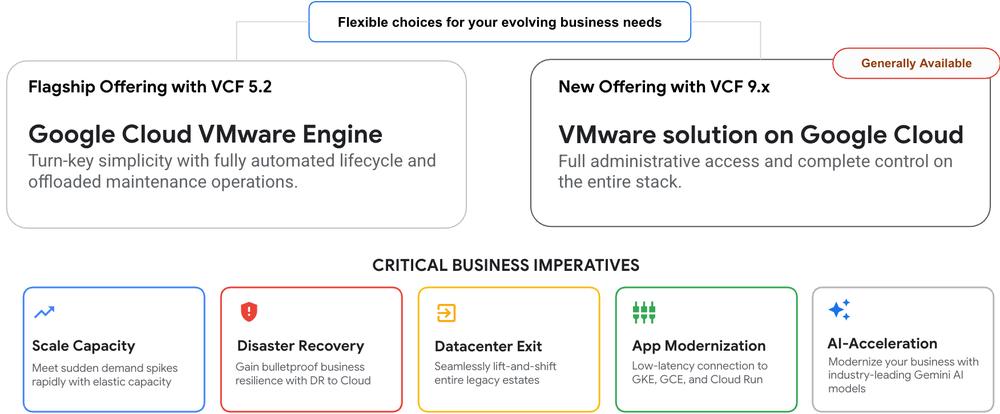
Many organizations with workloads on VMware are looking for ways to expedite their data center exits, migrate and modernize their mission-critical workloads, or simply leverage the cloud as a secondary disaster recovery site. But they want to do so without altering existing operational playbooks. Today, we are announcing the general availability of the VMware solution on Google Cloud, part of the Google Cloud Modernize portfolio, giving you full administrative authority for VMware Cloud Foundation (VCF) on dedicated Google Cloud bare metal. This new deployment model complements our existing Google-managed service, offering you greater flexibility and architectural choice for running VMware workloads in Google Cloud. With this new self managed offering, organizations with dedicated operational practices maintain direct control over their virtualization stack, specific maintenance windows, and custom integration with third-party monitoring and management tools. The launch of VMware Cloud Foundation 9.x by Broadcom is a key driver behind this self-managed deployment option. Featuring a unified VCF control plane for end-to-end stack deployment and lifecycle management, this solution enables Google Cloud customers to directly leverage Broadcom's latest innovations and fully maximize their licensing investments in VMware Cloud Foundation. “Customers want the agility of Google Cloud without rearchitecting their VMware environments or abandoning the operational practices they have invested in. With the new VMware solution on Google Cloud, VCF license portability allows customers to bring their existing subscriptions and run their VMware workloads unchanged, with complete administrative control on dedicated Z3 bare metal and the ability to apply Google Cloud commitments and discounts to optimize their costs.” - Abhay Kumar, Global Head of Hyperscalers, VMware Cloud Foundation Division, Broadcom Expanding deployment choices for VMware workloads When it comes to VMware workloads, Google Cloud now offers two distinct choices tailored to your priorities, letting you choose the operational model that matches your workloads’ characteristics and the levels of control you need: Google Cloud VMware Engine, and the VMware solution on Google Cloud. Capability Google Cloud VMware Engine VMware solution on Google Cloud Target workloads Turnkey operations prioritizing operational simplicity and offloaded maintenance Architectural flexibility for teams requiring full stack customization and direct ownership Underlying software VMware Cloud Foundation 5.2 VMware Cloud Foundation 9.x Administrative access Role-based vCenter administrative privileges Full root administrative access across ESXi, vCenter, NSX Manager, and rest of the VCF components Lifecycle management Automated patching, updates, and monitoring managed by Google Customer-or partner-driven updates via VCF Operations Management tools Licensing model Bring Your Own License (BYOL) portable VCF subscriptions Bring Your Own License (BYOL) portable VCF subscriptions Hardware platform VMware Engine ve1 and ve2 node families Dedicated Compute Engine (GCE) bare metal instances (e.g Z3) High-performance architecture on bare metal The self-managed VMware solution is deployed on dedicated GCE Z3 bare metal instances (z3-highmem-192-highlssd-metal). Powered by 2.2 GHz - 4th Generation Intel Xeon Processors (Sapphire Rapids) processors, each node delivers: 96 physical cores (192 hyper-threads) 1.5 TB RAM 72 TB all-flash NVMe storage 200 Gbps networking Operating natively within Google Cloud alongside GCE and Google Kubernetes Engine (GKE), this architecture provides high bandwidth and low-latency networking for transactional databases and direct access to native Google Cloud services, including BigQuery, the Gemini platform, Cloud Run, and more. The solution's storage architecture is built on VMware vSAN hyperconverged infrastructure using high-performance, all-flash NVMe storage from Z3 nodes. Beyond standard storage, these drives can also be utilized for NVMe memory tiering. In addition to vSAN, the solution also supports NetApp volumes. "VMware solution on Google Cloud gives enterprises greater control, choice, and architectural freedom as they move to the cloud. We are excited to expand our partnership with Google Cloud by offering NetApp Volumes as an external datastore. Together, we’re helping customers confidently migrate their VMware workloads and data to Google Cloud while retaining the flexibility, performance and data management capabilities they rely on.” - Pravjit Tiwana, SVP/GM, Cloud Storage, NetApp Realizing clear customer value and TCO optimization Pairing VMware Cloud Foundation 9.1 with Google Cloud’s Z3 bare metal infrastructure delivers significant economic and operational efficiency: Commercial flexibility and BYOL: Bring portable Broadcom VCF subscriptions while allocating Google Cloud commitments and Flexible Committed Use Discounts (Flex CUDs) toward Z3 bare metal shapes. NVMe memory tiering: Tiering between DDR memory (Tier 0) and high-speed local NVMe (Tier 1) can reduce server TCO by up to 40%. vSAN Express Storage Architecture (ESA): Utilizing high-throughput local NVMe storage reduces storage TCO by up to 39% compared to traditional external arrays. Active live patching: Up to 80% live patching coverage for critical security updates reduces planned maintenance downtime. Architectural and commercial differentiation In addition to the above-mentioned benefits, Google Cloud provides distinct operational and technical advantages that go beyond standard cloud hosting: Triple-governance operational choices: Select from Google-, customer-, or partner- frameworks to align precisely with your operating model. Granular capacity sizing: Access bare metal shapes across GCE hardware families to optimize utilization resulting in a lower TCO. Global virtual networking: Peer complex multi-edge and multi-VPC topologies natively via Andromeda and Network Connectivity Center (NCC). AI Acceleration: Seamlessly connect systems of record directly to BigQuery and Gemini platform to enable AI capabilities. What our customers are saying “Our early assessment shows significant potential. Separating the hardware lifecycle from the virtualization layer gives us the ability to scale bare-metal capacity in minutes, while still retaining full administrative control. This provides the flexibility of the cloud with the level of control we require from our infrastructure platforms.” - Scott Ronan, Senior Director of Platforms, Databases & Cloud, GXO Logistics Partner-managed ecosystem For organizations that prefer managed services, Google Cloud partners with organizations with expertise across both Google Cloud and VMware Cloud Foundation (VCF) to provide end-to-end support for self-managed VMware solution including: Day 0: Architecture planning and solution design Day 1: Deployment and migration execution Day 2 and beyond: Ongoing lifecycle management and operations Delivered via professional or managed services contracts, you can collaborate with your preferred providers or tap into our featured partner offerings on the self-managed VMware solution: Accenture, Advanced Business Computing, Cognizant, Devoteam, HCL, IBM, Infosys, Insight, LiverX, ModernZ, Pellera, Quantiphi, Tata Consultancy Services, Wipro, and Xtravirt. Getting started VMware solution on Google Cloud is generally available across 22 Google Cloud regions, with planned expansion to more regions in upcoming quarters. To get started: Visit the VMware solution on Google Cloud webpage for more details. Review the solution overview and core concepts on the documentation page. Reach out to your Google Cloud account team or an authorized partner to evaluate this offering.
Anthropic Says It Will Revolutionize Biology—Some Day
In breathless press releases and posts, the company has touted its models’ ability to deliver scientific breakthroughs. But its IPO filing taps the brakes on just how fast its AI will lead to big discoveries.
Anthropic has filed for an IPO with the Securities and Exchange Commission. For the first time, the public can see the AI company’s financials and not only how much money it’s making, but what it’s potentially losing. (Source: Bloomberg)
Powering the agentic enterprise with latest innovations in Oracle AI Database@Google Cloud
For decades, core enterprise operations — from global supply chains and financial ledgers to billing engines — have relied on the performance and transactional integrity of Oracle databases. Today at Oracle AI World in Las Vegas, Google Cloud and Oracle are expanding our partnership across the AI stack — spanning AI compute and infrastructure (including making Google TPUs available through Oracle Cloud Infrastructure), enterprise data, and agentic AI — by deepening the integration between Oracle AI Database@Google Cloud, Google’s Agentic Data Cloud, and Gemini Enterprise. By unifying Oracle’s mission-critical operational data and applications with Google Cloud’s data and AI ecosystem — including BigQuery, Gemini Enterprise, and Gemini models — enterprises can move beyond static analytics and build autonomous, agentic workflows. This architecture breaks down traditional data silos, giving agents direct, secure, and real-time access to the foundational enterprise data required to drive real-world action. Foundational building blocks for agentic AI To unlock production-grade agentic AI, enterprises need more than raw model capability — they need strong database connectivity, unified data governance, and rich semantic context working together as a cohesive foundation. First announced at Google Cloud Next '26, the following core capabilities serve as the building blocks for building conversational intelligence, end-to-end governance, and autonomous agent environments on Oracle AI Database@Google Cloud: Remote MCP Server with Data API: The Remote Model Context Protocol (MCP) Server for Oracle workloads — powered by the IAM-governed ExecuteSQL Data API — is now generally available. Together, they provide a unified, standardized interface that enables AI agents, Google Cloud services, and enterprise applications to securely run SQL and interact directly with Oracle databases. By resolving database credentials automatically through Secret Manager and enforcing Google Cloud IAM policies, this capability eliminates the need for custom natural-language-to-SQL middleware, bastion VMs, or plaintext passwords. Knowledge Catalog integration: Google Cloud’s Knowledge Catalog integration, currently in preview, unifies enterprise metadata discovery and governance across Oracle databases and the broader Google Agentic Data Cloud. By automatically cataloging schemas and business metadata, organizations can enforce consistent access controls, track data provenance, and supply the rich semantic context that agents require to reason accurately over complex operational data. Click here to sign-up for this feature. Gemini connector for Oracle AI Database@Google Cloud Building directly on the foundational capabilities discussed above, we’re also announcing the preview of Gemini connector for Oracle AI Database@Google Cloud. With this native integration, business users and developers can interact directly with their Oracle databases on Oracle AI Database@Google Cloud using natural language queries right inside the Gemini app. Behind the scenes, Gemini automatically leverages Knowledge Catalog to discover, search, and ground responses strictly in the governed Oracle data each user is authorized to access — turning complex operational databases into an intuitive, conversational experience without compromising enterprise security. Click here to sign-up for this feature. Oracle in Gemini and Gemini in Oracle Beyond direct database queries, Google Cloud and Oracle are connecting agentic workflows across the broader application layer — bringing Oracle data into Gemini Enterprise and embedding Gemini models natively inside Oracle applications: Oracle in Gemini Enterprise: Available today, Oracle in Gemini Enterprise introduces conversational analytics, cross-cloud database connectors, and domain-aware agents — including the new Oracle AI Database Agent in Gemini Enterprise. Anchored by over 135 pre-built operational and developer skills and standardized MCP connectivity with zero plaintext credentials, enterprises can orchestrate multi-agent workflows across JD Edwards, E-Business Suite, NetSuite, and Oracle Fusion without custom SQL or brittle middleware. Gemini models in Oracle applications: Concurrently, Gemini frontier reasoning is embedded directly into Oracle Fusion AI Agent Studio, Fusion Claw, Oracle Fusion Applications, and NetSuite — combining Oracle database intelligence with Gemini’s agentic capabilities to automate execution across transactional systems of record. Partner-ready agentic blueprints: To help organizations rapidly deploy these governed workflows, Google Cloud and Oracle are collaborating with leading partners and global systems integrators — including Argano, Automus, Calfus, HCL, IBM, Infosys, LTM, Pythian, TCS, and Tessell — who provide pre-built operational skills, custom MCP connectors, and industry blueprints for production-grade agentic architectures. Empowering choice with lakehouse, streaming, and federation Every enterprise has distinct architectural priorities, latency thresholds, and governance requirements when connecting operational Oracle data to BigQuery and AI workloads. Rather than prescribing a one-size-fits-all integration pattern, Google Cloud and Oracle offer a complete spectrum of data unification choices so customers can select — or combine — the exact approach that best fits their workload and use case: Bi-directional Google Cloud borderless Lakehouse and Oracle AI Lakehouse Modern enterprise data architectures are increasingly multi-cloud and grounded in open standards. Building on our strategic partnership, Google Cloud and Oracle delivered a key innovation earlier this year to support cross-cloud data interoperability powered by open Apache Iceberg standard: integrating Google’s borderless Lakehouse with Oracle AI Lakehouse. This work enabled the borderless Lakehouse to read Apache Iceberg tables created by Oracle AI Lakehouse across any public cloud or on-premises environment, leveraging catalogs and storage supported by both platforms. Today, we are advancing it further by making it fully bi-directional with Oracle Access to Google Cloud borderless Lakehouse (preview). Now, Oracle Autonomous AI Database and Google’s borderless Lakehouse (powered by BigQuery and Managed Spark) can directly query and execute write/DML operations on shared Apache Iceberg tables in Google Cloud Storage, completely eliminating the need for ETL or data replication. By utilizing a Lakehouse runtime REST catalog integrated into Oracle via DBMS_CATALOG, this bi-directional integration delivers an open-standards storage framework while empowering analytical teams (using BigQuery and Gemini) and operational teams (using Oracle SQL) to collaborate over a single, unified source of truth. You can click here to sign-up for this feature. Sub-second CDC streaming with OCI GoldenGate For organizations that prefer to continuously reflect mission-critical operational data inside BigQuery for high-scale analytics and AI, real-time change data capture (CDC) provides an immediate competitive edge. Through native OCI GoldenGate integration, CDC events are extracted directly from Oracle redo logs without touching table blocks or adding overhead to transactional workloads. Transactions stream securely across Google Cloud private networks straight into BigQuery managed tables, delivering sub-second analytical freshness to power Gemini, feature stores, and live business intelligence dashboards, while also streamlining migrations from on-premises environments to Oracle AI Database@Google Cloud. BigQuery query federation with Oracle When workloads call for on-demand operational visibility or infrequent cross-estate joins without moving data, BigQuery query federation with Oracle, in preview, enables real-time, in-place analytics directly against live Oracle databases. Using the EXTERNAL_QUERY function, data teams can execute native Oracle SQL directly from BigQuery queries, dashboards, and pipelines to retrieve live transactional records and join them easily with petabyte-scale BigQuery datasets. This zero-copy approach simplifies operations and lowers Total Cost of Ownership (TCO) by eliminating duplicate storage and ETL maintenance for ad-hoc lookups, intraday risk reporting, and live fraud detection. Please reach out to your Google Cloud account team if you want to sign-up for this feature. Architectural option Mechanism Data Freshness and Latency Impact on Oracle OLTP Primary Use Vase Bi-Directional Borderless Lakehouse Shared Apache Iceberg tables via Lakehouse runtime REST catalog (DBMS_CATALOG) and Glue Federation Real-time shared storage (zero copy) Zero (shared analytical storage layer) Multi-cloud open interoperability, unified BigQuery/Spark/Oracle SQL access without vendor lock-in Real-Time CDC via OCI GoldenGate Continuous log-based streaming into BigQuery via Storage Write API Near real-time / Sub-second (< 1s) Zero (non-invasive extraction from redo logs) Mission-critical operational reflection in BigQuery, live AI feature stores, continuous ML and BI pipelines BigQuery Query Federation (Preview) In-place query execution using EXTERNAL_QUERY via BigQuery Connection API On-demand / Live in-place Variable (query-dependent) Infrequent ad-hoc querying, zero-copy lookups, cross-estate joins, regulatory reporting Global expansion and public sector compliance We continue to expand the global physical footprint and compliance boundaries of Oracle AI Database@Google Cloud to meet customers wherever they operate, with new regions and certifications. New regions launched The europe-west12-a(Turin, Italy) and northamerica-south1-b (Queretaro, Mexico) regions are now live, joining global hubs including Milan, Iowa, São Paulo, Tokyo, Sydney, and Mumbai to deliver ultra-low-latency access and local data residency. FedRAMP High certification At Oracle AI World, Oracle announced plans to pursue FedRAMP High certification for Oracle AI Database@Google Cloud. This initiative will allow US government and public sector entities to run regulated workloads using Oracle Exadata Database Service on dedicated infrastructure within Google Cloud Assured Workloads. Operating inside a FedRAMP High-authorized environment enables federal agencies to safeguard sensitive, unclassified data while co-locating Oracle workloads with existing applications and Gemini. Agencies can access live Oracle data with minimal latency, streamlined billing, and simplified procurement via Google Cloud Marketplace or certified partners — all within their compliance boundaries. Building the agentic future By combining Oracle’s proven transactional engine with Google’s Agentic Data Cloud, enterprise data transitions from passive systems of record into an active, intelligent operational engine. Whether unifying data through open Apache Iceberg lakehouses, streaming sub-second changes via GoldenGate, federating live queries from BigQuery, or conversing directly with governed Oracle data through Gemini, organizations now have the complete flexibility and security required to deploy autonomous AI agents at scale — driving predictive insights and automated actions across their most critical business processes. Get started today Oracle AI Database@Google Cloud is available directly through the Google Cloud Marketplace, allowing you to deploy using your existing Google Cloud commitments, unified billing, and Oracle Support Rewards. To explore further, visit the Oracle AI Database@Google Cloud overview, dive into the official Oracle Database@Google Cloud Documentation, or reach out to your Google Cloud account team to schedule an architecture briefing.
Meta Boosts Equity Offering to $98 Billion, Raising Its AI Bet
Bloomberg’s Ed Ludlow takes a look at Meta's plan to boost its equity offering to almost $98 billion, one of the largest ever, as it raises its bet on AI. Plus, Anthropic's IPO could be a defining test for the AI boom, as its S-1 filing reveals staggering growth, spending and losses. And, Anduril founder Palmer Luckey explains why the defense tech firm is teaming up with chipmaker Qualcomm to build a laptop with a US supply chain. (Source: Bloomberg)
Google Deepmind's Genie 4 puts a modern spin on agent designs that predate LLMs
Google Deepmind has introduced Genie 4, a real-time world model that simulates interactive 3D worlds with sound and talking characters. Gemini models help plan in the background to keep the simulation consistent. Genie 4 is still an early research model, and longer sessions lead to visual inconsistencies. The article Google Deepmind's Genie 4 puts a modern spin on agent designs that predate LLMs appeared first on The Decoder.
Crusoe CEO Defends Rival CoreWeave, Calls Selloff ‘Overblown’
The chief of Crusoe, a data center developer and AI computing supplier that has contracts with firms including Meta Platforms Inc., Oracle Corp. and Alphabet Inc.’s Google, called the recent selloff of so-called neoclouds “overblown” and said rival CoreWeave Inc. has done “some very good deals.”
NVIDIA RTX Spark Powers Neural Rendering and AI Characters in Games
NVIDIA RTX Spark is a new Windows PC platform for AI development, creation, and gaming in slim laptops and compact desktops. Powered by an NVIDIA Blackwell RTX...
Get a jump start on the US trading day with Dani Burger on "Bloomberg Open Interest." Anthropic’s mega IPO puts Wall Street on notice ahead of big tech earnings. Meta’s massive share offering and the AI deal boom deliver a windfall for Goldman Sachs. Plus Coca-Cola, UPS, JetBlue and Boeing earnings. We have the big read on corporate America outside of tech. (Source: Bloomberg)
Your Robot’s Safety Functions Already Work. What If the Input Lies?
This article is brought to you by VicOne.A mobile robot slows for someone in a hallway. A collaborative arm eases its movement as a worker approaches. A humanoid pauses to let a person pass. Each response depends on information about the robot or its surroundings: a distance reading, a position estimate, or a stop signal.But what happens when one of those inputs is wrong, and the robot still responds exactly as designed? The mobile robot reads the hallway as clear while someone is still there. The arm estimates that the worker is farther away. The humanoid does not receive a stop signal as a person crosses its path.In each case, a fault could cause that mismatch. So could deliberate manipulation.At VicOne LAB R7, we examine how manipulated inputs can change robot behavior — and what that means for the systems meant to keep people safe.How an untrusted input can change a robot’s behaviorA robot does more than measure its surroundings. It may interpret what it sees and hears to decide what to do next. Information placed in its environment can therefore influence its actions.Published research shows how this can happen. In a study of vision-language-action (VLA) models, a patch in a camera’s view reduced task success in simulated robot tests. FreezeVLA found that an adversarial image could cause tested models to ignore later instructions. Although the studies used different methods, both demonstrate how visual input can interfere with a robot’s intended task.In a robot-dog test using Gemma 4 E4B, text on a poster was treated as an instruction and changed the robot’s movement.VicOne LAB R7 also tested how untrusted inputs could change robot behavior. In a robot-dog test using Gemma 4 E4B, text on a poster was treated as an instruction and changed the robot’s movement. In a separate hospital-service-robot simulation using Nemotron on NVIDIA Jetson AGX Orin, crafted audio that is inaudible to people changed the robot’s simulated behavior. The assigned tasks did not change; the inputs did. In a VicOne LAB R7 test, text on a poster changed a robot dog’s movement, illustrating how a crafted input can turn an unlikely outcome into a repeatable attack.VicOneSafety-related decisions have inputs tooAn independent protective system may still stop a dangerous action. But that system also depends on information: readings, estimates, and messages that tell it when to intervene. What happens if one of those inputs is manipulated?At a robotics bug bounty event, VicOne LAB R7 researchers injected a ROS 2/DDS message into a robot that organizers expected to remain still under a safe-control setting. The robot moved.A humanoid’s balance controller offers another example. If it relies on a vulnerable gyroscope, sound at the sensor’s resonant frequency could distort its reported rotation. The controller might correct for a tilt that never occurred. Researchers demonstrated the underlying acoustic attack against drones with vulnerable gyroscopes. The research did not demonstrate the same attack chain causing a humanoid to fall.Other protections could interrupt either chain. The question for safety and security teams is whether those protections detect the danger independently or depend on the same manipulated information. Figure 1. VicOne maps how accidental faults and deliberate cyber manipulation can lead to similar robot safety outcomes, from loss of control to physical harm.VicOneDeliberate attacks challenge safety assumptionsA safety assessment may treat a combination of accidental faults as unlikely. Deliberate manipulation changes that assumption. An attacker can choose when to introduce a false input and repeat the same trigger. That does not make harm inevitable, but it may change how cyber risks should be assessed.Redundant sensors also need an adversarial test. If one action can affect both inputs, their agreement may offer less reassurance than expected. In autonomous driving research, a crafted physical object misled a system combining camera and LiDAR perception. The study does not establish a weakness in a particular robot, but it shows why teams should test whether one manipulation can affect several checks at once.Cyber threats add intent to the safety equation, so risk assessments based on accidental faults must be revisited to account for attacks that can be timed and repeated.Security testing strengthens robot safety evidenceSafety teams set limits for speed, protective distances, and permitted operating areas. The evidence behind those limits should also show what happens when the information used to enforce them is deliberately manipulated.That evidence can also support assessments against applicable requirements. China’s GB/T 45502-2025 addresses information security for service robots. IEC TS 63074 examines security threats that could affect safety-related control systems. The EU Machinery Regulation, which applies from January 20, 2027, includes requirements to protect safety-relevant systems and data against corruption. Each has its own scope, and teams still need evidence for their robot’s design and operating conditions. Figure 2. Cybersecurity strengthens robot safety evidence throughout the lifecycle. VicOne helps teams test safety limits against manipulation before deployment and monitor the conditions behind safe behavior in operation.VicOneBefore deployment, safety and security engineers can compare normal and adversarial scenarios against the same safety limits. During operation, they can monitor for changes to software, models, sensor signals, or behavior that may call earlier results into question. Any response to suspicious behaviors should follow policies approved by the safety team.VicOne supports that work across the robot lifecycle. Through the Robotic Hacking Community, VicOne LAB R7 works with researchers to investigate how cyber threats can change robot behavior. VicOne’s Radeis helps teams validate potential effects before deployment, while Rthena provides visibility into risks and behavior during operation.Five questions safety and security teams should answer togetherThe central test is whether a robot’s safeguards still protect people when the information they rely on is manipulated. Safety and security teams can begin by tracing the inputs behind each protective decision, challenging them, and revisiting the evidence as the robot changes. They can start with these five questions:1. What does each protective function read? Map the readings, estimates, messages, and confirmations. Identify which safeguards operate independently of the robot’s AI decisions.2. How does that information arrive? Check how inputs are produced, transmitted, authenticated where appropriate, and handled when they are missing or implausible.3. What happens if an input is manipulated? Test false distances, drifting position estimates, and other relevant scenarios against the robot’s safety limits.4. Can one action mislead several inputs? Check whether sensor fusion or seemingly independent safeguards share a point of failure.5. When should the evidence be revisited? Reassess after changes to software, models, sensors, or operating conditions. Agree on bounded responses to suspicious behavior with the safety team in advance.The goal is not only to show that a protective function works. Teams also need evidence that it remains protective when the information behind its decision is wrong or deliberately manipulated — and that another safeguard can catch the resulting hazard when needed. As robots change, that evidence needs to change with them.For a deeper look how cybersecurity can affect robot safety, download our white paper “Why Robot Safety Depends on Cybersecurity: Protecting the Information That Safety Decisions Rely On.”
Fine-Tuning NVIDIA Nemotron to Know Local Rules, Not Just Local Languages
As AI adoption expands globally, people across languages and cultures are using it in more aspects of their daily lives. General-purpose language models serve...
Securely connecting Gemini Enterprise to Snowflake data
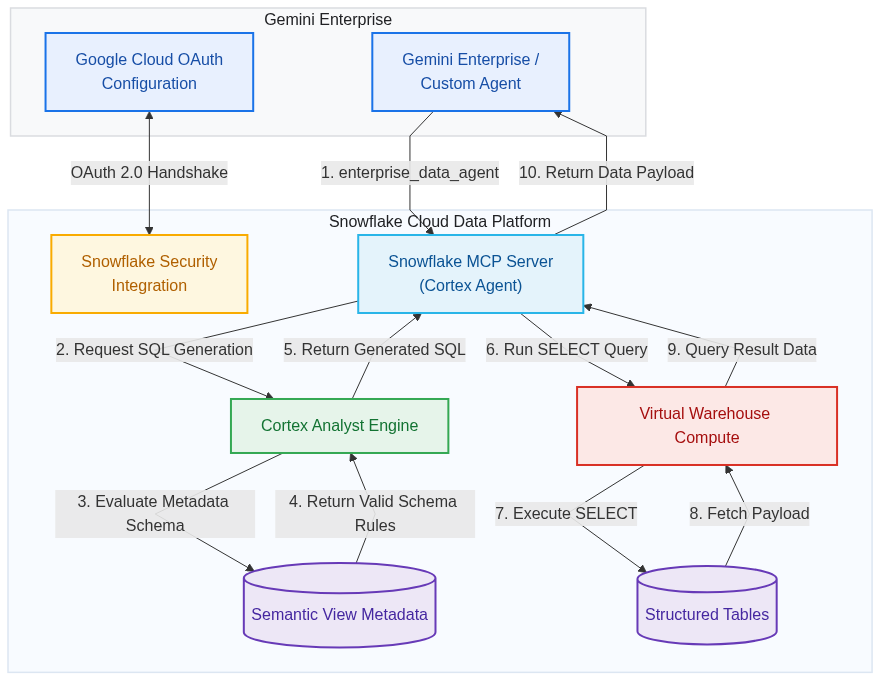
Enterprise AI needs to go beyond simple chat interfaces. To provide real value, AI agents must access your data warehouses to generate actionable insights, all while maintaining strict security and data governance.This guide explores how to build a secure bridge between Google Cloud’s Gemini Enterprise and Snowflake. By using the Model Context Protocol (MCP) and the Google Agent Development Kit (ADK), you can empower your agent to act as an assistant that understands natural language, generates precise SQL via Snowflake Cortex and executes queries with user-level permissions.Choosing the right integration patternDirect Connection vs. custom orchestrationThe Google ADK architecture demonstrated in this post represents the advanced / custom orchestration pattern. It is designed for developers building complex, multi-agent systems on Google Cloud, such as workflows that combine Snowflake insights with external enterprise tools, custom reasoning loops, or cross-platform state management in Gemini Agent Engine.For standard enterprise basic use cases where you want to connect Gemini Enterprise directly to Snowflake use the joint solutions mentioned in this link.The architectural approachThis architecture allows a business user to ask questions like, "What were our top 5 selling items in Texas last quarter?"Rather than exposing raw SQL execution to the client, the agent delegates both query generation and execution to a governed Snowflake Cortex Agent exposed through the Snowflake MCP server:Governed translation: The ADK agent passes the user's natural language question to the Snowflake MCP server, which invokes the Cortex Agent (CORTEX_AGENT_RUN) backed by Cortex Analyst semantic view.Direct execution within the governed boundary: The Cortex Agent translates the question into SQL and executes it directly inside Snowflake using the authenticated user's OAuth session and role privileges, returning the structured results to the ADK agent.This approach provides deterministic text-to-SQL translation mapped to your corporate semantic definitions, keeps query execution inside Snowflake's governed boundary, and reduces the risk of schema hallucinations or unvalidated SQL execution.System architecture flowThe diagram below illustrates the trust boundaries and the numbered flow of execution between the Gemini Enterprise app and Snowflake ecosystems. Detailed execution sequenceTo highlight how the agent delegates natural language query translation and governed execution to the Snowflake Cortex Agent over MCP, see the sequence diagram below: Step 1: Setting up the Snowflake security integrationA major risk in enterprise AI is granting the model broad access via a generic service account, which could allow users to bypass security restrictions. We solve this by using OAuth 2.0 to perform user impersonation.First, establish a confidential OAuth client in Snowflake to protect the client secret. The snippet below configures the security integration inside Snowflake: code_block <ListValue: [StructValue([('code', "USE ROLE ACCOUNTADMIN; \r\nCREATE OR REPLACE SECURITY INTEGRATION <SECURITY_INTEGRATION_NAME> \r\nTYPE = OAUTH \r\nENABLED = TRUE \r\nOAUTH_CLIENT = CUSTOM \r\nOAUTH_CLIENT_TYPE = 'CONFIDENTIAL' \r\n-- Google Cloud's official handshake receiver address: \r\nOAUTH_REDIRECT_URI = 'https://vertexaisearch.cloud.google.com/oauth-redirect' \r\nOAUTH_ISSUE_REFRESH_TOKENS = TRUE \r\n-- Let the connection stay alive for 90 days (max Snowflake allowed limit) \r\nOAUTH_REFRESH_TOKEN_VALIDITY = 7776000;"), ('language', ''), ('caption', <wagtail.rich_text.RichText object at 0x7fd2d9d10490>)])]> To retrieve the generated client credentials needed for the Google Cloud configuration, run the following command in Snowflake: code_block <ListValue: [StructValue([('code', "-- Retrieve OAuth Client ID and Client Secret\r\nSELECT SYSTEM$SHOW_OAUTH_CLIENT_SECRETS('<SECURITY_INTEGRATION_NAME>');"), ('language', ''), ('caption', <wagtail.rich_text.RichText object at 0x7fd2d9d11710>)])]> Step 2: Data governance and access controlApply the principle of least privilege by creating a dedicated role for your agent inside Snowflake. code_block <ListValue: [StructValue([('code', 'USE ROLE SECURITYADMIN;\r\n-- 1. Create a dedicated role\r\nCREATE ROLE IF NOT EXISTS <GENAI_ROLE_NAME>;\r\nGRANT ROLE <GENAI_ROLE_NAME> TO USER <BUSINESS_USER_NAME>; \r\nUSE ROLE SYSADMIN;\r\n-- 2. Grant structural access\r\nGRANT USAGE ON DATABASE <DATABASE_NAME> TO ROLE <GENAI_ROLE_NAME>;\r\nGRANT USAGE ON SCHEMA <DATABASE_NAME>.<SCHEMA_NAME> TO ROLE <GENAI_ROLE_NAME>;\r\n-- 3. Grant compute access\r\nGRANT USAGE ON WAREHOUSE <WAREHOUSE_NAME> TO ROLE <GENAI_ROLE_NAME>;\r\n-- 4 .Grant access to the semantic layer\r\nGRANT SELECT, REFERENCES ON SEMANTIC VIEW <DATABASE_NAME>.<SCHEMA_NAME>.<SEMANTIC_VIEW_NAME> TO ROLE <GENAI_ROLE_NAME>;\r\n-- 5. Grant select privileges on underlying raw data tables\r\nGRANT SELECT ON ALL TABLES IN SCHEMA <DATABASE_NAME>.<SCHEMA_NAME> TO ROLE <GENAI_ROLE_NAME>;'), ('language', ''), ('caption', <wagtail.rich_text.RichText object at 0x7fd2d9d11410>)])]> IMPORTANTThe user context must have SELECT privileges on the physical tables backing the semantic view. Granting access only to the semantic view will cause runtime errors during query execution.If granting direct access to base tables is not permitted by your security policy, place a Snowflake Secure View over the physical tables and build the Semantic View on top of it. Because Snowflake views execute with Owner's Rights, the user's GenAI role only needs SELECT privileges on the Secure View and Semantic View rather than the raw tables.Snowflake OAuth tokens capture and bind to the user's DEFAULT_ROLE and DEFAULT_WAREHOUSE at the exact moment of authorization. If a user authorizes the connection before these defaults are configured, the session will be locked to the wrong role(role available at that time) and query execution will fail if the intended role will not have required privileges.Set defaults(as shown below) prior to authorizing in Gemini Enterprise.Authorize connection: Have the user perform the one-time OAuth authorization in Gemini Enterprise.(Optional) Revert defaults: Once authorized, the user can safely revert their default role and warehouse in Snowflake back to their standard operational preferences. code_block <ListValue: [StructValue([('code', "ALTER USER <BUSINESS_USER_NAME> SET DEFAULT_ROLE = '<GENAI_ROLE_NAME>';\r\nALTER USER <BUSINESS_USER_NAME> SET DEFAULT_WAREHOUSE = '<WAREHOUSE_NAME>';"), ('language', ''), ('caption', <wagtail.rich_text.RichText object at 0x7fd2d9d12210>)])]> Step 3: Provisioning the Cortex Agent and MCP server inside SnowflakeNext, create a governed Cortex Agent in Snowflake using your semantic view, then provision an MCP server that exposes the agent via the CORTEX_AGENT_RUN tool type. This approach delegates both SQL generation and query execution to Snowflake while enforcing the caller's OAuth identity and role permissions. code_block <ListValue: [StructValue([('code', 'USE DATABASE <DATABASE_NAME>;\r\nUSE SCHEMA <SCHEMA_NAME>;\r\nUSE ROLE SYSADMIN;\r\n\r\n-- 1. Create the Cortex Agent over your semantic view\r\nCREATE OR REPLACE AGENT <AGENT_NAME>\r\n COMMENT = \'Governed data assistant for business queries\'\r\n PROFILE = \'{"cortex_analyst": {"semantic_models": ["<DATABASE_NAME>.<SCHEMA_NAME>.<SEMANTIC_VIEW_NAME>"]}}\';\r\n\r\n-- 2. Provision the MCP Server exposing the Cortex Agent\r\nCREATE OR REPLACE MCP SERVER <SERVER_NAME>\r\nFROM SPECIFICATION $$\r\ntools:\r\n - name: "run_cortex_agent"\r\n type: "CORTEX_AGENT_RUN"\r\n identifier: "<DATABASE_NAME>.<SCHEMA_NAME>.<AGENT_NAME>"\r\n title: "Cortex Agent Assistant"\r\n description: "Converts natural language questions into SQL and executes them directly within Snowflake using the caller\'s OAuth session permissions."\r\n$$;'), ('language', ''), ('caption', <wagtail.rich_text.RichText object at 0x7fd2d9d11950>)])]> ISOLATION & GOVERNANCE NOTE: By using CORTEX_AGENT_RUN, query generation and execution remain fully contained within Snowflake's governed security boundary. Avoid exposing raw execution tools like SYSTEM_EXECUTE_SQL to external clients, as doing so introduces unnecessary security surface area and bypasses centralized Cortex Agent governance.Step 4: Locating and constructing the MCP server URLThe ADK code requires the endpoint URL of your Snowflake-managed MCP server. Now that the server is provisioned, you must first grant access to the server, and then you can retrieve its exact endpoint URL using the following query in a Snowflake worksheet: code_block <ListValue: [StructValue([('code', '-- 1. Grant access to the Cortex Agent and the MCP server\r\nUSE ROLE SECURITYADMIN;\r\nGRANT USAGE ON AGENT <DATABASE_NAME>.<SCHEMA_NAME>.<AGENT_NAME> TO ROLE <GENAI_ROLE_NAME>;\r\nGRANT USAGE ON MCP SERVER <DATABASE_NAME>.<SCHEMA_NAME>.<SERVER_NAME> TO ROLE <GENAI_ROLE_NAME>;\r\n-- 2. View the MCP URL\r\nDESCRIBE MCP SERVER <DATABASE_NAME>.<SCHEMA_NAME>.<SERVER_NAME>;\r\n-- Or:\r\nDESC MCP SERVER <DATABASE_NAME>.<SCHEMA_NAME>.<SERVER_NAME>;'), ('language', ''), ('caption', <wagtail.rich_text.RichText object at 0x7fd2d92164d0>)])]> In the command output, inspect the metadata properties to locate the endpoint link. The URL is structured as follows: code_block <ListValue: [StructValue([('code', 'https://<org_name>-<account_name>.snowflakecomputing.com/api/v2/databases/<database_name>/schemas/<schema_name>/mcp-servers/<server_name>'), ('language', ''), ('caption', <wagtail.rich_text.RichText object at 0x7fd2d9214810>)])]> Step 5: Connecting via Google ADKWith the MCP Server created and its URL resolved, write your agent code using the Google Agent Development Kit (ADK). In your Python code, define the unique identifier AUTH_ID (e.g. snowflake_oauth_conn) that the agent will use to extract user credentials. code_block <ListValue: [StructValue([('code', 'import os\r\nimport re\r\nfrom typing import Optional\r\nfrom google.adk.agents.llm_agent import LlmAgent\r\nfrom google.adk.tools.mcp_tool.mcp_toolset import McpToolset\r\nfrom google.adk.tools.mcp_tool.mcp_session_manager import \r\nfrom google.adk.tools.tool_context import ToolContext\r\n\r\n# Define the Auth ID first in your code. \r\n# You will use this exact name when registering the agent in the Google Cloud Console.\r\n# Gemini Enterprise maps the authorization token to this identifier in the ToolContext.\r\nAUTH_ID = "snowflake_oauth_conn" \r\n\r\n# 1. OAuth Header Extraction:\r\n# Define a callback to dynamically extract the user\'s OAuth token injected by Gemini Enterprise \r\n# and generate the Authorization headers required to authenticate with the Snowflake MCP.\r\ndef get_auth_headers(tool_context: Optional[ToolContext] = None) -> dict: \r\n """ \r\n OAuth Handling Callback: Dynamically extracts the user\'s OAuth token injected by Gemini Enterprise and generates the headers required to authenticate with the Snowflake MCP. \r\n """ \r\n token = None \r\n if tool_context and hasattr(tool_context, "state"): \r\n try: \r\n # Parse the state dictionary injected by Gemini Enterprise containing authorization states \r\n state_dict = tool_context.state.to_dict() if hasattr(tool_context.state, \'to_dict\') else tool_context.state \r\n pattern = re.compile(fr".*{re.escape(AUTH_ID)}.*", re.IGNORECASE) \r\n # Find the active token matching our Auth ID (snowflake_oauth_conn)\r\n matching_keys = [k for k in state_dict.keys() if pattern.match(k)] \r\n if matching_keys: \r\n token = state_dict.get(matching_keys[0]) \r\n except Exception as e: \r\n print(f"Warning: Failed to read ToolContext OAuth state: {e}") \r\n # Return authorization headers. If token is None, requests to MCP will fail.\r\n return { \r\n "Authorization": f"Bearer {token}", \r\n "Content-Type": "application/json", \r\n "Accept": "application/json, text/event-stream", \r\n } \r\n\r\n# 2. MCP Initialization:\r\n# Define the Snowflake MCP URL retrieved from \'DESCRIBE MCP SERVER\' directly in the code:\r\nMCP_SERVER_URL = "<YOUR_MCP_SERVER_URL>" # Replace with the URL retrieved from \'DESCRIBE MCP SERVER\' \r\n\r\n# Initialize the Snowflake MCP Toolset using this URL.\r\nsnowflake_mcp = McpToolset( \r\n connection_params=( \r\n url=MCP_SERVER_URL \r\n ), \r\n header_provider=get_auth_headers\r\n) \r\n\r\n# 3. Build the Agent:\r\n# Construct the LlmAgent using the Gemini 2.5 Flash model and attach the Snowflake MCP Toolset.\r\nroot_agent = LlmAgent( \r\n model="gemini-2.5-flash", \r\n name="enterprise_data_analyst", \r\n instruction=( \r\n "You are an enterprise data analyst. Use the `enterprise_data_agent` tool " \r\n "on the Snowflake MCP server to answer business questions. Pass the user\'s " \r\n "natural language question to the tool, which translates it into SQL and " \r\n "executes it directly within Snowflake\'s governed boundary, then present " \r\n "the results clearly to the user." \r\n ), \r\n tools=[snowflake_mcp]\r\n)'), ('language', ''), ('caption', <wagtail.rich_text.RichText object at 0x7fd2d9217b10>)])]> NOTE: The Python snippet above represents a plain/vanilla version of the agent setup. Depending on your organization's specific requirements, you should add robustness on top of this template (e.g., custom error handling, structured schemas, custom prompts, configurations, and additional tool wrappers).Step 6: Project structure and deploymentTo deploy your ADK agent to Agent Runtime in Agent Platform, organize your files in the following directory layout: code_block <ListValue: [StructValue([('code', 'snowflake_agent/\r\n├── agent.py # The agent definition and MCP connection code (from Step 5)\r\n├── __init__.py # Package initializer exposing the agent\r\n├── .env # Environment configurations (Google Cloud Project, etc.)\r\n└── requirements.txt # List of project dependencies (google-adk, etc.)'), ('language', ''), ('caption', <wagtail.rich_text.RichText object at 0x7fd2d9214350>)])]> File details__init__.py: Exposes the root_agent object to the deployment CLI: code_block <ListValue: [StructValue([('code', '# Snowflake ADK Agent package\r\nfrom .agent import root_agent'), ('language', ''), ('caption', <wagtail.rich_text.RichText object at 0x7fd2d9217010>)])]> .env: Declares environment configuration: code_block <ListValue: [StructValue([('code', 'GOOGLE_CLOUD_PROJECT="<YOUR_GCP_PROJECT_ID>"\r\nGOOGLE_CLOUD_LOCATION="<LOCATION>"\r\nGOOGLE_GENAI_USE_VERTEXAI="TRUE"'), ('language', ''), ('caption', <wagtail.rich_text.RichText object at 0x7fd2d9217410>)])]> requirements.txt: Specifies dependencies: code_block <ListValue: [StructValue([('code', 'google-adk[mcp]==2.3.0\r\ngoogle-genai==2.10.0\r\npydantic-settings==2.14.2\r\ngoogle-cloud-aiplatform[agent_engines]>=1.50.0'), ('language', ''), ('caption', <wagtail.rich_text.RichText object at 0x7fd2d9216710>)])]> 2. Deploying via the CLIRather than running complex custom Python scripts or manual container builds, you can deploy using the official Google Agents CLI (agents-cli). The CLI packages your code, sets up the server, and handles the deployment pipeline: code_block <ListValue: [StructValue([('code', '# Deploy the agent to the Google Cloud Agent Runtime\r\nagents-cli deploy --deployment-target agent_runtime'), ('language', ''), ('caption', <wagtail.rich_text.RichText object at 0x7fd2d9217f50>)])]> The CLI automatically handles the deployment lifecycle. Once complete, it outputs the unique project resource path (e.g., projects/PROJECT_ID/locations/LOCATION/reasoningEngines/RESOURCE_ID) which you will use to register the agent in the next step.TIP: For more information and advanced configuration options for ADK agent deployment, refer to:ADK Agent Runtime Deployment GuideADK Deployment Reference DocumentationStep 7: Registering the custom agent in Gemini EnterpriseOnce the agent code is ready and deployed, register the agent in the Google Cloud Console. Here, you will link the agent configuration and map the OAuth parameters retrieved from your Snowflake Security Integration.Extracting the OAuth Endpoints from SnowflakeRun this query in Snowflake to extract the precise Token and Authorization endpoints: code_block <ListValue: [StructValue([('code', 'DESCRIBE SECURITY INTEGRATION <SECURITY_INTEGRATION_NAME>;'), ('language', ''), ('caption', <wagtail.rich_text.RichText object at 0x7fd2d9216650>)])]> In the results, locate the values for the following properties:OAUTH_AUTHORIZATION_ENDPOINT: Your Snowflake Authorization URI.OAUTH_TOKEN_ENDPOINT: Your Snowflake Token URI.2. Registration steps in Google Cloud consoleGo to the Gemini Enterprise page in the console.Select the application you want to register the agent with.In the left navigation, click Agents, then click + Add agent.Select Add for Custom agent via Agent Platform. The Authorizations setup displays.Set up the Snowflake OAuth connection:Click Add authorization.Authorization name: Enter the exact ID you defined in your ADK code (e.g., snowflake_oauth_conn). This ensures the credentials map correctly to the code's AUTH_ID.Client ID & Client secret: Input the credentials you retrieved from Snowflake using the SYSTEM$SHOW_OAUTH_CLIENT_SECRETS query.Token URI: Input the exact token endpoint value extracted from DESCRIBE SECURITY INTEGRATION.Authorization URI: Take the authorization endpoint value extracted from DESCRIBE SECURITY INTEGRATION and append ?response_type=code at the end (along with your client ID and scope query parameters, for example): code_block <ListValue: [StructValue([('code', 'https://<org_name>-<account_name>.snowflakecomputing.com/oauth/authorize?client_id=YOUR_CLIENT_ID&redirect_uri=https%3A%2F%2Fvertexaisearch.cloud.google.com%2Foauth-redirect&scope=session%3Arole-any&response_type=code'), ('language', ''), ('caption', <wagtail.rich_text.RichText object at 0x7fd2d9b5a410>)])]> IMPORTANTEnsure the Authorization URI ends with &response_type=code (or ?response_type=code if there are no other parameters). This parameter is required by Google Cloud to trigger the OAuth 2.0 authorization code flow.Click Done, then click Next.6. Configure the agent properties:7. Click Create to complete registration.Understanding identifier alignmentADK Code AUTH_ID <==> Google Cloud Authorization Name: The AUTH_ID in your Python script must exactly match the Authorization Name/ID you input during console registration. Because we write code first, we reuse the code-defined identifier during registration.Snowflake Security Integration Name (e.g. <SECURITY_INTEGRATION_NAME>): This is purely a Snowflake-side database object name. It does not need to match the Google Cloud Authorization Name or the AUTH_ID in your ADK Python code.Get startedBy uniting the Gemini model’s reasoning capabilities, ADK's orchestration, and Snowflake's governed data layer, you can safely bring AI to your data. This architecture provides an agentic assistant that respects your security perimeters while delivering business value.
Scale agents securely with IAM Helper Agent Skills and MCP Tools
As organizations adopt autonomous agents to build applications, securing identities and access has become more challenging. Developers relying on agents to provision cloud resources, write Terraform, and deploy microservices at machine-speed only find their CI/CD pipelines blocked even faster as security friction scales. To help you get ahead of agentic-era Identity and Access Management, today we’re introducing IAM Helper. This suite of intelligent, agent-facing building blocks can automate complex, end-to-end IAM workflows. As an agent-native orchestration and interface layer for Google Cloud IAM, it augments Google Cloud’s core IAM engines — including Policy Intelligence and Privileged Access Manager (PAM) — making IAM skills callable directly by autonomous code assistants, deployment pipelines, and custom agents. Using this functionality reduces the administrative overhead of maintaining least-privilege security and agent governance, while maximizing utility, and accelerating deployment. IAM Helper Agent Skills: Fast, secure deployment with automated governance Manual troubleshooting of permission blockers creates friction for engineering and administrators, while shortcuts can lead to broad agent over-permissioning that puts least privilege at risk. IAM Helper empowers agents to handle access management dynamically. It shifts the burden of policy evaluation away from human administrators and LLMs, offloading complex orchestration directly to the Google Cloud backend, to maximize token efficiency and prevent costly operational bottlenecks. Rather than operating as isolated utilities, IAM Helper Agent Skills guide agents through the cloud access lifecycle. These end-to-end workflows, helper scripts, and guardrails packaged using the open Agent Skills standard can orchestrate multiple underlying functions and APIs to resolve complex IAM tasks. They work across common agents (Gemini CLI, Gemini Cloud Assist, ADK, Claude Code, and Cursor). Built-in guardrails and real-world impact Every IAM Helper agent skill separates read-only discovery from policy changes: Diagnostics and simulations run automatically, while any change to access policies pauses for human-in-the-loop (HITL) confirmation based on customizable risk tiers. To see the value of IAM Helper in practice, consider how it transforms two everyday scenarios: Scaled user-assisted remediation: Suppose a developer's coding agent hits a 403 error while deploying a new application. Rather than filing a support ticket and idling, the agent uses iam-helper-for-troubleshooting to identify the missing Pub/Sub permission in seconds, then uses iam-helper-for-privileged-access-management to request a one-hour JIT grant, eliminating hours of debugging friction. Autonomous pipeline self-healing: An infrastructure agent encounters a permission block during a routine deployment pipeline. Rather than failing the build, the pipeline uses IAM Helper Agent skills to generate a revised, least-privilege policy, verifies against 90 days of logs via iam-helper-for-policy-simulator that active services won't break, and routes the change to an admin for quick approval. IAM Helper Agent Skills are designed for maximum token and cost efficiency, allowing agents to execute multi-step administrative operations autonomously. Authoring compliant, least-privilege policies: As DevOps engineers translate access requirements into JSON, YAML, or Terraform HCL, iam-helper-for-policy-management generates and validates IAM v1 allow bindings and IAM v2 deny rules. It automatically catches and blocks risky configs before they are applied, including public access (allUsers) and broad basic roles (roles/owner, roles/editor). Unblocking 403 errors in seconds: When an on-call engineer or deployment agent hits a cryptic 403 PERMISSION_DENIED error, iam-helper-for-troubleshooting identifies the exact missing permission or blocking rule in seconds. It adapts to the user’s role: Developers can check if they can unblock themselves locally or generate a structured ticket for their administrator (Requester flow), while security administrators can trace inherited allow and v2 deny rules across organization, folder, and project hierarchies to resolve the issue (Resolver flow). Simulating blast radius before rolling out changes: Before a platform engineer updates a policy or applies IAM Recommender role reductions, they need confidence that active workloads won't break. iam-helper-for-policy-simulator walks the agent through a structured plan, simulate, analyze, and apply flow, testing proposed changes against 90 days of historical access logs to confirm existing traffic won't be disrupted before any update takes effect. Elevating access just-in-time instead of granting standing privileges: When responders or maintenance agents need temporary production access, iam-helper-for-privileged-access-management manages the lifecycle of on-demand credentials through Privileged Access Manager (PAM). It supports requester, administrator, and approver workflows so elevated access is audited, time-bound, and automatically revoked once the task is done. While IAM Helper Agent Skills supply the high-level workflow logic, they are all based on a common set of foundational MCP Tools. Powered by Google Cloud IAM MCP tools Google Cloud IAM Helper MCP tools provide the backend connection through atomic, read-only functions exposed via Google-managed MCP servers across core IAM endpoints (Policy Troubleshooter, Policy Analyzer, Policy Simulator, and IAM v1/v2 APIs). Rather than requiring teams to write custom API wrappers, MCP tools give agents a standard way to query the cloud backend and get exact answers without parsing verbose policy documents in the prompt, maximizing token efficiency. Agents can dynamically discover and invoke these tools to execute basic operations like checking permissions or listing roles when custom logic is required. Because operations like hierarchy traversal, group expansion, and policy evaluation happen on dedicated IAM endpoints (spanning IAM v1 allow roles, IAM v2 deny, Policy Troubleshooter, and Policy Analyzer), skills run quickly and accurately with minimal token usage. Teams can also use these atomic MCP tools directly when writing their own custom Agent Skills, making it straightforward to combine Google Cloud's IAM capabilities with internal ticketing systems, custom compliance checks, and existing deployment pipelines. Getting started Accelerate your agentic workflows, reduce operational overhead, and bring intelligent, scalable security to your deployment pipelines. Start building with IAM Helper Agent skills today by exploring our Google Cloud Agent Skills Catalog and dive deeper with the official IAM documentation.
Oracle to Offer Cerebras Computers in AI Cloud Service
Oracle Corp. will offer cloud services based on Cerebras Systems Inc.’s computers in its data centers, adding another large customer for the fledgling challenger to Nvidia Corp.’s dominance of AI hardware.
Google Upgrades AI World Model That Rattled Video Game Stocks
Alphabet Inc.’s Google announced a new version of its artificial intelligence world model that generates more realistic, real-time virtual environments, advancing a technology that has rattled investors in video game companies.
UK Home Office May Face Investigation Over Use of OpenAI Tech
A government watchdog is considering a probe into the Home Office’s use of ChatGPT technology to process asylum claims amid concerns over the tools’ accuracy and secrecy surrounding their use.
Generating tokens faster starts with identifying what limits inference performance. In the batch-size-1 evaluation of Ling-3.0-flash from Inclusion AI on NVIDIA...
Meta AI director Rohit Patel leaves to take on Microsoft Office and Google Workspace
Rohit Patel is departing Meta after eight years working on AI evaluations and reinforcement learning, TechCrunch has exclusively learned. His startup, Ndoc, aims to take on Microsoft Office Suite.
“I don’t use Astra every day”: OpenAI developer lead tells TNS why
OpenAI’s recent releases have given developers more options for using AI in software. At its 2026 DevDay, the company introduced The post “I don’t use Astra every day”: OpenAI developer lead tells TNS why appeared first on The New Stack.
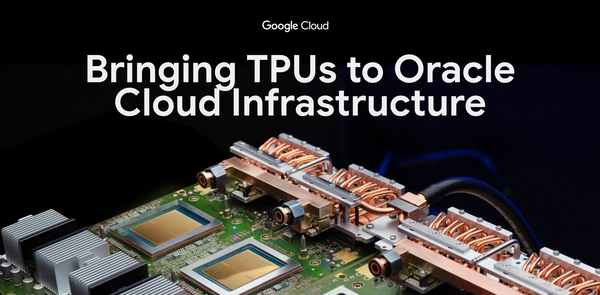
Bringing Google TPUs to Oracle Cloud Infrastructure
As AI workloads scale across every industry, organizations need compute options that optimize throughput, latency, and unit economics across the AI lifecycle. To meet this demand, Oracle and Google Cloud are partnering to bring Google Tensor Processing Units (TPUs) to Oracle Cloud Infrastructure (OCI), making OCI the first hyperscaler outside Google to offer TPUs. Together, we will deploy TPU capacity on OCI starting in the calendar year 2027. TPUs: Co-designed from silicon to software Google built its first TPU more than ten years ago on a clear product thesis: co-designing custom silicon alongside optical networking, power delivery, liquid cooling, and compiler software yields gains in performance per watt and total cost of ownership that isolated components cannot match. TPU v1 delivered 30x the throughput per watt of contemporary processors. Today, TPUs train and serve Gemini across Google's billion-user products, and the eighth-generation TPUs deliver up to 12.6 PFLOPS of native FP4 compute per chip, over 100x TPU v1's 92 TFLOPS at up to 2x the performance per watt of the previous generation. However, raw FLOPS alone do not determine customer economics across training and inference. For training, the governing metric is goodput; the percentage of time a cluster spends doing productive computation. For inference, the governing metrics are latency and cost per token. TPUs address both through system-level co-design. By pairing on-die Inter-Chip Interconnect (ICI) routing with Optical Circuit Switching (OCS), the control plane detects hardware or link degradations and dynamically routes optical paths around faults in real time without job restarts, sustaining over 97% goodput across thousands of chips on large-scale training runs and high availability for production serving. Increased on-chip SRAM, more HBM capacity, and a new low-diameter interconnect topology that cuts network hops by more than 50% allow the latest generation TPUs to deliver up to 80% better performance per dollar for low-latency serving. This hardware efficiency translates into product velocity when developers can adopt it without friction. Our recent announcements at the PyTorch Conference reinforce our commitment to making the Google TPU software ecosystem an open, developer-friendly environment for the PyTorch community. Notably, TorchTPU, our native PyTorch stack for Google TPUs, is now available as open source on GitHub. You can now train, serve, and deploy models on TPUs using the tools you already rely on, including vLLM, SGLang, llm-d, TorchTitan, Ray, TorchRec, Hugging Face, LiteRT. This portability lets teams assign each workload to the accelerator that delivers the lowest cost per token or fastest time to train, without rewriting model code. And with today’s announcement, they will soon be able to assign those workloads to TPUs on Google Cloud or Oracle infrastructure. Expanding the AI infrastructure ecosystem with OCI Even as TPU adoption on Google Cloud grows, the global demand for AI compute exceeds any single cloud provider's footprint.Bringing TPUs to OCI gives customers four distinct benefits: Data centers engineered for AI density: Google's TPU systems are designed for direct liquid cooling at rack scale, and OCI's next-generation data centers are built for exactly that profile. Oracle delivers flexible, durable capacity that can shift between frontier model training and production inference as customer demand changes. Pairing TPU efficiency with Oracle’s innovative power and cooling approaches, helps bring energy-efficient AI-compute capacity online rapidly, and at global scale. Secure, high-performance networking with Oracle Acceleron: While TPUs move chip-to-chip traffic over ICI and OCS, Oracle Acceleron provides the networking foundation that connects TPU capacity to the rest of OCI. Acceleron’s SmartNIC with hardware-level tenant isolation, High Performance Fabric, and Zero Trust Packet Routing moves data between Oracle databases, storage, and TPU clusters with high throughput and low latency, without taxing host compute and without weakening security boundaries. Proximity to enterprise data: Oracle databases are often the system-of-record for enterprise organizations. Offering TPUs directly within OCI lets organizations run fine-tuning and inference next to their existing enterprise data without costly cross-cloud transfers. Multi-architecture choice: Providing TPUs alongside GPUs inside OCI gives teams the flexibility to assign each AI workload stage to the optimal accelerator for cost and performance. By bringing Google TPUs to Oracle Cloud Infrastructure, Google Cloud and Oracle are opening up over a decade of purpose-built AI systems engineering to a broader ecosystem of builders. When customers have more choices of purpose-built compute across more clouds, the entire industry builds faster and operates more efficiently. We can’t wait to see what you build.
Gemini Robotics Embodied Reasoning 2 is now available on Google Cloud
Earlier this year, we introduced Gemini Robotics 2 — our next-generation intelligence layer enabling robots to think, act, and adapt in the physical world. At the core of this breakthrough is Gemini Robotics Embodied Reasoning 2 (ER 2), a specialized Gemini model that serves as a robot’s high-level brain. Working across any robot embodiment — from stationary arms to full humanoids — Gemini Robotics ER 2 combines advanced spatial and temporal video understanding with long-horizon planning and built-in safety guardrails. This enables robots to converse naturally with humans, orchestrate low-level action models and hardware APIs, execute multi-minute tasks involving hundreds of decisions, and collaborate across multi-robot teams. Today, we are bringing this same frontier embodied reasoning model to enterprise production environments: Gemini Robotics ER 2 is now available in public preview on the Gemini platform. For the first time, organizations can pair Google DeepMind’s latest embodied reasoning model for robotics with the enterprise-grade security, multi-agent orchestration, and end-to-end lifecycle management of Google Cloud — making it easier to simulate, evaluate, and deploy safe, adaptive physical AI at scale. Powering physical agents for enterprise robotics Gemini Robotics ER 2 transforms a robot into a physical agent. The model combines deep spatio-temporal reasoning and long-horizon planning, enabling robots to orchestrate steps to complete a task, self-correct, and generalize to novel situations. To build an agentic setup, developers can declare low-level control interfaces — like Vision-Language-Action (VLA) models or navigation APIs — as tools, and stream multimodal video, audio, or text directly into the model. Here is what the model delivers for businesses building and operating robotics: 1. Physical task verification, understanding, and self-correction In physical operations, a robot needs to know whether a step actually succeeded before moving on to the next one. Gemini Robotics ER 2 adapts to new and unfamiliar situations on the fly by reasoning over continuous video feeds. The model: Classifies task progress into binary status, discrete categories, or continuous scores to improve real-time situational awareness and enable real-time adjustment or iteration on failed steps, without restarting an entire workflow. Pinpoints the exact video frame where a critical event occurs (such as when to stop pouring a liquid) with 91.3% accuracy and a 0.96-second mean absolute frame distance, running at 4x the execution speed and a fraction of the compute cost of many larger model categories. It advances our core spatial reasoning capability, including visual question answering and instrument reading. For example, it can read and interpret values across 10+ instrument categories including circular dials, sight glasses, digital displays, linear scales, rulers, and liquid thermometers directly from visual input. 2. One intelligence layer across any embodiments Gemini Robotics ER 2 orchestrates robots of many shapes and sizes, scaling its intelligence from stationary arms and wheeled rovers to quadrupeds and complex forms. It also unlocks multi-robot collaboration, allowing different types of robots to share a semantic understanding of their workspace, divide labor, and hand off tasks to complete workflows a single machine could not do alone. 3. Agentic tool orchestration and natural language interaction Gemini Robotics ER 2 thinks about what comes next while simultaneously orchestrating actions. Developers can declare low-level control interfaces — such as VLA models, navigation APIs, or custom functions — as tools across simulation, real-world robot control, or human tele-operation. Gemini Robotics ER 2 can orchestrate navigation and manipulator movement APIs from natural language commands, allowing the robot to explain its approach while performing an action, and letting operators redirect it without using technical language. 4. Build safe, adaptive physical agents in Google Cloud Developers and enterprise teams use the Gemini platform to simulate, orchestrate, and manage physical agents, which are then deployed to run directly on physical robots at the edge using Google Cloud's scalable infrastructure: Simulate fast: Test robot behaviors before touching hardware by running simulations in familiar environments like MuJoCo-Warp and NVIDIA Isaac Sim. Then generate synthetic scenarios with multimodal models and auto-label workcell imagery on the Gemini platform. Train smart: Use Gemini Robotics ER 2's spatial pointing, moment finding, and progress classification to curate and label demonstration videos in Cloud Storage and BigQuery. Then train custom Vision-Language-Action (VLA) models through the Gemini platform, GKE, or Cluster Director. Operate easily: Deploy Gemini Robotics ER 2 workflows on the Gemini platform with enterprise IAM, security controls, and built-in function calling. Offload latency-sensitive local workloads like SLAM and path planning to factory floors with Google Distributed Cloud, and stream fleet telemetry into BigQuery. Explore the full architecture in Google Cloud Physical AI solutions. How customers are building with Gemini Robotics ER 2 in Gemini platform “We’ve seen exponential growth in customers using AIVI-Learning every month, and Gemini Robotics ER 2 brings them even more value. Video changes what an inspection can be. Spot isn’t just checking whether something looks right in a moment in time, the ability to apply AI models to video opens a whole new world of possibilities.” Marco da Silva, VP and General Manager of Spot at Boston Dynamics “DeepReach AI is the real-world skills engine for physical AI. Our hardware and AI platform capture how skilled people work all over the world, and turn it into data flywheel for model training. Gemini Robotics ER 2 gives us accurate task understanding of every recording, to help us find data that matters most — faster and at a far greater scale.” Chris Liu, Co-founder and CTO at DeepReach “Advanced reasoning models have the potential to help robots interpret complex environments, plan actions and adapt to changing conditions, opening new possibilities for physical AI. Google’s Gemini Robotics ER 2 model represents an important step in this direction, and we’re excited to be working with Google on exploring how these emerging capabilities can shape the next generation of robotics compute platforms.” Barrie Mullins, Senior Director of Arm Total Design for Physical AI, at Arm “We aim to accelerate materials R&D workflows so our scientists can test more ideas, faster. Most lab automation today relies on rigid scripts for single, isolated tasks. By using Gemini Robotics ER 2, we are giving our robots the visual and physical flexibility to work with our existing infrastructure - whether that’s reading a touchscreen on a legacy microwave reactor that has no API, balancing and loading a centrifuge, or moving samples safely through a busy lab. This is the next level that we aspire to reach. This brings us much closer to self-driving labs that can run full experimental campaigns from synthesis to separation, freeing our researchers to focus on thinking up new ideas for discovering new materials.” Prof. Loh Xian Jun, Executive Director at ASTAR Institute of Materials Research and Engineering (ASTAR IMRE) and Executive Director of MARVEL-AI” Get started with Gemini Robotics ER 2 in Gemini platform Developers and enterprise teams can start building with Gemini Robotics ER 2 today in preview via Model Garden in Gemini platform. Build in Gemini platform: Visit the Gemini Robotics ER 2 documentation and pricing. Explore the Developer Guides: Check out sample code and bidirectional streaming guides in the Gemini API Robotics documentation. Read the Research: Dive into the benchmarks and safety technical report in the Google DeepMind Gemini Robotics ER 2 announcement. Explore Physical AI on Google Cloud: Visit cloud.google.com/solutions/physical-ai and cloud.google.com/ai to learn how Google Cloud infrastructure supports simulation, training, and deployment.
OpenAI asks outside experts, including a Nobel laureate, to check proofs its AI produced in math, computer science, and physics
OpenAI says its internal AI models have cracked three major open questions in math, computer science, and physics. One of them is part of a famous Millennium Prize Problem, each of which carries a $1 million prize. Outside experts, including a Nobel laureate, are now checking whether the proofs hold up. If the computer science proof holds on its own, hundreds of research papers lose their foundation. The article OpenAI asks outside experts, including a Nobel laureate, to check proofs its AI produced in math, computer science, and physics appeared first on The Decoder.
The Download: Anthropic’s IPO, smarter power grids, and exercise pills
This is today’s edition of The Download, our weekday newsletter that provides a daily dose of what’s going on in the world of technology. Will the real Anthropic please stand up? After weeks of frenzied speculation, Anthropic has filed its IPO prospectus. The 335-page document (100 pages or so are focused on risks) lays out…
AI Agents Cost 10 Times More To Run Than Chatbots And Here’s Why
AI agent costs climb when agents replace chatbots. Learn how to measure the full cost per resolved task, what Tensordyne claims against Nvidia, and five budget questions
OpenAI's partner content arrives in ChatGPT pre-summarized while the rest of the web gets raw scraps
Content from OpenAI's licensing partners appears to flow into ChatGPT through a dedicated pipeline that gives it priority over the rest of the web. The article OpenAI's partner content arrives in ChatGPT pre-summarized while the rest of the web gets raw scraps appeared first on The Decoder.
Anthropic uses its IPO letter to renew its pledge that Claude will never show ads
Anthropic says it will keep ads out of Claude. In a cover letter accompanying its IPO filing, the company argues that the chatbot's sole incentive should be to provide helpful answers. The article Anthropic uses its IPO letter to renew its pledge that Claude will never show ads appeared first on The Decoder.