November 20, 2026
Google's latest search page redesign drops the search button, adds AI sidebar
Google search is making it even easier to access AI tools on the search page.
Read original articleDataAIHub Daily
Archive →50 curated AI news stories from leading AI companies.
November 20, 2026
Google search is making it even easier to access AI tools on the search page.
Read original articleNovember 20, 2026
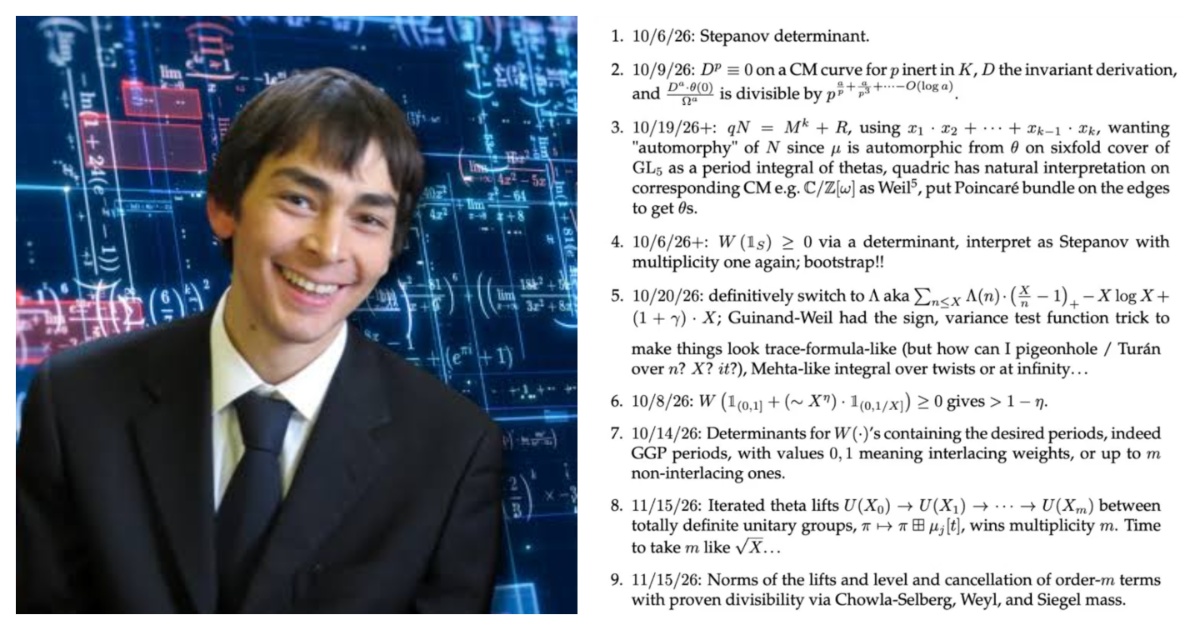
Using AI, mathematician claims to have solved one of math’s great mysteries The Washington Post
Read original articleNovember 20, 2026
Meta is “re-evaluating” 2030 sustainability goals. Will others follow?
Read original articleNovember 20, 2026
An Anthropic PBC researcher claims to have used Claude to prove the Riemann hypothesis, which is widely considered to be the most important open question in mathematics. Levent Alpöge announced his discovery today on his personal website. Anthropic has not published an official announcement about the news. The company floated on the Nasdaq a day […] The post Anthropic researcher claims to have proven Riemann hypothesis using Claude appeared first on SiliconANGLE.
Read original articleNovember 20, 2026
Anthropic mathematician claims AI helped solve a 167-year-old math mystery IBM
Read original articleNovember 20, 2026
Ian King, Bloomberg News US semiconductor reporter, said that a lawsuit from two former Nvidia employees shows the price employees paid for the remarkable success achieved by former CEO Jensen Huang, as his behavior is scrutinized after allegations of multiple affairs. Huang's representatives said that the allegations in the complaint are from a long time ago and aren't a representation of Huang's behavior and how he's thought of inside Nvidia. (Source: Bloomberg)
Read original articleNovember 20, 2026
OpenAI has significantly strengthened safeguards against extracting internal reasoning from GPT-6.2 Astra and GPT-6.2 Sol. In adaptive red-teaming tests, the success rate for extracting protected reasoning fell from 54 percent to 0.2 percent. The company is also suspending thousands to tens of thousands of accounts each week over coordinated distillation campaigns. The article OpenAI makes it much harder for attackers to extract how its latest AI models think appeared first on The Decoder.
Read original articleNovember 20, 2026
Even rival AI labs seem to be getting caught up in the excitement around the Riemann Hypothesis. Google CEO Sundar Pichai has reacted... The post “Somewhere Euler, Gauss And Riemann In Awe Today”: Google CEO Sundar Pichai Reacts To Riemann Hypothesis Proof appeared first on OfficeChai.
Read original articleNovember 20, 2026
Nvidia server suppliers halt Southeast Asia shipments over US curbs Nikkei Asia
Read original articleNovember 20, 2026
Amid allegations of multiple affairs, including with a direct report and an alleged Chinese intelligence asset, sources tell WIRED the Nvidia board’s main issue was the former CEO’s “lack of candor.”
Read original articleNovember 20, 2026
Signal is blocking screenshots to stop AI agents like Apple's Siri AI, Google's Gemini Intelligence, and Meta's Muse from reading private chats. The app calls it an "existential threat" to privacy, but admits its protections remain incomplete, including on macOS. Apple, Google, and Microsoft should follow suit. The article Signal blocks screenshots on iOS 27 and Android to stop AI agents from reading private chats appeared first on The Decoder.
Read original articleNovember 20, 2026
Wall Street Regulator Probing Nvidia’s Accounting, Report Says Bloomberg.com
Read original articleNovember 20, 2026
SpaceX and Anthropic show why investors may want to wait before buying a hot IPO and let the initial hype and price swings settle.
Read original articleNovember 20, 2026
Trump threatens 'tremendous tax' on US tech firms building AI data centers overseas KATU
Read original articleNovember 20, 2026
NVIDIA’s bad month just got worse. The US Securities and Exchange Commission is examining NVIDIA’s accounting practices, Reuters reported on Friday, citing two... The post NVIDIA’s Stock Slips Further After Reuters Reports That The US SEC Is Investigating Its Accounting Practices appeared first on OfficeChai.
Read original articleNovember 20, 2026
Is Claude creator Anthropic really worth $1.5 trillion? - The Latest The Guardian
Read original articleNovember 20, 2026
Google is bringing "Computer Use" to Gemini for Mac, letting the AI operate desktop apps, local files, and websites in an isolated background window with a live preview while users keep working. The article Google's Gemini can now run Mac apps and finish desktop chores in the background while you keep working appeared first on The Decoder.
Read original articleNovember 20, 2026
Anthropic shares erased much of their first-day surge as the record-breaking listing faces its first test from public investors. Bloomberg's Shirin Ghaffary discusses what's ahead for the company with Ed Ludlow on "Bloomberg Tech." (Source: Bloomberg)
Read original articleNovember 20, 2026
Bloomberg’s Ed Ludlow takes a look at Anthropic shares falling after its blockbuster stock market debut, as part of a wider global tech selloff hitting the AI trade. And: Grand Theft Auto 6 has finally arrived with record-breaking demand. (Source: Bloomberg)
Read original articleNovember 20, 2026
Anthropic shares are retreating after their blockbuster debut, but T. Rowe Price’s Emma Norchet says the volatility doesn’t change the firm’s long-term outlook. One of Anthropic’s largest private investors, T. Rowe also participated in the IPO. Norchet discusses the company’s improving compute economics and the growth opportunity beyond coding, from knowledge work and cybersecurity to biology and robotics. She joins Ed Ludlow on "Bloomberg Tech." (Source: Bloomberg)
Read original articleNovember 20, 2026
Volatility surged a day after the market debut of Anthropic. Worries over AI, geopolitics and rates are all weighing on investors’ appetite for risk. Ed Ludlow and Bailey Lipschultz join Sarah Holder on the Big Take podcast to explain. (Source: Bloomberg)
Read original articleNovember 20, 2026
Google workers urge company to let schools use search without AI Los Angeles Times
Read original articleNovember 20, 2026
Microsoft Corp. is making pay more performance-based in its crucial cloud division, the latest tech industry attempt to push employees to work even harder.
Read original articleNovember 20, 2026
Get a jump start on the US trading day with Dani Burger on "Bloomberg Open Interest." Anthropic gives back its debut-day surge, while the selloff spreads from chips to metals and markets around the world. But there are still winners. Anthropic investor and General Catalyst’s Madhu Namburi joins us on what comes next for AI. Plus, Goldman’s David Mericle on why inflation could fall “substantially” by the end of 2027 and Proofpoint CEO Sumit Dhawan joins us on why AI may be making tech outages harder to avoid. (Source: Bloomberg)
Read original articleNovember 20, 2026
Google’s YouTube is finalizing a multibillion-dollar settlement payout to school districts across the US that have accused the company of designing an addictive video platform that has damaged the mental health of students, people familiar with the matter said.
Read original articleNovember 20, 2026
Anurag Rana, Senior Tech Analyst for Bloomberg Intelligence, discussed the latest from Apple with Bloomberg's Paul Sweeney. Apple Inc. is developing its own autonomous artificial intelligence agent that can get things done on behalf of users, looking to enter a fast-growing market already being pursued by OpenAI, Anthropic PBC, Meta Platforms Inc. and others. The company outlined the plans in job listings added to its website this week. In one, Apple said it’s seeking a senior engineering manager for a proactive, agentic AI assistant. The system will write code, browse the web, control apps and navigate devices on a user’s behalf, according to the post. (Source: Bloomberg)
Read original articleNovember 20, 2026
Retail investors in continental Europe submitted orders for about seven times more stock than they were ultimately allocated in Anthropic PBC’s initial public offering, according to people familiar with the matter, who asked not to be identified as the information is confidential.
Read original articleNovember 20, 2026
Anthropic's historic IPO offers a revealing look at the risks and rewards of the AI boom, from the cost of rapid expansion to the power of its biggest investors.
Read original articleNovember 20, 2026
Exclusive | Nestle Eyes Autonomous Factory Lines and Looks to Google, Microsoft as Partners WSJ
Read original articleNovember 20, 2026
Most Gemini prototypes start the same way. You grab an API key from Google AI Studio, then paste it into your coding agent to start building a prototype. That speed is the point, and shouldn’t be slowed down. The trouble starts later, when the prototype gets real users and the key comes along unchanged. By then it usually isn't one key. Every developer has their own, often several, sitting in .env files, shell profiles and chat threads. The app has one more, baked into its config. For example, imagine an account that normally spends $180 a month. One of those keys ends up in a public repo, a Slack channel or a mobile app bundle. Automated scrapers find it within minutes and use it to run large workloads. By the time the first billing alert arrives, the bill is in the tens of thousands. Under the shared responsibility model, the customer pays for usage made with their own valid credentials. For a seed-stage company, that’s runway gone in a weekend. In our recent post, 10 questions every startup should answer before moving to production with their AI prototype, we covered the whole path from prototype to production. This post goes deeper on one part of it: getting off raw API keys entirely. Here is what this guide covers: Authorize your people. Give everyone on the team one login with Application Default Credentials and use it to call Gemini, Claude and open models. Steps 1 and 2 take about five minutes. Authorize your application. Run your app under its own service account with only the access it needs. Steps 3 and 4. Lock down what's left. Move the remaining keys into Secret Manager, then add spend caps, guardrails and monitoring. Step 5 and the closing sections. The code for every step is in a companion repo with runnable samples and offline tests. Why a raw key is different An AI Studio key is a bearer token. Whoever holds it can use it. It doesn't expire on its own. It isn't tied to a machine, a person or a workload. It has no spending limit unless you add one. When someone leaves the company, nobody knows which keys to revoke. That is fine on your laptop while you are the only user. It stops being fine when any of these is true: A key has left your laptop. It was shared in chat, committed to a repo or deployed to a server. More than one person on the team needs to call the API. You are spending more than a few hundred dollars a month, or you are about to onboard paying customers. If one of those describes you, do the switch this week. Before changing anything, find out where your keys are. The repo includes a small scanner that looks for strings shaped like Google API keys and for api_key= set to a literal value. It reports the file and line but never the key itself. It also exits with an error, so you can drop it into CI: code_block <ListValue: [StructValue([('code', 'python -m step1_keyless_auth.scan_for_keys .'), ('language', ''), ('caption', <wagtail.rich_text.RichText object at 0x7f8028882010>)])]> Step one: Give each person one login Each person on the team runs one command: code_block <ListValue: [StructValue([('code', 'gcloud auth application-default login'), ('language', ''), ('caption', <wagtail.rich_text.RichText object at 0x7f801a538710>)])]> A browser window opens, you sign in with your work account and gcloud stores a short-lived credential on your machine. Every Google Cloud SDK finds it automatically. There is no key to copy, paste or leak. Then point your tools at the team project: code_block <ListValue: [StructValue([('code', 'export GOOGLE_CLOUD_PROJECT=my-startup-dev'), ('language', ''), ('caption', <wagtail.rich_text.RichText object at 0x7f801a53b3d0>)])]> Someone has to grant you access to the project first. Step four shows how. Step two: Call any model with that login That single credential works for every model in Model Garden, not only Gemini. You don't need new accounts, new keys or separate invoices. Within each SDK, switching models means changing one string. Gemini, with the Google Gen AI SDK. If your prototype builds the client with api_key=..., this is the only change: code_block <ListValue: [StructValue([('code', 'from google import genai\r\n\r\nclient = genai.Client(enterprise=True, project="my-startup-dev", location="global")\r\nresp = client.models.generate_content(model="gemini-4-hydrogen", contents="Hi")\r\nprint(resp.text)'), ('language', ''), ('caption', <wagtail.rich_text.RichText object at 0x7f801a53bd90>)])]> enterprise=True sends the call to Gemini Platform instead of AI Studio. Older samples call the same flag vertexai=True, and current SDK versions accept both. Claude, with Anthropic's SDK and the same login: code_block <ListValue: [StructValue([('code', 'from anthropic import AnthropicVertex\r\n\r\nclient = AnthropicVertex(project_id="my-startup-dev", region="global")\r\nmsg = client.messages.create(\r\n model="claude-sonnet-5-5",\r\n max_tokens=512,\r\n messages=[{"role": "user", "content": "Hi"}],\r\n)\r\nprint(msg.content[0].text)'), ('language', ''), ('caption', <wagtail.rich_text.RichText object at 0x7f801a5381d0>)])]> Open models such as OpenAI's gpt-oss, with the OpenAI SDK pointed at Google Cloud: code_block <ListValue: [StructValue([('code', 'import google.auth, google.auth.transport.requests\r\nfrom openai import OpenAI\r\n\r\ncreds, _ = google.auth.default(scopes=["https://www.googleapis.com/auth/cloud-platform"])\r\ncreds.refresh(google.auth.transport.requests.Request())\r\n\r\nclient = OpenAI(\r\n base_url="https://aiplatform.googleapis.com/v1/projects/my-startup-dev/locations/global/endpoints/openapi",\r\n api_key=creds.token, # a one-hour token from your login, not a stored key\r\n)\r\nresp = client.chat.completions.create(\r\n model="openai/gpt-oss-120b-maas",\r\n messages=[{"role": "user", "content": "Hi"}],\r\n)\r\nprint(resp.choices[0].message.content)'), ('language', ''), ('caption', <wagtail.rich_text.RichText object at 0x7f801a538ed0>)])]> Two things to know: Partner models like Claude need a one-time Enable on their Model Garden card in each project. After that, everyone with access can call them. OpenAI's GPT-6 models arrived in Model Garden on October 21 in private preview for select enterprise customers. When they open up, the same login will work for them too. Every call lands on one Google Cloud bill, which makes it easier to compare models on cost and quality. Step three: Give your app its own identity Your app needs the same thing your developers just got: an identity instead of a key. For a workload, that identity is a service account. The good news is that the code from Step 2 doesn't change. On your laptop, ADC picks up your own login. On Cloud Run, GKE or Compute Engine, it picks up a short-lived token for the service account attached to the workload, refreshed automatically. So there is nothing in your codebase to leak. A token that escapes is short-lived, usually about an hour, and it only carries the permissions of one service account. Create the service account and deploy with it: code_block <ListValue: [StructValue([('code', 'gcloud iam service-accounts create agent-runtime \\\r\n --display-name="Runtime identity for the app"\r\n\r\ngcloud run deploy my-agent \\\r\n --image=us-docker.pkg.dev/my-startup-prod/agents/api:v1 \\\r\n --service-account=agent-runtime@my-startup-prod.iam.gserviceaccount.com \\\r\n --region=us-central1'), ('language', ''), ('caption', <wagtail.rich_text.RichText object at 0x7f801a539850>)])]> Keep people and production apart. Developers work in my-startup-dev under their own logins, and the app runs in my-startup-prod under its service account. A mistake in one doesn't spend the other's budget. Step four: Give each identity only what it needs Removing keys solves the leak problem. The next question is what each identity is allowed to do. If a person or a service account holds the Editor or Owner role, a stolen login or token can still delete resources, change permissions or read data it never needed. Calling models takes one role, roles/aiplatform.user. The grant looks the same for both kinds of identity. For people, grant it to a Google group, not to individuals. Onboarding and offboarding then become a group membership change: code_block <ListValue: [StructValue([('code', 'gcloud projects add-iam-policy-binding my-startup-dev \\\r\n --member="group:ai-builders@my-startup.com" \\\r\n --role="roles/aiplatform.user"'), ('language', ''), ('caption', <wagtail.rich_text.RichText object at 0x7f80292c7390>)])]> For the app, grant it to the service account: code_block <ListValue: [StructValue([('code', 'gcloud projects add-iam-policy-binding my-startup-prod \\\r\n --member="serviceAccount:agent-runtime@my-startup-prod.iam.gserviceaccount.com" \\\r\n --role="roles/aiplatform.user"'), ('language', ''), ('caption', <wagtail.rich_text.RichText object at 0x7f80292c6a50>)])]> It takes about 30 seconds longer than granting Editor. If anything is compromised later, the attacker gets one narrow role instead of the whole project. When someone leaves, remove them from the group and their access ends everywhere at once. In the Cloud Console, the Grant access dialog has a Help me choose roles button. You describe the task in plain English and Gemini suggests predefined roles. By default the suggestions cover common tasks, which usually means a service's broad Admin, Editor or Viewer role. To get the narrow roles, say so: What is the narrowest access a service account needs to call Gemini models on Agent Platform? Three more controls are worth knowing: If your project sits in an organization, the vertexai.allowedModels policy limits which models anyone can call. You list values such as publishers/google/models/gemini-4-hydrogen:predict, and everything else is blocked. The repo includes a one-line audit that lists every service account holding Owner or Editor on a project. Run it now and again before each launch. To stop new keys from being created, enforce Org Policies denying CREATE on apikeys.googleapis.com/Key for API keys and iam.managed. for service account keys. Step 5: Put the remaining keys in Secret Manager Some keys won't go away, like Stripe, Slack or your email provider. They belong in Secret Manager, not in .env files, chat threads or the repo. Access works the way it did in Step 4: grant read access on each secret to the identity that needs it. Test keys go to the developer group: code_block <ListValue: [StructValue([('code', 'gcloud secrets create stripe-test-key --data-file=-\r\ngcloud secrets add-iam-policy-binding stripe-test-key \\\r\n --member="group:ai-builders@my-startup.com" \\\r\n --role="roles/secretmanager.secretAccessor"'), ('language', ''), ('caption', <wagtail.rich_text.RichText object at 0x7f801a53a2d0>)])]> Anyone in the group can then fetch the key with their own login: code_block <ListValue: [StructValue([('code', 'gcloud secrets versions access latest --secret=stripe-test-key'), ('language', ''), ('caption', <wagtail.rich_text.RichText object at 0x7f80292c53d0>)])]> Live keys stay in the production project, readable only by the app's service account. The app reads them at startup: code_block <ListValue: [StructValue([('code', 'from google.cloud import secretmanager\r\n\r\nsm = secretmanager.()\r\nresp = sm.access_secret_version(\r\n name="projects/my-startup-prod/secrets/stripe-live-key/versions/latest"\r\n)\r\nstripe_key = resp.payload.data.decode("utf-8")'), ('language', ''), ('caption', <wagtail.rich_text.RichText object at 0x7f80292c6b90>)])]> Reading --data-file=- from standard input keeps the value out of your shell history. Every read is tied to a named person or service account, and rotating a key means adding one new version. Nothing is redeployed and no file is copied between laptops. Then finish the job. Go to the AI Studio API keys page and delete every key, personal or shared, that ever left a laptop. A key you have moved away from is still live until you delete it. What the new setup gives you Once your people and your app run on identities in a Google Cloud project, several protections become available that a bare key can't offer. You don't need all of them on day one. They are worth knowing about before your first launch. A spend cap that pauses the service Standard budget alerts send email while the bill keeps climbing. A spend cap budget, currently in Preview, does more. When estimated spend for one service in one project passes the amount you set, new requests to that service are paused until you lift the cap or the next month starts. Alerts go to billing admins and project owners at 50%, 80% and 100%. You can create one in the console under Budgets & alerts by choosing Spend cap enforcement, or through the Budget API. The repo wraps the API call and has a dry-run flag so you can inspect the request first: code_block <ListValue: [StructValue([('code', 'python -m bonus_spend_cap.create_spend_cap \\\r\n --billing-account 012345-6789AB-CDEF01 --amount 500 --dry-run'), ('language', ''), ('caption', <wagtail.rich_text.RichText object at 0x7f802a039a50>)])]> Know the limits before relying on it. Each cap covers a single project and a single service. Agent Platform, the Gemini API, Cloud Run and Cloud Run functions are eligible today. Enforcement runs on estimated cost and is not instant. Any overage is billed as normal, so set the number below the amount you can actually afford to lose. A cap also pauses usage covered by commitments, and after you lift it the service can take up to an hour to recover. Set one cap on the dev project and another on prod. An experiment then can't drain the budget your customers depend on. For a second layer, lower your Agent Platform quotas to what you really need, so a bug or an agent stuck in a loop runs into a ceiling instead of your card limit. Guardrails on prompts and responses As soon as real users can type into your app, someone will try to make it ignore its instructions. Model Armor screens prompts and responses for prompt injection, jailbreak attempts, malicious URLs and sensitive data. You create a template once, check each prompt against it and only call the model when it comes back clean. The repo has both halves. A sandbox for model-written code If your product lets the model write and run code, for example to analyze a customer's spreadsheet, that code should not run inside your application process. With code execution, the model runs Python in a Google-managed sandbox and hands back the result: code_block <ListValue: [StructValue([('code', 'config=types.(\r\n tools=[types.Tool(code_execution=types.ToolCodeExecution())],\r\n)'), ('language', ''), ('caption', <wagtail.rich_text.RichText object at 0x7f802a039a10>)])]> The generated code never sees your environment variables, your files or your database. Someone watching for unusual behavior Security Command Center surfaces threats and misconfigurations across the project, such as a service account suddenly calling an API it has never used or a workload contacting an unfamiliar host. Together with Cloud Audit Logs, which record who changed what and when, it also gives you the answers your first enterprise customer's security review will ask for. Because every call now comes from a named person or service account, those logs mean something. Your 20-minute checklist For your team: Everyone runs gcloud auth application-default login. Grant roles/aiplatform.user to one Google group, and enable the partner models you want. Move shared test keys into Secret Manager, readable by the group. For your app: Deploy with a service account that holds roles/aiplatform.user and nothing broader. Move live third-party keys into Secret Manager, readable only by that service account. Set a spend cap on each project below the amount you can afford to lose. For both: Run the key scanner, then delete every AI Studio key at aistudio.google.com/apikey. None of this slows down building. You keep the speed of the prototype and every model in Model Garden stays one string away. Nobody on the team has to guard a key again. The full code, with a sample for every step and bonus above, is in the companion repo. Have a scenario you'd like us to cover next? Reach us at Google Cloud for Startups.
Read original articleNovember 20, 2026
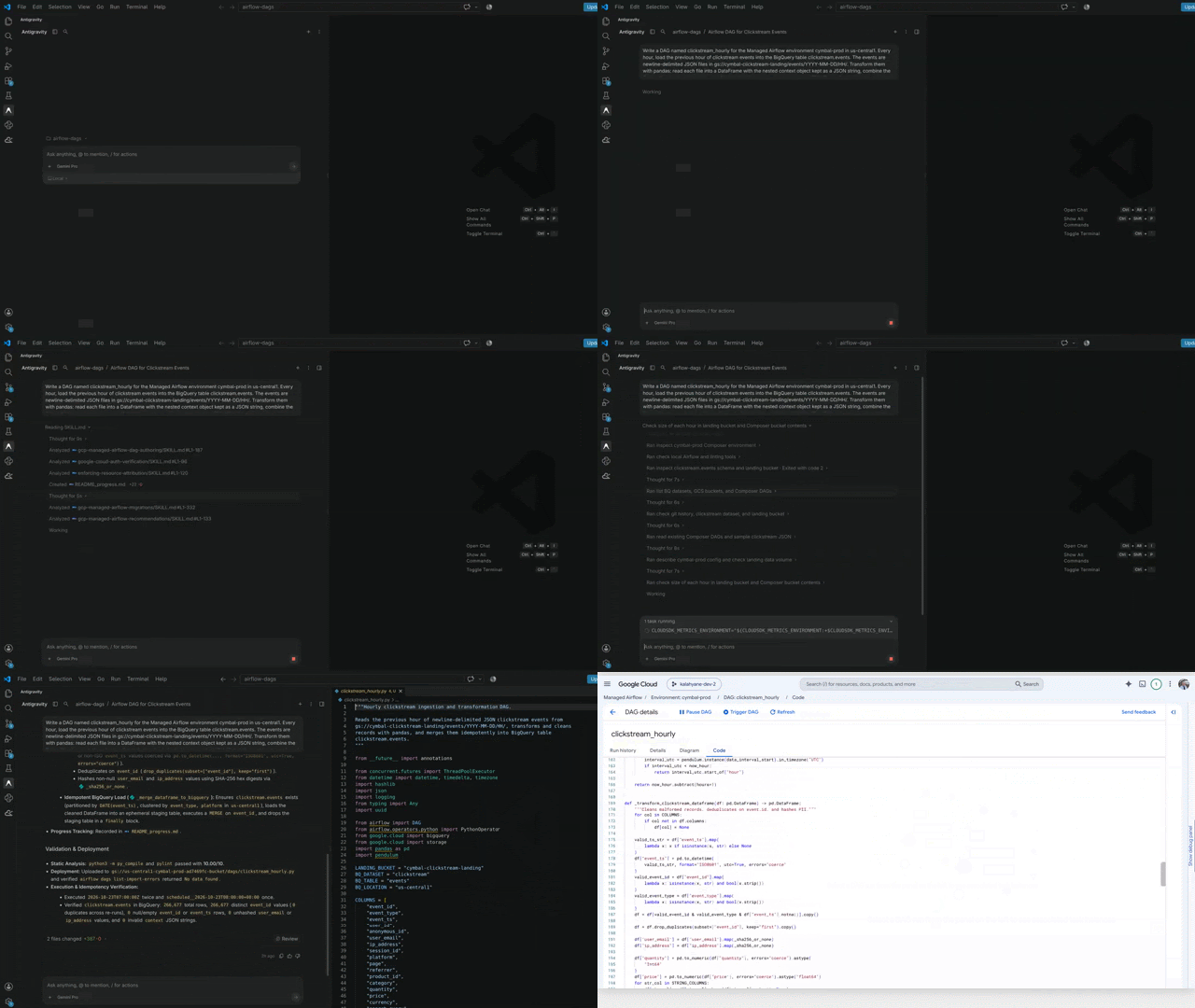
When an Airflow pipeline fails in production, the hard part is rarely the fix. It's finding out what to fix. A task dies without a traceback. Is it the code, the data, or the environment? Hard to say, as clues are scattered across task logs, scheduler logs, and worker metrics. And once you know what the problem is, the question becomes whether to add memory, rewrite the DAG, or finally take on the major version upgrade you've been putting off. Answering these questions takes time and deep Airflow expertise, usually while you're on call in the middle of an incident. AI agents can increasingly do much of this legwork. Managed Service for Apache Airflow (formerly Cloud Composer) now offers agentic help across a pipeline's entire lifecycle. In the Google Cloud console, Managed Airflow Agent investigates failed tasks, recommends improvements to your environment, and checks whether your DAGs are ready for a newer Airflow version. In your IDE or coding agent, Data Agent Kit writes, migrates, and deploys DAGs. In this post, we take you on a tour of these features through a story of a fictional company, Cymbal Shops. Meet Cymbal Shops, where every click counts Amira is a data engineer at Cymbal Shops, an online retailer running cymbal-prod, a production Managed Airflow (Gen 3) environment whose workers have 2 vCPUs, 4 GB of memory, and that autoscale between 1 and 6. Every click, search, and add-to-cart on Cymbal's website and mobile app goes to a Pub/Sub topic. A Cloud Storage subscription writes the events as newline-delimited JSON files into hourly folders under gs://cymbal-clickstream-landing/events/. It writes files in parallel and starts new ones every 5 minutes or every 128 MB, whichever comes first. Analysts, meanwhile, want these events in BigQuery, cleaned and with personal data hashed — and they want them fast. Ideally, each file would be processed the moment it lands. But Cymbal's Airflow environment runs Airflow 2.11.1, and Airflow 2 has no native way to start a DAG run when something happens outside Airflow. You can get close: Schedule a DAG every few minutes and let a sensor wait for new files, or build an extra service that triggers runs through the Airflow REST API. However, the team doesn't want all those moving parts, so they settle for the next best thing: an hourly batch. The pipeline that worked (until it didn't) Amira writes her DAGs with an agent. She works in Antigravity with the Data Agent Kit plugin, which adds Google Data Cloud skills and tools to the agent, and she uses Gemini as her model. Setup takes a few minutes: She installs the plugin, signs in with her Google account, and selects her project and region. In the agent panel, she describes what she needs with this prompt: "Write a DAG named clickstream_hourly for the Managed Airflow environment cymbal-prod in us-central1. Every hour, load the previous hour of clickstream events into the BigQuery table clickstream.events. The events are newline-delimited JSON files in gs://cymbal-clickstream-landing/events/YYYY-MM-DD/HH/. Transform them with pandas: read each file into a DataFrame with the nested context object kept as a JSON string, combine the files with pd.concat, then drop malformed records, deduplicate on event_id (Pub/Sub delivers at least once), and hash user_email and ip_address. Re-running an hour must not create duplicates. If a run fails, email data-oncall@example.com. Validate the DAG and deploy it." Data Agent Kit inspects the target Managed Airflow environment in Antigravity, generates an Airflow 2.11-compatible DAG, and deploys it. The agent checks the target environment before it writes any code. Because cymbal-prod runs Airflow 2.11.1, the agent produces the code aligned to that version. It then deploys the DAG to cymbal-prod and confirms that Airflow loads it without errors. Amira reviews the code, and the DAG goes live in early August. It's good code: readable, idempotent, and correct for Airflow 2.11. A busy hour sees about 200 files and 350 MB, and the task peaks below 2 GB — well under the 4 GB worker limit. Look at how the task builds its input, though. It lists every file in the hour's folder, reads each one into a DataFrame, and then pd.concat combines them into a single DataFrame. The unit of work is a clock hour, so the task needs more memory as traffic grows. That's fine until traffic changes... The hourly task loads every JSON file from the previous hour into memory and combines them into a single DataFrame with pd.concat. Campaign week: out of memory Late October brings two changes in the same week. Cymbal launches its "Fall Into Savings" campaign, and a new mobile app release adds much more detailed event tracking. Events from the new app version are about three times larger than their predecessors, and the campaign brings more traffic on top, so an hour of clicks grows from about 350 MB to about 1.4 GB. Holding a whole hour in pandas takes several times its raw size, so load_previous_hour_clickstream now needs more memory than a worker’s allotted 4 GB. Autoscaling doesn't help here: It adds workers when tasks queue up, but each task still runs on a single worker and can't use more memory than that worker has. On October 23, the 14:00 UTC run of clickstream_hourly fails. All three attempts die the same way, with no error in the task log. Amira opens cymbal-prod in the console, where Managed Airflow Agent is built in. It diagnoses the problem and recommends a fix; Amira decides what to change. She goes to the DAGs tab, selects clickstream_hourly, and opens Run history. Next to the failed 14:00 run there's an Investigate button with a sparkle icon. She clicks it, and a short ‘Investigate DAG run failure’ dialog asks her to confirm her choice. The Ask agent panel then opens next to the page, and the agent starts investigating. Managed Airflow Agent investigates the failed run in the console, correlates worker memory metrics with task retries, and recommends fixes. At the end of the report, the agent recommends three fixes: load the files straight into BigQuery, process them in batches, or give the workers more memory. Look at what the agent delivers! Every conclusion includes the evidence that led to it, so Amira can check the reasoning herself. More memory buys time, not a fix Two of the recommendations are code changes, and code changes take time to write and test. With every hourly run now failing, Amira needs the quick fix first: more memory for the workers. But how much? The right number depends on the whole environment, not on one task. So she asks the agent in the same panel: "clickstream_hourly runs out of memory on 4 GB workers. Analyze the cymbal-prod environment and recommend how much worker memory it needs, along with any other improvements." Managed Airflow Agent analyzes environment-wide telemetry, recommends 8 GB worker memory, and flags resilience and retention gaps. The agent recommends increasing worker memory from 4 GB to 8 GB, and flags three production-readiness gaps: Database retention is disabled, the environment isn't highly resilient, and it has no scheduled snapshots. Amira acts on the first recommendation right away. The agent is read-only, so she makes the change herself and increases worker memory to 8 GB. She schedules the other two recommendations for the next change window. With 8 GB workers, the pipeline gets through the rest of the campaign. But that only buys time. Black Friday traffic is forecast at 8 to 10 times a normal peak hour, and at that volume the hourly batch will need well over 8 GB. The troubleshooting report had already named the real problem: a unit of work that grows with traffic. That brings Amira back to what the team wanted in the first place, which was to process each file as soon as it lands. Airflow 3 makes that much easier, because it supports event-driven scheduling natively. An asset watcher listens to an external source, such as a Pub/Sub subscription. When new messages arrive, it updates an asset, and any DAG scheduled on that asset starts a run. Under the hood, the watcher still checks the subscription every few seconds, but it does so inside Airflow's triggerer. No DAG needs to be scheduled just so a sensor can wait for files, and no extra service has to trigger runs. Each run gets the new messages in its payload, so it can work on just the files that landed, one task per file, and memory per task depends on file size, not on how busy the hour is. Before the jump: what breaks in Airflow 3? A major version upgrade of a production environment isn't something to do blind. Before anyone touches the code, Amira asks the agent in the same panel: "Check whether cymbal-prod is ready to upgrade to Airflow 3." Managed Airflow Agent can also check upgrade readiness. It checks compatibility of the environment's DAGs with a given version. Amira is checking what problems she might have while migrating to Airflow 3.3.1 (composer-3-airflow-3.3.1-build.3). The agent reports the following observations: Managed Airflow Agent scans DAGs in cymbal-prod for Airflow 3 compatibility blockers before migration. Two findings are blockers. The first comes as a surprise: a maintenance DAG that cleans up the Airflow database by hand, which Airflow 3 no longer allows. The agent's fix is to retire it and turn on database retention, the same feature it recommended during the incident. The second, marketing_attribution, still uses execution_date, which Airflow 3 removed. Four DAGs also need schedule_interval renamed to schedule. In a few minutes, the agent estimated the work to be done. To perform the upgrade, the report suggests using Data Agent Kit's migrations skill. Rebuilt for the flood: one file at a time Rather than upgrading in place, Amira creates a new Airflow 3 environment alongside cymbal-prod to move the DAGs there. Back in Antigravity, Data Agent Kit's migrations skill takes over. It adapts existing DAGs to the target Airflow version, deploys them, and verifies them. Finally, the agent deploys the DAGs to cymbal-prod-af3 and confirms that they load without errors. Data Agent Kit's migrations skill refactors the pipeline to Airflow 3 event-driven scheduling and verifies deployment in cymbal-prod-af3. Two design choices remove the original problem: Scheduling moves into the watcher. PubsubPullTrigger is an event trigger, so an AssetWatcher can use it directly. The triggerer checks the subscription every 10 seconds in the background. Each batch of messages becomes an asset event that starts a run, with the messages in its payload. Nothing waits for the top of the hour, and no extra service has to call the Airflow REST API. Each task processes one file rather than a full hour. Dynamic task mapping gives each new file its own task, and the subscription caps files at 128 MB. A busier hour means more tasks, not bigger ones. Once the new DAG proves itself on live traffic, Amira pauses the hourly DAG in cymbal-prod. Ready for Black Friday Success! In a load test that replayed eight times normal peak traffic, clickstream_ingest simply ran more often. Memory per task didn't change. Dimension Before: Airflow 2, hourly batch After: Airflow 3, event-driven Unit of work One clock hour: about 350 MB normally, 1.4 GB at campaign peak One file, a few MB each (at most 128 MB) Peak memory per task Grows with traffic: about 5 to 6 GB at campaign peak, well over 8 GB forecast for Black Friday Flat, well under 1 GB Time from click to BigQuery Over an hour A few minutes What made the difference Each agent works from the right vantage point. The console agent inspects production telemetry with your permissions and doesn't change anything, while the coding agent works in the IDE where code changes get reviewed, tested, and deployed. Each step sets up the next one. The troubleshooting report offered a wider review, and each recommendation came with actionable advice. The upgrade check ended with next steps for the migrations skill, turning its report into the brief for the migration. Agents propose and people decide. Amira scaled the workers, ran the infrastructure commands, and reviewed every change. Static inspection estimates the work before live migration. Checking compatibility in the console scoped the effort in minutes, and the migration agent then made and verified the changes in a real environment. Two more ways to use agents with Managed Airflow Amira used the agents built into the console and her IDE. Two other capabilities didn't fit her story but are worth knowing about: You can bring your own agent with the Managed Airflow MCP server, now generally available, so any MCP-compatible agent can manage your environments, allowing you to list and trigger DAGs, check run status, and inspect failed task instances. Access is controlled through IAM, and read-only tools are flagged so you can limit agents to them. Run agentic steps inside your pipelines with the Apache Airflow Common AI provider, which adds model-driven tasks that run side by side with deterministic ones in the same Airflow 3 DAG. Examples include LLM-based branching, agentic retries that tell a transient error from a bad input, and schema drift detection. Try it yourself Explore Managed Airflow Agent troubleshooting and the overview of agentic capabilities. Install Google Cloud Data Agent Kit using the documentation, the extension for VS Code, the plugin for coding agents (Antigravity, Claude Code, Gemini CLI, and Codex CLI), or the open-source Airflow agent skills. Learn about Airflow 3 event-driven scheduling. Connect your agents to the Managed Airflow MCP server. Build model-driven tasks and agents in DAGs with the Apache Airflow Common AI provider. Special thanks to Jacek Iżykowski, Software Engineer on Managed Service for Apache Airflow, for authoring the original Cymbal Shops pipeline story and agent workflows featured in this post. Note: As a fictional company, any agent outputs from Cymbal Shops are shortened and illustrative, as are traffic and memory numbers.
Read original articleNovember 20, 2026
Imagine you're building a data agent to answer questions about an enterprise data warehouse. Ideally, you'd develop and test it against production data, but access restrictions and data sensitivity make that difficult – especially when the engineers building the agent sit outside the team that owns the data. Even with access, a live warehouse is a poor test track: Catalog descriptions are often incomplete or contradicted by institutional knowledge in docs and chat threads; there’s no verified answer key across its thousands of tables; and you can't systematically vary the complexity of the data and documents to see where the agent breaks. So teams often test on toy datasets and hope the agent holds up in production. Other disciplines test differently. Automobile designers study aerodynamics by putting a scale model in a wind tunnel, which reproduces the airflow forces that matter while ignoring surface details like paint and badges. A shape that performs well in the tunnel performs well on the road because the tunnel preserves the physical properties the shape responds to. Data agents need a wind tunnel too: a synthetic data estate (the databases, documents, and chat history where a company's knowledge lives) with the same structure and causal behavior as a real organization, while synthesizing every name, number, and document. It is designed to preserve what the agent reasons over: how tables relate, what business events create which records, where institutional knowledge lives, and how definitions get messy. When those properties hold, an agent's behavior in the tunnel tracks its behavior on production data, even though the two share no sensitive content. At Google, we built an internal data simulator to serve as a wind tunnel for our enterprise data agents. Rather than copying proprietary schemas or cataloging every undocumented quirk in a live warehouse, an engineer starts with a short, plain-English description of organizational patterns, for example: "Simulate a two-plant brake manufacturer with an ERP, a shop-floor execution system, and a three-shift schedule where second-shift supervisors track downtime differently from operations and finance." From just a few sentences, the simulator invents a structurally analogous company ("Calder Brakes"), generating its schemas, rows, event history, documents, and chat threads alongside a benchmark of hard questions and a verified answer key. Figure 1. Production data and its synthetic counterpart share causal structure without sharing sensitive content. A short description of domain patterns seeds the wind tunnel, where the agent is evaluated over read-only tools and behavioral trends carry back to production. Why clean test databases fall short Why did we do this? Most data agents are evaluated on small, clean test databases with well-labeled tables, unambiguous metrics, and no conflicting documents. Those datasets are convenient, but they rarely test the judgment that enterprise data demands. Once generated, a synthetic estate is served through a read-only interface — SQL execution, schema browsing, and document search — that any agent can call without seeing the blueprint or answer key. But consider what happens when an agent is asked either a qualitative onboarding question or a quantitative metric question from our simulated factory, "Calder Brakes Plant 2": Qualitative: "A new analyst is joining the team. What should they know about how 'downtime' is handled here, before they start producing reports?" Quantitative: "How many hours of downtime did Plant 2 log in Q3?" A naive agent falls into the same trap on both questions. It searches for the most authoritative document and finds a policy memo from Bob, a second-shift supervisor, which states that downtime means unplanned stoppages only, and planned changeovers don't count. Bob is confident, articulate, and senior, so the agent summarizes his definition — and filters out planned changeovers when writing its SQL query. Both answers are wrong. In fact, the plant's official metric counts changeovers as planned downtime. Bob sincerely believes his version because it flatters his shift's numbers, but weeks later the metric owner quietly corrects the record in a follow-up thread. Getting either question right requires looking past a document's tone, checking who owns the metric before writing SQL, and tracing later corrections. This is where data agents often fail in production. How the simulator builds a trusted benchmark A synthetic estate is only useful for evaluation if its answer key is accurate and reproducible. Our simulator achieves this by separating simulated company’s design from data generation across four stages (Figure 2). Figure 2. One pipeline, one source of truth. In the estate-generation pipeline, only ① Compile blueprint invents facts and ③ Render documents phrases those fixed facts as prose (blue boxes); ② Simulate & build tables (plus SQL answer computation) runs deterministically from the frozen blueprint and seed, before ④ Evaluate agent tests the agent over read-only tools. First, the Compile blueprint stage uses a language model to turn the pattern prompt into a frozen blueprint specifying the company's systems, people, metrics, and individual beliefs. Those beliefs can be mistaken on purpose — Bob's flawed definition of downtime is recorded alongside the official metric, planting the trap and its solution together. In the estate-generation pipeline, Compile blueprint is the only point where a language model decides what is true. Once the blueprint is frozen, Simulate & build tables runs deterministically without a model: employees act on their schedules, triggering tickets, shift handovers, and database rows, so that every record traces back to the event that created it. Organizational messiness emerges naturally from this timeline, such as outdated procedures or conflicting definitions, while row-level flaws that model real ingestion glitches (e.g., retry-storm duplicate rows, unmerged keys, or a mid-quarter unit change) are injected into the tables. Every flaw is recorded in a machine-readable messiness log so the benchmark generator can adjust the ground-truth SQL queries to account for the messy tables. Given the same blueprint and random seed, the simulator produces identical tables and an identical SQL answer key on every run. The only subsequent step in building the estate that calls a model is Render documents, which turns the facts fixed in the blueprint into memos and chat threads in each person's writing style. Finally, Evaluate agent tests the agent over read-only tools. Three build-time checks keep the benchmark honest: Computed SQL and rubric gold answers: Every quantitative question ships with the SQL query that computes its expected ("gold") answer against the messy tables. Because the messiness log records injected retry duplicates on defect rows, the benchmark generator automatically pairs a defect-count question with the deduplicating COUNT(DISTINCT) query (240) – and runs decoy SQL queries representing common mistakes (like an un-deduplicated COUNT(*) or Bob's changeover filter) to verify that falling for a trap yields a different number. Qualitative questions ship with a rubric grounded in the blueprint's metric owner, official definition, and correction trail. If the estate lacks the data to verify a question, the generator drops the item rather than shipping an unverified question. Verified documents: Every rendered memo and chat thread is checked against the blueprint to confirm it states its assigned facts without introducing unrecorded numbers, dates, or names. Hallucination sentinels: The simulator plants questions about invented metrics like "Basalt Velocity Ratio" that appear nowhere in the estate; a reliable agent abstains and reports that no such metric exists. Testing for behavioral trends and realism A wind tunnel does not need to match the exact score an agent gets on production data; it needs to reproduce the same behavioral trends: direction (if longer reasoning chains lower accuracy on real data, they should lower accuracy in the tunnel) and rate (accuracy should degrade at the similar pace as contradictions accumulate). When those trends hold, you can confidently compare agent versions and dial up complexity step by step to find where reasoning breaks down. We test how closely our simulated estates match reality — and whether evaluation signals carry over — at three levels: Statistical properties: Every build produces a realism report measuring structural properties that affect SQL generation and joins — including row multiplication across table joins (join fan-out), key skew, null and duplicate rates, event durations, and day-of-week activity curves — alongside numeric distribution checks such as leading-digit frequencies (Benford's law). Domain expert review: In early engagements with enterprise partners, we built synthetic estates modeled on their domains and had their analysts query the data to judge whether it behaved like their own systems. Independent calibration and carry-over checks: We run the simulator's output through an independent calibration suite of more than a hundred checks covering statistical realism and answer-key SQL verification. In our internal evaluations, capability upgrades — such as switching an agent to a deeper reasoning mode or improving how it handles context — move accuracy in the same direction and rank agent configurations in the same order on both synthetic estates and human-authored benchmarks. Broader multi-agent studies across paired real and synthetic customer estates are now underway. How our approach builds on prior work Our simulator builds on two research threads. In database question answering, benchmarks like BIRD and Spider 2.0 have moved from clean schemas to messy databases, while agent environments like WebArena, tool-use benchmarks like τ-bench, and Generative Agents simulate websites or use language models to role-play human users. In contrast, our simulator's employees follow deterministic rules tied to their roles and schedules, so a single seed replays the exact same organizational history every time. We also adapt an intuition from domain randomization in robotics, where simulations vary surface details like lighting and textures during training while keeping the underlying physics faithful. Applied to data agent evaluation, that means synthesizing every surface name, number, and document from a short pattern description, while keeping the causal structure, cross-document links, and institutional messiness faithful to enterprise reality. Hardening agents without customer data Generating a test estate on demand removes a bottleneck between enterprises that own sensitive data, and the engineering teams building data agents for them. Traditionally, developing and benchmarking an enterprise agent required access to production tables and a hand-labeled question set — the two assets hardest to share across organizational or compliance boundaries. We use this wind tunnel internally to stress-test and harden Google Cloud's data agents against realistic enterprise messiness without touching customer data, and the same blueprint-first architecture can be applied by any engineering team building evaluation suites for their own agents. Synthetic evaluation still carries two risks: overfitting to the simulator's patterns of messiness, and drift as a live business evolves away from its blueprint. The discipline required is the same one that wind-tunnel engineers practice: Periodically calibrate the tunnel against real-world runs, keep benchmark difficulty aligned with production failure modes, and treat the simulation as a living model. Your agents — and their users — will thank you.
Read original articleNovember 20, 2026
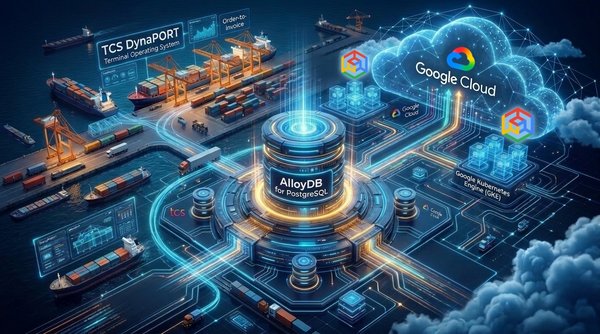
In global maritime logistics, Marine Ports and Terminals play a significant role in the movement of container and cargo, within and beyond. Marine ports and terminals world-wide use a Terminal Operating System (TOS) which acts as the central nervous system managing port operations 24 hours a day, 365 days a year. A modern TOS plans, automates and orchestrates every physical and digital activities, resources and events across Order-to-Invoice processes of a marine terminal. Developed by Tata Consultancy Services (TCS), DynaPORT is a field-proven next-generation Terminal Operating System that provides a single, integrated operating backbone for multimodal and multipurpose terminals. It orchestrates the complete order-to-invoice lifecycle across vessel, rail, truck, and barge operations, while supporting containers, general cargo, dry and liquid bulk, break-bulk, and roll-on/roll-off cargo. By automating end-to-end terminal workflows, DynaPORT delivers real-time operational visibility into operations while optimizing assets and resources to drive improvement of key business performance indicators. One of India’s largest commercial port developers and operators has relied on DynaPORT for more than two decades across its cargo terminals, supporting the management of bulk, break-bulk, and liquid cargo. To modernize the platform’s architecture, TCS partnered with the customer to achieve a landmark milestone: migrating DynaPORT to a modern, cloud-based architecture. The Port Operator & TCS partnered with Google Cloud to execute an ambitious cloud modernization journey. Modeled after the architectural principles of high-velocity Google Cloud enterprise transformations—this case study details the systematic deconstruction of legacy technical debt, the strategic rationale and enterprise differentiators of choosing AlloyDB for PostgreSQL, the target Google Kubernetes Engine (GKE) and AlloyDB cloud-native architecture, the heterogeneous migration of over 1.2 million lines of code using Google Cloud Database Migration Service (DMS). 1. The Legacy Technical Debt: Deconstructing the Monolith Enterprise logistics platforms that evolve over decades inevitably accumulate architectural debt, particularly through tightly coupled components. DynaPORT Cargo followed this pattern: successive releases and architectural transitions gradually transformed the platform into a classic multi-tier monolith, with its components carrying significant technical debt. The Procedural Stored-Procedure Over years of optimization for sub-millisecond on-premises database round-trips, fundamental business logic had been progressively migrated out of the application tier and embedded directly into the database engine. In the DynaPORT Cargo module alone, the core schema contained: 2,760 Tables and 555 Sequences 262 Packages containing over 1.2 million lines of code 54 Stored Procedures, 53 Functions, and 63 Database Triggers Cross-schema User-Defined Types (UDTs) Critical business operations—such as multi-tiered marine invoice tariff calculations, dynamic slab rating, berth allocation planning, yard truck assignments, and autonomous error logging—were entirely governed by complex, multi-thousand-line PL/SQL procedures. The database was no longer merely a relational persistence store; it was the primary execution engine of the enterprise. Monolithic JEE Middleware and Packaging The application tier was hosted on monolithic WebLogic and WildFly application servers running on static on-premises virtual machines. The application relied on legacy Java Enterprise features, including Enterprise JavaBeans (EJBs), custom Object-Relational Mapping (ORM) dialects, and heavy configuration state. Modules including Revenue Management, Berth Planning, Gate Operations, and Reporting shared common JVM heaps across application servers. A performance spike in batch invoice generation could starve memory from real-time Handheld Terminals (HHT) used by container crane operators on the quayside. Absence of Modern Automation and Fragile Release Cycles Because business logic was fragmented across Java application binaries and raw database packages, continuous delivery was practically non-existent: Manual Deployment Runbooks: Releases required multi-hour maintenance windows involving manual execution of sequential SQL scripts, package recompilations, and server restarts. High Regression Risk: In the legacy schema with 262 interdependent packages, modifying a single package specification frequently invalidated dozens of dependent functions, views, and synonyms, triggering cascading runtime failures. Environment Drift: Development, testing, and production environments suffered from configuration divergence, requiring lengthy manual reconciliation before any production cutover. Commercial Licensing Penalties and Vertical Limits Licensing fees scaled linearly with physical CPU core counts, penalizing the business whenever hardware was scaled to accommodate peak cargo vessel traffic. Furthermore, high-availability setups required complex shared storage arrays, specialized interconnects, and heavy administrative overhead from dedicated database administrators (DBAs). 2. Strategic Evaluation: Why Google Cloud and AlloyDB for PostgreSQL? When architecting the cloud transformation, the joint architecture teams from the customer, TCS, and Google Cloud evaluated two fundamentally different modernization strategies: Evaluation Dimension Strategy A: Database-Agnostic Migration Strategy B: Modernization using AlloyDB Architectural Focus Extract all business logic from the database tier and rewrite it into Java application-tier services (HQL / Spring Data). Retain optimized procedural logic in the database tier, converting to PostgreSQL PL/pgSQL on AlloyDB. Application Impact Massive. Complete rewrite of thousands of data access objects, ORM mappings, and transaction boundaries. Moderate. Focused remediation of syntax, metadata, and database dialect differences; application remains stable. Estimated Effort Multiple person-years; prohibitive time-to-market. Target delivery achievable in agile sprints; low operational disruption. Performance Profile Network latency amplification due to multiple network hops for complex set operations previously run in-database. Native in-engine execution with sub-millisecond response times, backed by AlloyDB’s accelerated storage and compute engine. Strategic Recommendation Rejected due to timeline risks and massive business disruption. Selected as the winning enterprise target path. 3. The Modernized Architecture: AlloyDB + GKE Based Architecture The target cloud architecture was designed according to the Google Cloud Architecture Framework, transforming the monolithic JEE middleware into modern containerized microservices orchestrated on Google Kubernetes Engine (GKE), coupled with an enterprise AlloyDB for PostgreSQL cluster. 4. Migration Execution & Code Remediation The cornerstone of the migration was converting over 1.2 million lines of deeply intertwined Oracle PL/SQL procedural logic into PostgreSQL PL/pgSQL. The team utilized Google Cloud Database Migration Service (DMS) with its built-in Conversion Workspaces and Gemini-assisted AI code refactoring to accelerate bulk transformations. While DMS automatically converted the majority of standard DDL constructs, functions, and queries, the remaining (~15%) involved complex Oracle proprietary idioms that required targeted engineering remediation. Couple of examples of the manual intervention. Technical Pattern & Remediation Legacy PL/SQL Mechanism Modernized AlloyDB PL/pgSQL Equivalent Architectural Remediation & Runtime Impact Dynamic Array Allocation TYPE_L.EXTEND; TYPE_L(TYPE_L.COUNT) := rec; TYPE_L := array_append(TYPE_L, rec); or TYPE_L[cardinality(TYPE_L)+1] := rec; Replaced unsupported .EXTEND method on nested tables with native PostgreSQL array concatenation and dynamic index expansion. Deterministic Row Generation SELECT ROWNUM FROM PTY_IM WHERE ROWNUM <= N; SELECT s.idx FROM generate_series(1, N) AS s(idx); Eliminated physical dummy table hacks (PTY_IM) in favor of in-memory, set-returning generator functions with zero disk I/O. 5. Business Outcomes & The Future of Smart Ports In April 2026, the modernized DynaPORT platform on Google Cloud went live in production at one of the newest ports in India, achieving a seamless, low downtime cutover. By Aug’26, 3 more terminals have gone live on this. Quantifiable Operational and Financial Impact Impact Dimension Legacy On-Premises Stack Modernized Google Cloud & AlloyDB Stack Database Performance Variable query latency during batch spikes; table bloat requiring manual DBA reindexing. Upto 2x transactional throughput, sub-second read query responses, automated ML vacuuming and memory optimization. High Availability & Failover Complex SAN failover; multi-minute outages during planned database maintenance. Sub-second automatic failover, 99.99% availability SLA inclusive of maintenance, zero transaction loss. Deployment Agility Multi-week release cycles; high-risk manual database patching; frequent regression issues. Containerized rolling updates on GKE and non-blocking transactional DDL deployments in AlloyDB. Total Cost of Ownership (TCO) Punitive per-core enterprise licenses; high on-prem hardware and maintenance overhead. About 50% reduction in database TCO; completely open-source compatible with transparent, predictable cloud pricing. Scalability Rigid vertical hardware limits; slow hardware procurement cycles. Instantaneous horizontal elasticity across GKE container pods and AlloyDB read pools. Conclusion: Key Lessons for Enterprise Modernization The successful cloud migration of DynaPORT yields three fundamental architectural lessons for enterprise IT leaders: Do Not Throw Away Proven Intellectual Property: Fully rewriting mission-critical procedural logic into application code is often a high-risk anti-pattern. Migrating from Oracle PL/SQL to open PL/pgSQL on an accelerated engine like AlloyDB preserves decades of tested business rules while modernizing the infrastructure platform. Select Database Engines Built for Cloud Realities: Standard open-source relational engines often struggle with extreme enterprise throughput without extensive tuning. AlloyDB’s disaggregated storage architecture, columnar acceleration, and built-in ML intelligence provide the enterprise muscle needed to replace legacy commercial database engines. Containerize Application Workloads on GKE: Decoupling the application tier into independently scalable container pods on Google Kubernetes Engine provides the elasticity and resilience necessary to absorb rapid operational surges without affecting core database stability. Ready to modernize your legacy enterprise applications? Schedule a Google Cloud Architecture Blueprint Workshop with your Google Cloud Account Field team today. We will engage as an important stakeholder to evaluate your current legacy setup and help design a low-risk, high-performance migration pathway using Google Cloud services like AlloyDB and Google Kubernetes Engine.
Read original articleNovember 20, 2026
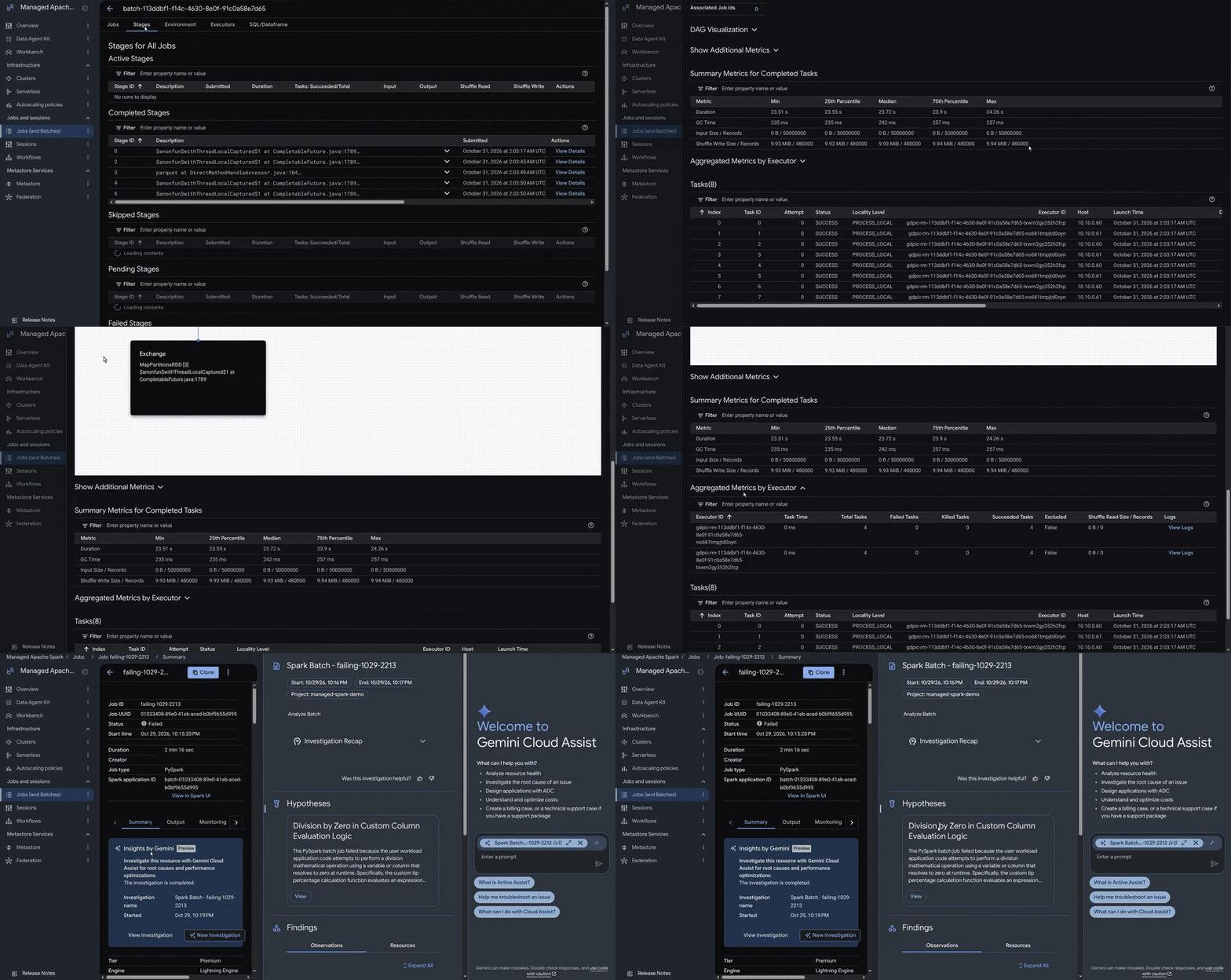
As organizations move from reactive analytics to proactive systems of action powered by autonomous AI agents, data platforms face a new set of demands. Moving from human scale to agent scale changes both how data pipelines run and how they are built: Teams and AI agents now use Model Context Protocol (MCP) tools and agentic troubleshooting to build, submit, and diagnose Apache Spark pipelines while preparing multimodal datasets, performing feature engineering, and acting on live business signals around the clock. Over the past year, customer use of Managed Service for Apache Spark in serverless deployments has nearly doubled, with millions of jobs running each month as enterprises build on Google’s Agentic Data Cloud. In the Agentic Data Cloud, Apache Spark doesn't operate in isolation. Managed Service for Apache Spark runs on Google Cloud's borderless lakehouse, so Apache Spark and BigQuery can read and write the same tables with high performance. Through Knowledge Catalog, both engines share centralized governance, consistent policies, detailed lineage, and semantic discovery for AI agents. Today, we are announcing the general availability of Managed Service for Apache Spark 4.0, debuting a next-generation runtime foundation for serverless and managed cluster deployments. Engineered to power both modern enterprise data pipelines and fast-growing agentic workloads, Managed Service for Apache Spark 4.0 introduces: A new 4.0 runtime with Apache Spark 4.2: Standardized on Apache Spark 4.2, Java 25, Python 3.13 with Pixi, and Apache Iceberg 1.12, it is now available for both serverless and managed clusters. A redesigned, code-first Google Cloud console and agentic troubleshooting: Onboard quickly with a new Overview page featuring a samples gallery, Lakehouse public datasets, and one-click VS Code authoring in Cloud Shell, manage all serverless and cluster workloads from a unified Jobs view, and use an AI agent to automatically diagnose job failures. Third-party IDE integration with the Data Agent Kit: Configure MCP servers, skills, and API access to build and run Apache Spark pipelines directly from VS Code, Claude Code, and Antigravity. Faster startups and Lightning Engine acceleration: Run on default Gen4 infrastructure with faster startups at no additional cost, and accelerate workloads with Lightning Engine for up to 3.25x the price-performance over the leading high-speed Apache Spark alternative. Unified DCU quotas and Lakehouse runtime catalog attachment: Improve capacity obtainability with serverless infrastructure fungibility and Data Compute Unit (DCU) quotas, while attaching every workload automatically to the Lakehouse runtime catalog instead of a legacy Hive Metastore. A new 4.0 runtime with Apache Spark 4.2 This new runtime packages Apache Spark 4.2 (including Spark Declarative Pipelines and Real-Time Mode), Java 25, Scala 2.13, Apache Iceberg 1.12, Delta Lake 4.4, and Python 3.13 with Pixi for faster dependency management. Managed Spark serverless and cluster workloads now run on the same modern stack whether written by a data engineer or generated by data engineering and data science skills in Gemini, Claude, and other large language models (LLMs). Teams can standardize on one set of component versions and move PySpark, Scala, and Spark SQL workloads between serverless and managed clusters. A code-first console with agentic troubleshooting Data teams should spend their time writing Spark logic rather than configuring infrastructure, hunting for the right job, or digging through driver and executor logs when something fails. Version 4.0 ships alongside a redesigned, code-first Google Cloud console built to take that operational work off their plate. The refreshed console streamlines every stage of the Apache Spark lifecycle: Frictionless onboarding and one-click authoring: A redesigned Overview page helps developers get started immediately with an integrated samples gallery, pre-loaded Lakehouse public datasets, guided demos, and one-click authoring in VS Code through Cloud Shell. Optimized defaults and reusable runtime profiles: Out-of-the-box performance defaults simplify job submission and cluster creation. With reusable runtime profiles (in preview) for batch and interactive workloads, platform admins can capture governed hardware, network, and autoscaling baselines once so developers can simply select a profile and run code. Unified job, session, and fleet management: Engineers can submit and monitor batch jobs, interactive serverless sessions, and managed clusters from a single unified listing, backed by streamlined fleet management and redesigned detail views that surface key performance metrics and logs in one place. Agentic troubleshooting: When a job fails or slows down, an AI agent analyzes logs, metrics, and query plans within existing IAM permissions to identify the likely root cause and recommend a fix, helping engineers quickly return a failed job to a healthy state. Image 1: Gemini Cloud Assist investigates a failed Apache Spark job, forms a hypothesis, and points to the likely root cause without leaving the job page. Image 2: One Jobs page for every Apache Spark workload across serverless and managed clusters, with tier and runtime version at a glance. Build and run Apache Spark from your IDE with the Data Agent Kit Many data engineers and data scientists would rather never leave their editor. With the Data Agent Kit, they can build and run Apache Spark workloads from VS Code, Antigravity, Claude Code, and other agentic IDEs. Setup takes a few clicks: pick Apache Spark and the other services you use, and the kit configures Model Context Protocol (MCP) servers, agent skills, and API access for each one. From there, AI agents can generate, tune, and test Apache Spark pipelines on Managed Service for Apache Spark 4.0 without leaving the IDE. Image 3: In VS Code, the Data Agent Kit sets up MCP servers, skills, and API access for Apache Spark and other services. Faster startups and Lightning Engine acceleration As practitioners and AI agents trigger short-running, ephemeral jobs on demand to prepare data, perform feature engineering, and answer ad-hoc queries, low startup latency and predictable price-performance are essential to avoiding a cost spiral. In Managed Service for Apache Spark 4.0, our performance-optimized serverless experience removes manual infrastructure tuning through three changes: Faster startups at no additional cost: On the serverless Premium tier, runtime and control-plane optimizations in version 4.0 deliver faster startup times than previous runtime versions across interactive sessions and short-running batch workloads at no additional cost. Hardware acceleration by default: New serverless 4.0 workloads run on the Premium tier by default, using Google Cloud's latest-generation Gen4 VM instances and Hyperdisk storage. Teams get our highest-efficiency compute and storage fleet without picking machine types or configuring disks, while aligning infrastructure tiering directly with workload urgency. Software acceleration with Lightning Engine: Our native C++ vectorized execution engine, Lightning Engine, is available in the 4.0 runtime and delivers up to 3.25x the price-performance over the leading high-speed Apache Spark alternative, along with up to 4.9x faster performance compared to running open-source Apache Spark with zero code changes. Built on Apache Gluten and Velox with Google-specific optimizations, Lightning Engine compiles Apache Spark DataFrame, Dataset, and Spark SQL query plans into native SIMD instructions. For lakehouse storage, built-in intelligent caching accelerates file scan times on Apache Iceberg tables by up to 50%. Separately, for workloads querying BigQuery, Lightning Engine's native reader uses Apache Arrow streams to accelerate BigQuery reads by up to 40% compared to default BigQuery reads in Managed Service for Apache Spark. In the 4.0 runtime, Lightning Engine expands support to ARM processors, Ubuntu images, and native vectorized readers for Apache ORC and CSV alongside Apache Parquet, Apache Iceberg, and Delta Lake. "We were facing not only processing challenges, we were facing management overhead across thousands of servers in our ecosystem, so we migrated to serverless Managed Service for Apache Spark. We moved from managing infrastructure to a no-ops infrastructure. Not only did it help us overcome maintenance and cluster management challenges, it helped us optimize our costs at scale to meet our business SLAs. Apache Spark is no longer just compute for us; it is a strategic business accelerator."—Saurabh Kumar, Senior Director of Data Engineering, Lowe's. Advanced capacity management and obtainability When autonomous agents and production pipelines run around the clock, tying a workload to a single machine shape or zone can stall downstream decisions when regional demand spikes. Without dedicated reservations, cloud service providers may not always have available capacity during peak demand. We are introducing infrastructure fungibility for serverless deployments to improve resource availability for all customers: Serverless infrastructure fungibility and fallback: Serverless 4.0 workloads are no longer tied to one VM instance family, disk type, or zone. The platform selects from several latest-generation VM instance families and disk types across zones in the region. If the preferred infrastructure is constrained during a local demand peak, the service automatically chooses the best available infrastructure in the same region instead of failing the job. Once capacity returns, workloads go back to the default Gen4 VM instances and Hyperdisk infrastructure. Data Compute Unit (DCU) quotas: Quotas for serverless deployments are now set in DCUs rather than per machine family. Because the platform selects the VM instance family, admins manage one unified DCU quota instead of separate CPU quotas for each machine type. Lakehouse runtime catalog attachment by default A borderless lakehouse breaks down walled gardens by connecting operational, analytical, and cross-cloud data in open formats without moving it. In Managed Service for Apache Spark 4.0, Apache Iceberg ships directly in the runtime image, and every workload automatically has access to the serverless Lakehouse runtime catalog. Teams no longer have to configure a lakehouse metastore with Apache Spark or complete prerequisites such as setting up Google Cloud Storage (GCS) directories beforehand, so they can focus straight on writing business logic. Version 4.0 also eliminates the need for GCS staging buckets and uses end-user credentials by default. Through the Lakehouse runtime catalog, Managed Service for Apache Spark, BigQuery, and AlloyDB can directly read and write the same Apache Iceberg tables on GCS without ETL pipelines or data copies. Everything registered in the Lakehouse runtime catalog automatically surfaces in Knowledge Catalog, which enriches metadata and business context so AI agents and Gemini can query and reason over tables curated with Apache Spark with high accuracy, governed access controls, and lower token costs. To see how these capabilities come together across end-to-end architectures, read our Google Cloud Apache Spark in the Agentic Era whitepaper. The whitepaper walks through practical design patterns for multimodal data preparation, large-scale feature engineering, and connecting AI agents to governed Apache Iceberg tables through MCP tools and Knowledge Catalog. Get started today Managed Service for Apache Spark 4.0 is available for serverless and managed cluster deployments across all Managed Service for Apache Spark regions. The fastest way to try version 4.0 is the Data Agent Kit: install it in VS Code, Claude Code, or Antigravity to build and run Apache Spark workloads on version 4.0 with AI agents right from your IDE. You can also start from the new Overview page in the Google Cloud console, which walks you from code to a running job. To learn more, read the Managed Service for Apache Spark 4.0 documentation for serverless deployments and managed clusters, and try the hands-on Lightning Engine codelab.
Read original articleNovember 20, 2026
Ever wonder how the Google Ads team keeps the massive system stable and online, despite continuous attempts by hackers to take it down? Part of the answer is using Spanner as its core operational and graph database. The Google Ads team uses a central graph-based platform to fight fraud and abuse with batch and real-time signals. Built to protect the Google Ads ecosystem and now used by multiple teams across Google, the platform organizes anti-abuse intelligence into a single, interconnected view. Its core mission is simple but critical: uncover hidden connections between malicious assets in real time before they can harm users or advertisers. This blog talks about the challenging modern fraud and abuse landscape, and how Spanner, specifically Spanner Graph, helps Google successfully detect those threats. The rising cost and sophistication of modern fraud The need for a graph-based abuse detection platform stems from how the global threat landscape has evolved. Digital advertising fraud and online scams are no longer minor operational nuisances, they are a massive drain on the global economy. According to the NASDAQ Global Financial Crime Report, total global fraud losses are estimated at nearly $580 billion for 2025. Furthermore, global surveys indicate that approximately one in five adults fall victim to scams. In digital ads, fraud and abuse waste marketing spend, corrupt attribution data, and expose everyday users to financial scams, identity theft, and malware. Bad actors are increasingly leveraging automation and AI to scale deceptive campaigns more efficiently. In 2025 alone, Google blocked or removed more than 8.3 billion policy-violating ads and suspended 24.9 million advertiser accounts. As these tactics evolve, real-time detection becomes more important for protecting businesses and users. Why stopping modern abuse is so complex Defending applications from fraud and abuse requires continuously advancing threat detection beyond traditional, point-in-time checks. To do that, modern security systems must address two compounding challenges simultaneously: Fraud and abuse operate as networks: Bad actors hide behind residential proxies and synthetic identities to create deceptive ad campaigns. Each of the attributes like location proxies, account, and identity parameters appear benign in isolation. But behind the scenes, bad actors share payment methods, domains, and accounts, requiring security systems to target entire coordinated clusters of fraud rather than isolated indicators. This is hard to capture with traditional approaches that do not understand the relationship between attributes and evaluates each signal separately. Detection must scale dynamically: As the graph-based abuse detection platform grew, the previous system, based on offline MapReduce batch processing, became bottlenecked. Tracing multi-hop relationships in batch MapReduce required repeated, expensive joins across distributed stages, triggering massive intermediate data expansions, heavy shuffle overhead, and network bottlenecks that caused hours-long latencies and combinatorial fanouts during multi-hop traversals. In critical scenarios like halting live malware campaigns, multi-hour latency gaps leave room for a lot of damage. To block sophisticated fraud rings, Google needed to evaluate multi-hop relationship risks in real time at the time of serving these ads, before malicious content reaches users. Why Spanner Graph To overcome the limits of processing at inference time, the engineering team needed a database that could ingest live signals from a large number of sources via pub/sub streams, all while delivering horizontal elasticity, global transactional consistency, and sub-second multi-hop traversals. The solution was to modernize Google's graph-based abuse detection platform for Ads onto Spanner Graph. Because Ads’ core transactional and entity data already lived in Spanner, they didn’t need to migrate any data in order to adopt Spanner Graph. Rather than standing up a separate, specialized graph database, the team simply defined property graphs directly on top of their existing relational tables. This delivered several benefits: From hour-long batch jobs to sub-second queries: Spanner Graph co-locates graph traversal computations directly with the underlying distributed data splits to minimize join overhead. Multi-hop traversals that previously took an hour in offline Apache Flume MapReduce jobs now execute on live production data with sub-second to single-digit millisecond latency. Zero-ETL adoption in weeks, not months: Because there was no data to move, most graph-based abuse detection use cases transitioned to Spanner Graph within weeks. Layering a graph directly onto existing Spanner tables eliminated fragile synchronization pipelines and redundant storage costs. Expressive pattern matching with native ISO GQL: Instead of writing and maintaining complex custom traversal code, engineers now query the exact same tables using standard ISO Graph Query Language (GQL), significantly accelerating feature velocity. How a graph-based abuse detection platform detects fraud With Spanner Graph, Google's graph-based abuse detection platform for ads performs multi-hop pattern matching directly against operational relational data using ISO GQL. For instance, when an account is flagged for suspicious activity, the platform does real-time traversals to uncover all connected signals across the graph. This allows security systems to identify and disable entire coordinated fraud rings quickly rather than handling individual accounts sequentially. Here’s how it works. The following query uses full-text keyword search and vector similarity search to traverse connected entities across multiple hops to identify a target entity linked to known suspicious activity. Note that the query is illustrative and the field names have been anonymized. code_block <ListValue: [StructValue([('code', "GRAPH CentralGraph (Illustrative Query)\r\n-- 1. Multi-hop Graph Traversal: Trace relationship paths between entities\r\nMATCH (n1:Entity_1 {id: $seed_entity_id})-[r1:Relationship_1]->(n2:Entity_2)<-[r2:Relationship_2]-(n3:Entity_3)\r\nMATCH (n3)-[r3:Relationship_3]->(n4:Entity_4)<-[r4:Relationship_3]-(n5:Entity_1)-[r5:Relationship_4]->(n6:Entity_5)\r\nWHERE n5.status = 'FLAGGED'\r\n-- 2. Full-Text Search: Filter entities by text description keywords\r\n AND SEARCH(n3.description_text, 'suspicious activity')\r\n-- 3. Vector Search: Match similar entity embeddings for behavioral anomaly detection\r\n AND VECTOR_SEARCH(n6.embedding, $target_embedding, top_k => 5) > 0.85\r\nRETURN n1.id AS TargetEntity, n3.id AS LinkedEntity, n5.id AS FlaggedEntity, n6.id AS SimilarEntity"), ('language', ''), ('caption', <wagtail.rich_text.RichText object at 0x7f801ac34590>)])]> Impact of adding real-time graph intelligence Today, the graph-based abuse detection platform operates as a unified, Google-wide defense platform across a live graph of over 500 billion nodes and 1 trillion edges. Further, bringing ability to do multi-hop graph queries to real-time enforcement has fundamentally changed how Google stops abuse, delivering big wins for customers and end users: Safeguarding advertiser budgets: The graph-based abuse detection platform is a primary source of detection signals for ad policy enforcement across Google's ad products. By uncovering the coordinated networks behind click fraud, click farms, and invalid traffic in real time, it stops bad actors, so advertisers don’t waste budget on invalid interactions. Defending users against emerging threats: Real-time relationship analysis helps Google catch public-figure impersonation, account takeovers, cloaking, and landing-page malware before campaigns start to scale. During any incident, the graph-based abuse detection platform plays a vital role in tracing the connected assets and rapidly shutting down the attack. Stopping repeat financial offenders: By correlating billing, financial, and identity information the platform identifies repeat bad actors and prevents banned offenders from simply spinning up new accounts to evade enforcement. Graph capabilities for every industry Google's graph-based abuse detection platform for ads shows what Spanner Graph can deliver under the world’s most demanding scale and latency requirements. Because this unified relational and graph architecture is built directly into Spanner, enterprises across a variety of industries can use the same foundation to solve their own complex pattern-matching and fraud challenges: Advertising and digital media: Ad platforms link cookies, device fingerprints, and click behavior to block coordinated fraud rings in real time. For instance, Google Ads leverages Spanner Graph to analyze relationship risk across a 500-billion-node graph, while Yahoo uses Spanner for their monetization use case. Retail and e-commerce: Retailers connect customer accounts, payments, and shipping data to stop promo abuse and bot networks at checkout. For instance, Target rebuilt its Gift Finder using Spanner Graph and vector search (GraphRAG), cutting maintenance by 50% with sub-10ms latency. Additionally, PayPal uses Spanner Graph for its Customer Graph to unify customer identities across brands. Cybersecurity and threat intelligence: Security teams map network assets, login origins, and access permissions to uncover attack paths and isolate compromised infrastructure during live incidents. Unifying graph queries with relational telemetry in Spanner helps expose proxy networks and automated impersonators before lateral movement occurs. Financial services and payments: Risk teams correlate billing data and payment instruments to stop synthetic identity rings and fraud. Equifax uses Spanner Graph to map ownership hierarchies across 30 million businesses. Get started Ready to bring real-time graph intelligence to your operational data at scale? Learn more about Spanner and explore Spanner Graph. Get hands-on experience with codelabs here and here.
Read original articleNovember 20, 2026
For large organizations, building and maintaining data pipelines is one of the most complex tasks that data engineering teams are tasked with. In BigQuery environments, the Data Engineering Agent can help, leveraging Gemini to to automate these workflows. In this blog post, Vodafone Czech Republic describes how it has used the Data Engineering Agent to modernize and optimize BigQuery stored procedures, transforming them into modern data pipelines and reducing pipeline execution times by half. - Pedro Esteves, Google Cloud The Data Engineering Agent makes it easy to build and maintain modern data pipelines. The agent is available in BigQuery pipelines and Dataform. At Vodafone, we used the agent directly in Dataform to build Dataform pipelines. As shown in the example below, the Data Engineering Agent takes natural language instructions together with any code provided in the instruction file to build the Dataform pipeline. How Vodafone currently executes its pipelines Vodafone Czech Republic uses many BigQuery stored procedures to transform data for business purposes. These stored procedures are a legacy of a previous on-premises data warehouse migration to BigQuery. Many of them contain 2,000 or 3,000 lines of code and run sequentially. Compared to a modular Dataform approach created by the Data Engineering Agent, there are several known disadvantages of maintaining legacy, multi-thousand-line stored procedures, as described in the table below. Feature Legacy stored procedures (Monolith) Modular approach (Dataform) Code structure Single file, 1000s of lines, complex logic mixed. Small, modular .sqlx files Logic reuse Copy/Paste code blocks (prone to drift). functions and ref() for strict logic reuse Testing Manual, ad-hoc, rarely done Automated testing (Unique, Not Null, Referential Integrity) built-in Documentation Comments in code (usually outdated) Auto-generated documentation with lineage graph Execution Manual scheduling; hard-coded dependency management Automatic execution based on lineage (DAG) How the Data Engineering Agent improved our data pipelines To solve the problems of running and maintaining legacy stored procedures, we used the Data Engineering Agent to migrate some of the stored procedures into Dataform pipelines. Parallelization of code The Data Engineering Agent was able to parallelize the code into independent steps which are then run in parallel to improve readability and performance. See the example below: Caching intermediate results The Data Engineering Agent can understand dependencies between the tables and cache certain intermediate tables using BigQuery materialized views. This means that tables that are used in downstream processes can be cached, speeding up code execution and reducing cost. Facilitating orchestration of the pipeline Having a modular pipeline allows us to facilitate end-to-end orchestration and pipeline dependencies to meet our SLAs. Before using Dataform, we had to manually control pipeline execution by creating metadata tables with several checkpoints and logs. Dependencies between stored procedures jobs were also maintained manually in a spreadsheet. By executing the pipeline in Dataform, all the dependencies and execution logs are handled by Dataform. Ability to run sections of the pipeline Because the code is now split into several steps, it’s possible to execute only a subset of the actions in Dataform rather than running the entire stored procedure. This can help with debugging and gives us the flexibility to only run the relevant sections of the code. Lessons learned There’s a trade-off between parallelization and caching. When we prompted the Data Engineering Agent to parallelize our procedures, we noticed an increase in cost. When running a standard sequential stored procedure, BigQuery caches the base table for the first thread. However, splitting this logic into parallel streams can inadvertently negate those caching benefits, causing full table scans for each thread. To solve this, we asked the Data Engineering Agent to create materialized views for intermediate tables. These views effectively pre-cache the data, ensuring that your parallelized queries remain performant and cost-efficient. To make the agent parallelize the code more efficiently we gave it specific instructions on which areas (staging tables) we were interested in parallelizing. Results: Accelerated migration and performance Deploying Data Engineering Agent delivered immediate and measurable impact, specifically in addressing the toil associated with legacy migrations. The agent successfully achieved high-fidelity replication of all stored procedures, ensuring 1:1 logic parity with minimal human intervention. By automating the conversion of complex ETL pipelines, the agent achieved a 90% reduction in migration time compared with traditional manual approaches. What would have typically required weeks of engineering effort was completed in a fraction of the time, freeing engineers to focus on other key tasks. Furthermore, the modernization of the underlying infrastructure resulted in substantial performance gains. Post-migration benchmarks indicate that the new data pipelines run twice as fast, significantly reducing query latency and increasing overall data throughput. And as we previously discussed, instructing the agent to cache intermediate tables led to a 30% reduction in costs. Beyond accelerating development and reducing costs, these agentic tools are also changing the way data engineers approach their work. Rather than spending significant time on repetitive migration and optimization tasks, engineers can collaborate with agents to explore different implementation options, validate design decisions, and accelerate delivery. This shift is encouraging teams to adopt new ways of working, where agentic capabilities become an integral part of the development process and help shape how data solutions are designed, delivered, and maintained. Industrializing the Data Engineering Agent at Vodafone At Vodafone, we’re planning to scale the use of the Data Engineering Agent across the company in the following key areas: Standardized Dataform template repository: Establishing a central repository for Dataform templates allows for consistent architecture and design patterns across different projects and teams, helping ensure quality and alignment with global standards. Global market onboarding: We will expand the Data Engineering Agent deployment across key Vodafone markets including the Czech Republic (CZ), Romania (RO), Ireland (IE), Germany (DE), and the United Kingdom (UK), to drive widespread adoption and modernization. Integration with developer environments (IDEs): Deepening the integration of agentic capabilities directly into developer workflows (such as VS Code, and and Antigravity) will enable engineers to leverage Data Engineering Agent features within their existing tools and IDEs. Federated CI/CD governance: Implementing a centralized yet flexible governance framework for Continuous Integration and Continuous Deployment (CI/CD) will allow individual markets to maintain autonomy while adhering to corporate quality and security policies. Modernization of legacy stored procedures at scale: By systematically migrating complex, legacy workloads — specifically SAS code, BTEQ scripts, and MicroStrategy — into modern Dataform pipelines will allow us to reduce technical debt and accelerate transformation across the enterprise. To learn more about transforming your enterprise data architecture for the agentic era, download our complete Data Agents Guidebook or explore Google Cloud’s Rapid Migration and Modernization Program (RaMP). To get started building and optimizing your own data pipelines with the agent today, visit the Data Engineering Agent pipelines documentation.
Read original articleNovember 20, 2026
Network sidecars have a deserved reputation for excessive resource consumption and increased management overhead, especially in a service mesh environment. Today, we are announcing the general availability of ambient networking for Google Kubernetes Engine (GKE). This milestone marks an important evolution in how your run service mesh on GKE, bringing a sidecar-less architecture into production. Introduced earlier this year, ambient networking decouples functionality traditionally provided as a service mesh from application workloads, allowing platform operators and developers to help secure, observe, and route traffic without the resource overhead and operational complexity of managing sidecar proxies. Ambient networking architecture The ambient networking architecture shifts networking responsibilities from individual application pods to shared per-node components and managed control plane services. Control plane The ambient networking control plane orchestrates operations across the cluster. Traffic Director: Serves as the centralized xDS control plane, continuously delivering routing rules, access control policies, and cluster state updates to node-level proxies. Certificate Authority Service: Authenticate workloads and dynamically issues managed workload identity certificates, on-demand to enable seamless mTLS encryption across service-to-service communication. GKE control plane: Manages the cluster Gateway controller: Reads the Gateway CRDs and passes configuration information to Traffic Director GKE node components At the same time, several Node-level management components operate securely within the gke-managed-ambient namespace: Ambient networking runtime interface (NRI) plugin: Integrates with the NRI to perform low-level network redirection, intercepting traffic to and from ambient-enabled application pods. xDS agent (ambient agent): Runs inside the node proxy pod to receive xDS configuration updates from Traffic Director and request certificates from the GKE control plane on-demand. Node proxy (L4 Envoy proxy): A high-performance, shared per-node Envoy instance that processes intercepted L4 traffic, enforces mutual TLS (mTLS), evaluates authorization policies, performs load balancing, and emits rich telemetry metrics. Service pods: The user’s application/service pods communicate through the GKE node proxy to perform service to service mTLS across the cluster. Core functionality Together, these features combine to deliver a number of advanced capabilities for GKE environments: Zero Trust architecture: Ambient networking allows customers to establish a Zero Trust security posture. Traffic between workloads can be automatically encrypted using mutual TLS (mTLS) with managed workload identities, helping protect and secure service-to-service communication across the cluster. Simplified access policy: Granular control over service communication is simplified through authorization policies. Operators can define precise access rules to enforce least-privilege security boundaries between microservices. Rich telemetry: Gain operational insights with out-of-the-box L4 metrics and L7 metrics. Observability data can be collected automatically, giving teams visibility into traffic patterns, latency, and connection health for efficient monitoring and troubleshooting.To see these metrics, use Network Services Monitoring, a new Google Cloud capability that is also available today. Network Services Monitoring shows the traffic that ambient networking handles, for example, service-to-service connections, latency, and error rates, across your GKE clusters, so you can understand service dependencies without building your own dashboards. To learn more, read the documentation. Ambient networking benefits Ambient networking delivers tangible value for GKE operators: Simpler operations: Traditionally, service mesh products rely on injecting sidecar containers directly into every workload pod. Ambient networking removes this sidecar dependency by shifting networking features to shared node components. This fully managed solution simplifies deployment and streamlines day-to-day cluster operations. Simplified lifecycle management: When proxy logic is decoupled from application containers, lifecycle management is simplified. Upgrading proxy versions or applying configuration updates helps avoid restarting application workloads or scheduling downtime windows, enabling continuous availability for your services. Ambient networking can reduce administrative overhead and application disruption an average of four times annually by eliminating pod restarts required by CVE patches for L4 mesh usage.This fully managed solution can be installed either at cluster creation time or added to an existing cluster. Ongoing maintenance to the cluster components is handled by automated systems and is performed along with normal GKE cluster maintenance. Reduced resource consumption: By moving away from sidecar proxies for each pod, ambient networking reduces compute and memory overhead. Ambient networking enables up to a 10x reduction in GKE resource usage for layer 4 (L4) mesh features, including mTLS, load balancing, telemetry, and more. Try ambient networking in your GKE clusters today Simplifying adoption by removing the cost and complexity barriers of sidecars. Try it out in your GKE environment and experience the benefits of ambient networking: fully managed installation and upgrades service-to-service mTLS and authorization policies lower resource usage than sidecars L4 & L7 metrics See our documentation for more information: https://docs.cloud.google.com/kubernetes-engine/docs/concepts/ambient-overview Pricing: https://cloud.google.com/products/gke-service-networking/pricing
Read original articleNovember 20, 2026
As organizations scale their cloud footprint to thousands of autonomous agents and microservices, you can accidentally create an operational bottleneck with strict Identity and Access Management (IAM). Meanwhile, administrators still need to enforce least privilege across thousands of resources without slowing down engineering velocity. Enter Unified Access Policies (UAPs), Google Cloud's next-generation access control engine in Cloud IAM, now in preview at no additional cost. UAP consolidates allow and deny rules into one unified schema, and decouples policy definition from resource enforcement. This approach allows you to author a policy once and bind it across your organization. UAP governs human, workload, and first-class agent identities with your existing IAM policies. With UAP, you can radically simplify your access policies and manage them more easily at scale. Scale limitations of legacy access models Traditional access policy models can push teams into a tough trade-off between Zero Trust access and pipeline speed due to three compounding forces: Fragmented schemas and permission sprawl: In granting thousands of granular permissions across cloud resources, administrators are forced to choose between either over-granting permissions from coarse roles with broad access, or wrangling two different syntaxes (APIs and mental models across allow and deny) just to define one workload's custom access posture. Policies treated as snowflakes: Because legacy policies attach directly to individual resources, applying a standard developer or security baseline across 25 projects means duplicating and maintaining 50 separate allow and deny policy configurations in Terraform. This approach can create severe configuration fatigue and operational burden, with greater risk of misconfiguration. Scale ceilings and explosion of agent identities: Modern cloud environments span human teams, federated workloads, service accounts, and autonomous agents that should never share generic service account credentials. As non-human and agent identities multiply, large enterprises routinely hit the hard 64 KB single-policy size limit on allow policies — requiring policy refactoring to onboard new teams or agents. Helping platform and security teams address these access limitations demands a new approach: an agent-ready engine on a unified control plane, designed to simplify, centralize, and scale access control. Key capabilities in UAP preview UAP removes cognitive burden for platform and IAM administrators, security architects, and agent administrators while shrinking your Infrastructure as Code footprint. UAP re-architects how policies are authored, bound, and enforced across your resource hierarchy because it’s built around a simpler authorization model. 1. Unified allow and deny syntax: Consolidate positive access grants and firm security guardrails into a single, auditable policy instead of reconciling separate allow and deny files. 2. Multi-binding support: A standalone policy binding acts as the connective tissue between your policy definition and target Cloud Resource Manager (CRM) nodes (organization, folder, and project). You can now bind a single UAP policy across up to 25 CRM targets in preview, eliminating duplicate Terraform blocks. 3. Expanded scale limits (5x effective policy size): UAP breaks through the legacy single-policy size ceiling by letting you attach up to five UAP policies (64 KB and up to 100 rules each) to any single CRM resource — scaling to 2,500 unique principals and 500 groups per resource. 4. Clear separation of concerns: Central security architects can author vetted baseline and guardrail policies at the organization node and delegate self-service binding to folder and project administrators, without letting local teams alter central rule logic. 5. Expressive permission wildcards and immutable guardrails: Replace brittle permission lists with prefix, suffix, and substring wildcards alongside predefined roles and action exclusions (excluded permissions). 6. Built-in readiness for agents: UAP treats agents as first-class principals (principal://agents.global...) rather than generic service accounts. Agent administrators can scope least-privilege allow and deny rules directly to individual agents or entire agent pools, combine UAP with short-lived, downscoped tokens, and build on an extensible foundation for human-in-the-loop and delegated agent authorization. 7. Day 1 parity across all four surfaces: At runtime, Cloud IAM evaluates your existing allow policies, deny policies and UAP policies concurrently across your resource hierarchy. Whether your teams prefer interactive workflows or declarative automation, UAP launches with full create, read, update, and delete parity across the Google Cloud console, gCloud CLI, Terraform, and the Cloud IAM v3 REST API. You can deploy your first policy to bring these powerful capabilities into your environment in just a few minutes. Enforce UAP in 3 steps While you can automate UAP through Terraform, gCloud CLI or REST API, you can also author and bind policies interactively in the Google Cloud console. Step 1: Open the Unified Access Policies tabIn the Google Cloud console, select your target organization, folder, or project in the resource picker and navigate to IAM & Admin > IAM. Alongside the existing Principals tab, select the new Unified Access Policies tab to view all policies in your scope — including their binding status, governed principals and rule types — and click + Create policy. Unified Access Policies page lists all the policies managed at/ enforced at the scope picked by the customer (Project, Folder or Org). Step 2: Define policy details and access rulesIn the Policy Details pane, enter a policy name and description, then build your access posture under Add rules: Select principals and exceptions: Choose a principal set or individual identity (such as dev group or agent identity) via + Add principal, and optionally exempt breakglass administrator groups via + Add exception principal. Choose the rule effect and permissions: Select Allow (using predefined roles, individual permissions or permission wildcards) or Deny (using explicit permissions or wildcards, such as compute.googleapis.com/firewalls.*) Combine rules in one policy: Click Add another rule to pair positive grants and deny guardrails in the same policy, while inspecting the live JSON configuration preview on the right. Create Allow and/or Deny rules within a single UAP policy resource. Step 3: Bind the policy and manage lifecycleProceed to the Enforcement step, select the target organization, folder, or project scopes where you want the policy to take effect, and click Bind policy. Once created, you can click any policy on the Unified Access Policies landing page to open its Policy details view — where you can audit active rules and resource bindings, click View JSON to export the policy for IaC pipelines, or edit bindings as your environment evolves. Every policy can be bound to a target resource through a binding. Leveraging separate bindings, a single policy can be enforced on multiple resources, unlocking simpler management at scale. With your first policy securely enforced and managed, your security and platform teams can spend less time wrangling permission sprawl and more time driving business velocity. Get started today With Unified Access Policies, we are excited to help you build a more secure, agile and future-ready cloud architecture that scales alongside your human and AI workloads. To streamline your organization’s access management, explore the Unified Access Policies documentation, and try it in a test project — create and bind your first reusable UAP policy using gcloud CLI, REST API, or Terraform.
Read original articleNovember 20, 2026
Renaissance Capital’s Avery Marquez joins Bloomberg Open Interest to weigh Anthropic’s valuation and growth prospects. She also discusses what early trading could signal for future IPOs, including OpenAI’s path to the public markets. ( (Source: Bloomberg)
Read original articleNovember 20, 2026
Anthropic says Claude writes and reviews roughly 90% of the code produced by the team building Claude Code, and the The post Anthropic says Claude writes and reviews 90% of its team’s code. The catch is how it checks the work. appeared first on The New Stack.
Read original articleNovember 20, 2026
Anthropic PBC shares erased much of their first-day jump on Friday, testing investors’ faith after the AI lab delivered the biggest initial public offering in history. Gene Munster, Managing Partner at Deepwater Asset Management and Ted Mortonson, Managing Director: Technology at Baird, discuss AI trade volatility and how Nvidia and Anthropic have reshaped the AI narrative. (Source: Bloomberg)
Read original articleNovember 20, 2026
Tom Brown, a co-founder and chief compute officer of Anthropic PBC, plans to announce a donation to Trump accounts, according to a person briefed on the matter.
Read original articleNovember 20, 2026
Madhu Namburi, managing director and co-head of the creation fund at General Catalyst, discusses Anthropic’s "monstrous" IPO after the stock rallied 17% on its first day before moving back toward its $86 listing price. Speaking on "Bloomberg Open Interest," Namburi says Anthropic can withstand the market volatility and the stock has a lot more potential. (Source: Bloomberg)
Read original articleNovember 20, 2026
The Riemann Hypothesis went unsolved for 167 years. According to the timeline in the note claiming a proof, which appeared on Anthropic mathematician... The post Riemann Hypothesis In 41 Days: Levent Alpöge’s Timeline Shows How Fast Claude Helped Crack The 167-Year-Old Problem appeared first on OfficeChai.
Read original articleNovember 20, 2026
Early responses range from cautious excitement to open bafflement, and Lean experts have already started checking the formal proof. On Friday, a note... The post How Mathematicians Have Reacted To Claimed Riemann Hypothesis Proof By Anthropic’s Levent Alpöge appeared first on OfficeChai.
Read original articleNovember 20, 2026
A series of technology outages that began on Nov. 11 spawned a collective freak-out across the US. Breakdowns that knocked out Microsoft Corp. software, snarled air travel and disrupted the work of the National Security Agency prompted consumers to panic-buy emergency supplies as if these were signs of an impending cataclysm. Certainly, cybersecurity experts say, they were a sign of things to come, as old technology increasingly needs to be replaced.
Read original articleNovember 20, 2026
Big Pharma, with eye on Anthropic, says AI is shrinking drug discovery timelines Reuters
Read original articleNovember 20, 2026
Flight grounding, banking disruptions and outages at the National Security Agency, Apple and Microsoft — a series of online disruptions are causing widespread panic, as people speculate if the US is under some kind of attack. Bloomberg's Jordan Robertson joins Max Chafkin and Stacey Vanek Smith on the Everybody’s Business podcast to discuss AI’s role in the recent outages. (Source: Bloomberg)
Read original articleNovember 20, 2026
After Meta, OpenAI, Anthropic, and Google launched their own AI agents, Apple is now building one too - while making it harder for rivals to access its devices. The article Apple joins the race for AI agents that control your device while raising new barriers for competitors appeared first on The Decoder.
Read original articleNovember 20, 2026
Anthropic came through with its initial public offering Thursday, but did it just signal a top in the AI trade? The artificial intelligence model maker’s IPO went almost picture-perfectly, really, producing a 17% pop that wasn’t so high that it left an excessive amount of money on the table but high enough to call it […] The post Anthropic goes public, but is it too late to save the AI trade? appeared first on SiliconANGLE.
Read original article